Quantum Hitbox
🟡 Updated this year⚠️ Install Order · 2 steps
Install in this order, then this mod last — most mods fail to load without their framework and dependencies in place.
🖼️ Gallery (4 images)
🔍 Analysis
- 👍 0.1% endorsement rate
- 🏆 #55 of 269 equipment mods in this game by downloads
📋 About This Mod
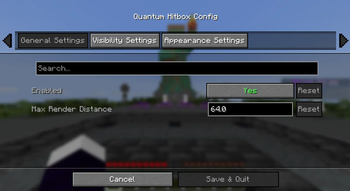
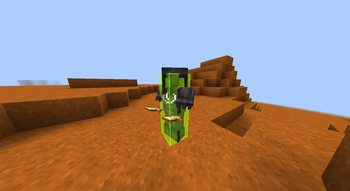
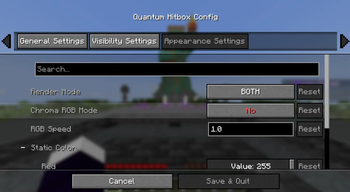
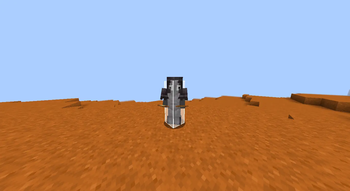
# ✨ Quantum Hitbox Features > Real-time RGBA Customization – Use intuitive sliders to pick any color and transparency level. Watch the changes happen instantly in the world as you move the bars! > > Smooth Chroma (RGB) Mode – Enable dynamic color cycling with adjustable speed for a vibrant, animated hitbox experience. > > Multiple Render Modes – Choose between a solid Fill, a sleek Outline, or Both to match your preferred visual style. > > Advanced Visibility Filters – Fine-tune what you see: toggle hitboxes for all entities, only the one you're looking at (crosshair), or even invisible entities. > > Self-Hitbox Hiding – Intelligently hides your own hitbox in first-person view to keep your screen clear while maintaining full visibility of others. > > Native & Professional UI – A clean, intuitive configuration menu that integrates seamlessly via Mod Menu & Cloth Config. > > Persistent Config – Your settings are automatically saved to a JSON file and reloaded every time you launch the game. ## 🎮 How to use > Install the mod and launch Minecraft. > > Open the config screen via Mod Menu or using your assigned keybinding (Check "Controls" to set your favorited key). > > Adjust the Red, Green, and Blue sliders to find your perfect color. > > Use the Alpha slider to set the transparency (affects both fill and outline!). > > Toggle Chroma for a rainbow effect or change the Render Mode to switch between solid and outline looks. > > Click Done to save. Your changes are visible instantly! ## 🐛 Bug reports & suggestions > > Send me a DM on Discord: > > ``` > marcellesa > ```
# ✨ Quantum Hitbox Features
> Real-time RGBA Customization – Use intuitive sliders to pick any color and transparency level. Watch the changes happen instantly in the world as you move the bars! > > Smooth Chroma (RGB) Mode – Enable dynamic color cycling with adjustable speed for a vibrant, animated hitbox experience. > > Multiple Render Modes – Choose between a solid Fill, a sleek Outline, or Both to match your preferred visual style. > > Advanced Visibility Filters – Fine-tune what you see: toggle hitboxes for all entities, only the one you're looking at (crosshair), or even invisible entities. > > Self-Hitbox Hiding – Intelligently hides your own hitbox in first-person view to keep your screen clear while maintaining full visibility of others. > > Native & Professional UI – A clean, intuitive configuration menu that integrates seamlessly via Mod Menu & Cloth Config. > > Persistent Config – Your settings are automatically saved to a JSON file and reloaded every time you launch the game.
## 🎮 How to use
> Install the mod and launch Minecraft. > > Open the config screen via Mod Menu or using your assigned keybinding (Check "Controls" to set your favorited key). > > Adjust the Red, Green, and Blue sliders to find your perfect color. > > Use the Alpha slider to set the transparency (affects both fill and outline!). > > Toggle Chroma for a rainbow effect or change the Render Mode to switch between solid and outline looks. > > Click Done to save. Your changes are visible instantly!
## 🐛 Bug reports & suggestions > > Send me a DM on Discord: > > ``` > marcellesa > ```
📊 Mod Details
- Game
- Minecraft Mods
- Author
- demoflash
- Version
- 1.0.3
- Downloads
- 1,512
- Endorsements
- 2
- Category
- equipment
- Created
- 3/30/2026
- Updated
- 3/25/2026
- Game Versions
- 1.21.11, 26.1
- Tags
- equipment, utility
🔧 How to Install Minecraft Mods Mods
Download from Modrinth. Use Prism Launcher or drop into your mods folder.
📖 Full step-by-step install guide for Minecraft Mods →
Visit the official mod page for specific installation instructions for this mod.
🎮 Need cheat codes or console commands? Check ur gaming wiki for Minecraft Mods commands, item IDs, and more.
❓ Frequently Asked Questions
Which Minecraft Mods versions does Quantum Hitbox support?
The author lists 1.21.11, 26.1. Other versions may work but are untested by the author.
What is the latest version of Quantum Hitbox?
Version 1.0.3, published 2026-03-25 with 1,512 downloads recorded at the source.
Keep browsing — more Minecraft Mods mods await