QCommand
🟡 Updated this year⚠️ Install Order · 2 steps
Install in this order, then this mod last — most mods fail to load without their framework and dependencies in place.
🖼️ Gallery (5 images)
🔍 Analysis
- 👍 0.5% endorsement rate
- 🏆 #800 of 894 fabric mods in this game by downloads
📋 About This Mod
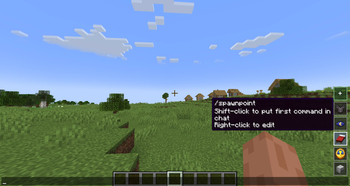
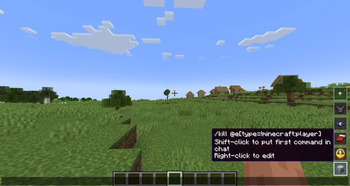
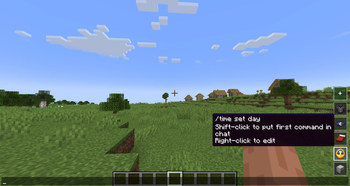
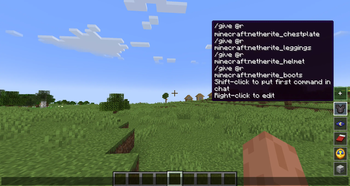
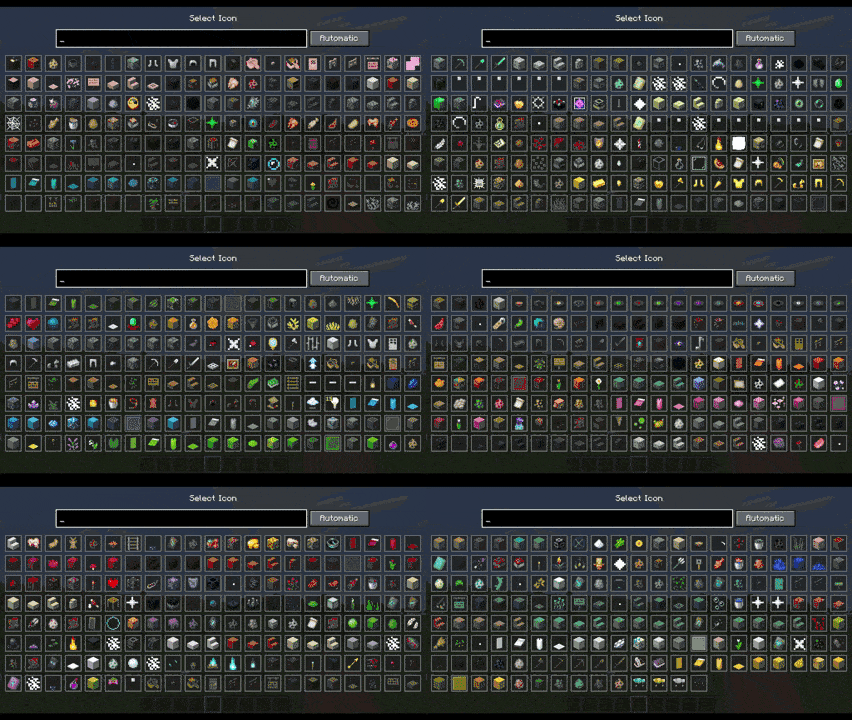
QCommand (+Macro/Keybind) QCommand is a client-side Minecraft Forge mod that adds quick command buttons to the chat screen. It lets players save one or more commands behind small clickable buttons, choose an icon for each button, assign optional keybinds, and quickly run repeated commands without retyping them. !(https://cdn.modrinth.com/data/cached_images/6fb8e757af03fdfb4ee361856b8c3507cfd1a5dd.png) !(https://cdn.modrinth.com/data/cached_images/f04c7aeaf0c1330caff0864b468e2cba831b130a.png) !(https://cdn.modrinth.com/data/cached_images/c960e86efbed0c63dd92417ff3a4560b647fd288.png) !(https://cdn.modrinth.com/data/cached_images/1847a5def86e23ef5fcd60a765477aa731403c81.png) !(https://cdn.modrinth.com/data/cached_images/8559c7df56447439c63143191ee047473165c597.png) The mod is designed for players who frequently use commands, server utilities, testing commands, admin tools, teleport commands, gamemode switches, or custom datapack/plugin commands. Main features: •Adds quick command buttons directly to the chat screen. •Lets you create, edit, delete, and store custom command entries. •Supports multiple command lines per saved button. •Executes saved commands quickly from the chat UI. •Allows choosing custom visual icons from items, effects, or particles. •Supports optional keybinds for saved commands. •Includes command autocomplete while editing command fields. •Supports repeat behavior while holding a command button. •Stores commands locally on the client. •Does not require the server to install the mod. Example uses: •Save /home, /spawn, /warp, or /back. •Save admin commands like /gamemode creative, /time set day, or /weather clear. •Save testing commands for modpacks, datapacks, maps, or servers. •Group several related commands into one command entry. •Use icons to visually recognize each command quickly. In short: QCommand makes Minecraft command usage faster by turning repeated commands into customizable chat-screen buttons.
QCommand (+Macro/Keybind)
QCommand is a client-side Minecraft Forge mod that adds quick command buttons to the chat screen. It lets players save one or more commands behind small clickable buttons, choose an icon for each button, assign optional keybinds, and quickly run repeated commands without retyping them.
!(https://cdn.modrinth.com/data/cached_images/6fb8e757af03fdfb4ee361856b8c3507cfd1a5dd.png)
!(https://cdn.modrinth.com/data/cached_images/f04c7aeaf0c1330caff0864b468e2cba831b130a.png)
!(https://cdn.modrinth.com/data/cached_images/c960e86efbed0c63dd92417ff3a4560b647fd288.png)
!(https://cdn.modrinth.com/data/cached_images/1847a5def86e23ef5fcd60a765477aa731403c81.png)
!(https://cdn.modrinth.com/data/cached_images/8559c7df56447439c63143191ee047473165c597.png)
The mod is designed for players who frequently use commands, server utilities, testing commands, admin tools, teleport commands, gamemode switches, or custom datapack/plugin commands.
Main features:
•Adds quick command buttons directly to the chat screen.
•Lets you create, edit, delete, and store custom command entries.
•Supports multiple command lines per saved button.
•Executes saved commands quickly from the chat UI.
•Allows choosing custom visual icons from items, effects, or particles.
•Supports optional keybinds for saved commands.
•Includes command autocomplete while editing command fields.
•Supports repeat behavior while holding a command button.
•Stores commands locally on the client.
•Does not require the server to install the mod.
Example uses:
•Save /home, /spawn, /warp, or /back.
•Save admin commands like /gamemode creative, /time set day, or /weather clear.
•Save testing commands for modpacks, datapacks, maps, or servers.
•Group several related commands into one command entry.
•Use icons to visually recognize each command quickly.
In short: QCommand makes Minecraft command usage faster by turning repeated commands into customizable chat-screen buttons.
📊 Mod Details
- Game
- Minecraft Mods
- Author
- exoenrgy
- Version
- 1.0
- Downloads
- 599
- Endorsements
- 3
- Category
- fabric
- Created
- 6/4/2026
- Updated
- 6/19/2026
- Game Versions
- 26.2
- Tags
- game-mechanics, management, utility
🔧 How to Install Minecraft Mods Mods
Download from Modrinth. Use Prism Launcher or drop into your mods folder.
📖 Full step-by-step install guide for Minecraft Mods →
Visit the official mod page for specific installation instructions for this mod.
🎮 Need cheat codes or console commands? Check ur gaming wiki for Minecraft Mods commands, item IDs, and more.
❓ Frequently Asked Questions
Which Minecraft Mods versions does QCommand support?
The author lists 26.2. Other versions may work but are untested by the author.
What is the latest version of QCommand?
Version 1.0, published 2026-06-19 with 599 downloads recorded at the source.
Keep browsing — more Minecraft Mods mods await