PureVanilla
🟡 Updated this year⚠️ Install Order · 2 steps
Install in this order, then this mod last — most mods fail to load without their framework and dependencies in place.
🖼️ Gallery (1 images)
🔍 Analysis
- 🏆 #41 of 909 fabric mods in this game by downloads
📋 About This Mod
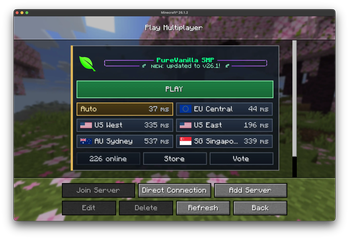
# PureVanilla Server List PureVanilla Server List is a small client-side Fabric mod that makes joining PureVanilla easier from Minecraft's multiplayer screen. Instead of manually adding server addresses, the mod adds a PureVanilla panel directly inside the multiplayer server list. From there, you can see the server message, check regional pings, and join through the fastest available route. ## What It Does !(https://i.ibb.co/6Rk9ws27/image.png) - Adds a PureVanilla featured server panel to the multiplayer server list. - Shows the current PureVanilla MOTD and online player count. - Pings available regions and highlights the best one for you. - Lets you join with one `PLAY` button, using the lowest-ping region when available. - Shows region names, flags, and ping times without exposing raw server addresses. - Includes quick links for the PureVanilla Store and Vote pages. - Shows a Status Page button if the main server status cannot be reached. ## What It Does Not Do - It does not change gameplay. - It does not give any in-game advantage. - It does not join servers automatically. - It does not replace Minecraft's normal multiplayer screen. ## Requirements - Minecraft `26.1.2` - Fabric Loader `0.19.2` or newer - Java `25` or newer This is a client-side mod. You only need to install it on your own Minecraft client. ## How To Use It 1. Install Fabric Loader for the supported Minecraft version. 2. Put the mod jar in your Minecraft `mods` folder. 3. Start Minecraft with the Fabric profile. 4. Open `Multiplayer`. 5. Use the PureVanilla panel at the top of the server list. ## Joining PureVanilla - Click `PLAY` to join using the best detected route. - Click a region button if you want to choose a specific region manually. - If PureVanilla cannot be reached, click `Status Page` to check for outages or maintenance. ## Links - Website: https://purevanilla.co/ - Store: https://purevanilla.co/shop - Vote: https://purevanilla.co/vote - Status: https://status.purevanilla.co/
# PureVanilla Server List
PureVanilla Server List is a small client-side Fabric mod that makes joining PureVanilla easier from Minecraft's multiplayer screen.
Instead of manually adding server addresses, the mod adds a PureVanilla panel directly inside the multiplayer server list. From there, you can see the server message, check regional pings, and join through the fastest available route.
## What It Does
!(https://i.ibb.co/6Rk9ws27/image.png)
- Adds a PureVanilla featured server panel to the multiplayer server list.
- Shows the current PureVanilla MOTD and online player count.
- Pings available regions and highlights the best one for you.
- Lets you join with one `PLAY` button, using the lowest-ping region when available.
- Shows region names, flags, and ping times without exposing raw server addresses.
- Includes quick links for the PureVanilla Store and Vote pages.
- Shows a Status Page button if the main server status cannot be reached.
## What It Does Not Do
- It does not change gameplay.
- It does not give any in-game advantage.
- It does not join servers automatically.
- It does not replace Minecraft's normal multiplayer screen.
## Requirements
- Minecraft `26. 1. 2`
- Fabric Loader `0. 19. 2` or newer
- Java `25` or newer
This is a client-side mod. You only need to install it on your own Minecraft client.
## How To Use It
1. Install Fabric Loader for the supported Minecraft version. 2. Put the mod jar in your Minecraft `mods` folder. 3. Start Minecraft with the Fabric profile. 4. Open `Multiplayer`. 5. Use the PureVanilla panel at the top of the server list.
## Joining PureVanilla
- Click `PLAY` to join using the best detected route.
- Click a region button if you want to choose a specific region manually.
- If PureVanilla cannot be reached, click `Status Page` to check for outages or maintenance.
- Website: https://purevanilla.co/
- Store: https://purevanilla.co/shop
- Vote: https://purevanilla.co/vote
- Status: https://status.purevanilla.co/
📊 Mod Details
- Game
- Minecraft Mods
- Author
- PureVanilla
- Version
- 1.0.2
- Downloads
- 298
- Endorsements
- 0
- Category
- fabric
- Created
- 5/27/2026
- Updated
- 8/4/2026
- Game Versions
- 26.2
- Tags
- utility
🔧 How to Install Minecraft Mods Mods
Download from Modrinth. Use Prism Launcher or drop into your mods folder.
📖 Full step-by-step install guide for Minecraft Mods →
Visit the official mod page for specific installation instructions for this mod.
🎮 Need cheat codes or console commands? Check ur gaming wiki for Minecraft Mods commands, item IDs, and more.
❓ Frequently Asked Questions
Which Minecraft Mods versions does PureVanilla support?
The author lists 26.2. Other versions may work but are untested by the author.
What is the latest version of PureVanilla?
Version 1.0.2, published 2026-08-04 with 298 downloads recorded at the source.
Keep browsing — more Minecraft Mods mods await