Proper Ping
⚪ Last updated 2024⚠️ Install Order · 2 steps
Install in this order, then this mod last — most mods fail to load without their framework and dependencies in place.
🖼️ Gallery (3 images)

🔍 Analysis
- 👍 0.0% endorsement rate
- 🏆 #191 of 344 forge mods in this game by downloads
📋 About This Mod
!(http://cf.way2muchnoise.eu/versions/984800.svg) _Fabric and newer Minecraft versions coming soon._ (http://cf.way2muchnoise.eu/title/984800.svg)](https://www.curseforge.com/minecraft/mc-mods/proper-ping) (https://static.unixkitty.com/icons/modrinth_long_color_24.svg)](https://modrinth.com/mod/proper-ping) (https://static.unixkitty.com/icons/discord_long_color_24.svg)](https://discord.unixkitty.com) --- Vanilla ping/latency calculation always seemed *incredibly* inaccurate and delayed to me. <details> <summary>Info</summary> They only send the latency value to clients once every 30 seconds: ```java public void tick() { if (++this.sendAllPlayerInfoIn > 600) { this.broadcastAll(new ClientboundPlayerInfoPacket(ClientboundPlayerInfoPacket.Action.UPDATE_LATENCY, this.players)); this.sendAllPlayerInfoIn = 0; } } ``` And this is how they "calculate" it: ```java int i = (int)(Util.getMillis() - this.keepAliveTime); this.player.latency = (this.player.latency * 3 + i) / 4; ``` </details> This mod goes around Vanilla and measures latency with a similar custom packet, but takes a proper average of 5 last RTT (round-trip-time) results. Besides that, it also adds a customizable hud element to always see your ping with options such as: - Hide completely - Position anywhere on the screen - Show last 5 latency measurements in the same hud element - Show numerical readings for other players on the server instead of abstract bars (there is a config option serverside to change the frequency of the server broadcasting these values to everyone) <details> <summary>Example config with default values</summary> ```toml #Enable ping HUD pingHudEnabled = true #Additionally show 5 last ping values showPingQueue = false #Draw text with a shadow drawTextWithShadow = true #Draw ping either on the left side (true), or on the right (false) leftOrRight = true #How many scaled GUI pixels to start drawing from the edge of the screen #Range: > 0 horizontalPadding = 4 #On which line counting from the top to start drawing from #Range: > 0 lineFromTop = 1 #How many scaled GUI pixels to start drawing from the top of the screen #Range: > 0 verticalPadding = 4 #Show numbers in milliseconds in player list playerListNumbers = true ``` </details> Example of a full display with the last 5 measurements turned on, numerical player list values, positioned on the right side of the screen: !(https://static.unixkitty.com/demo/proper_ping/gQsnBv0KLYYd.png) --- #### FAQ **Q**: Forge? **A**: Forge. **Q**: Can I include your mod in a video? **A**: As long as you include a link to the mod/modpack (if it happens to be in one), absolutely **Q**: Can I add your mod to a modpack? **A**: CurseForge/Modrinth modpacks are cool.

_Fabric and newer Minecraft versions coming soon._
[](https://www.curseforge.com/minecraft/mc-mods/proper-ping) [](https://modrinth.com/mod/proper-ping) [](https://discord.unixkitty.com)
Vanilla ping/latency calculation always seemed incredibly inaccurate and delayed to me.
Info
They only send the latency value to clients once every 30 seconds:
```java public void tick() { if (++this.sendAllPlayerInfoIn > 600) { this.broadcastAll(new ClientboundPlayerInfoPacket(ClientboundPlayerInfoPacket. Action. UPDATE_LATENCY, this.players)); this.sendAllPlayerInfoIn = 0; } } ```
And this is how they "calculate" it:
```java int i = (int)(Util.getMillis() - this.keepAliveTime); this.player.latency = (this.player.latency * 3 + i) / 4; ```
This mod goes around Vanilla and measures latency with a similar custom packet, but takes a proper average of 5 last RTT (round-trip-time) results.
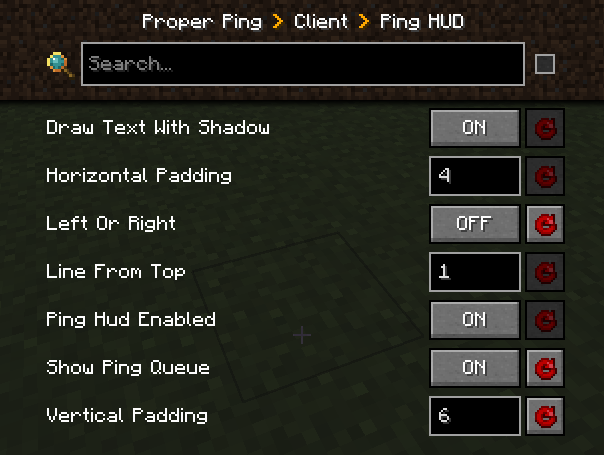
Besides that, it also adds a customizable hud element to always see your ping with options such as: - Hide completely - Position anywhere on the screen - Show last 5 latency measurements in the same hud element - Show numerical readings for other players on the server instead of abstract bars (there is a config option serverside to change the frequency of the server broadcasting these values to everyone)
Example config with default values
```toml ["Ping HUD"] #Enable ping HUD pingHudEnabled = true #Additionally show 5 last ping values showPingQueue = false #Draw text with a shadow drawTextWithShadow = true #Draw ping either on the left side (true), or on the right (false) leftOrRight = true #How many scaled GUI pixels to start drawing from the edge of the screen #Range: > 0 horizontalPadding = 4 #On which line counting from the top to start drawing from #Range: > 0 lineFromTop = 1 #How many scaled GUI pixels to start drawing from the top of the screen #Range: > 0 verticalPadding = 4
#Show numbers in milliseconds in player list playerListNumbers = true ```
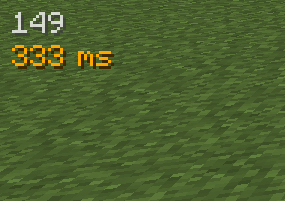
Example of a full display with the last 5 measurements turned on, numerical player list values, positioned on the right side of the screen: 
Q: Forge?
A: Forge.
Q: Can I include your mod in a video?
A: As long as you include a link to the mod/modpack (if it happens to be in one), absolutely
Q: Can I add your mod to a modpack?
A: CurseForge/Modrinth modpacks are cool.
📊 Mod Details
- Game
- Minecraft Mods
- Author
- unixkitty
- Version
- 1.0.0
- Downloads
- 7,426
- Endorsements
- 3
- Category
- forge
- Created
- 3/11/2024
- Updated
- 3/9/2024
- Game Versions
- 1.20.1
- Tags
- utility
🔧 How to Install Minecraft Mods Mods
Download from Modrinth. Use Prism Launcher or drop into your mods folder.
📖 Full step-by-step install guide for Minecraft Mods →
Visit the official mod page for specific installation instructions for this mod.
🎮 Need cheat codes or console commands? Check ur gaming wiki for Minecraft Mods commands, item IDs, and more.
❓ Frequently Asked Questions
Which Minecraft Mods versions does Proper Ping support?
The author lists 1.20.1. Other versions may work but are untested by the author.
What is the latest version of Proper Ping?
Version 1.0.0, published 2024-03-09 with 7,426 downloads recorded at the source.
Keep browsing — more Minecraft Mods mods await