Pozitification
🟡 Updated this year⚠️ Install Order · 2 steps
Install in this order, then this mod last — most mods fail to load without their framework and dependencies in place.
🖼️ Gallery (5 images)
🔍 Analysis
- 👍 0.9% endorsement rate
- 🏆 #348 of 500 adventure mods in this game by downloads
📋 About This Mod
<div align="center"> !(https://cdn.modrinth.com/data/cached_images/8bd55e0168dd59531075ebdfe14f36a731e6b73d.png) !(https://img.shields.io/badge/Minecraft-26.1+-4C9A2A?style=for-the-badge)!(https://img.shields.io/badge/Loader-Fabric-DBD0B4?style=for-the-badge)!(https://img.shields.io/badge/Java-25-ED8B00?style=for-the-badge&logo=openjdk&logoColor=white) (https://img.shields.io/modrinth/dt/pozitification?style=for-the-badge&logo=modrinth&logoColor=white&color=00AF5C&label=downloads)](https://modrinth.com/mod/pozitification)!(https://img.shields.io/badge/side-client%20%26%20server-9B4DCA?style=for-the-badge)(https://img.shields.io/badge/Telegram-channel-26A5E4?style=for-the-badge&logo=telegram&logoColor=white)](https://t.me/prostoimpery) </div> --- ## About **Pozitification** adds a small set of practical player poses to Fabric-based Minecraft. It lets you sit, crawl, lie down and return to a normal standing position without replacing the player with a boat or relying on a crouching animation. The poses are part of the player's actual state, so they affect the way the character is positioned and rendered rather than serving only as a visual change for the local client. The mod is intended to fit into ordinary gameplay. The controls are simple, the implementation is lightweight, and the behavior is designed to work naturally with the world around the player, including changes in height, low ceilings and partial blocks. ## Features **Sitting.** Sit on the ground or on a suitable surface and remain there until you stand up or switch to another available pose. **Crawling.** Move while keeping the character close to the ground. Crawling is useful for narrow spaces, exploration, roleplay and screenshots, and it does not depend on the vanilla swimming animation. **Lying down.** Use a lower, horizontal pose when you want the character to rest on the ground or create a more relaxed scene. **Synchronized multiplayer poses.** The pose state is synchronized between all players who have the mod installed. Everyone sees each other's poses correctly. **World-aware positioning.** The mod takes the actual shape of the surface into account when placing a player. Slabs, stairs, carpets, snow layers and other partial blocks are handled according to their collision or support shape rather than being treated as full blocks. **Configurable controls.** Every action can be assigned to a different key through Minecraft's standard Controls menu. ## Default Controls | Action | Default key | | --- | --- | | Sit | **X** | | Crawl | **Z** | | Lie | **C** | | Stand up | **Left Shift** | The key bindings are not fixed. Open **Options → Controls** in Minecraft to change them to whatever layout is most convenient for you. ## Multiplayer Pozitification is designed to be used on multiplayer servers as well as in single-player worlds. The mod must be installed on **both the client and the server** — this ensures full synchronization of poses between all players. Because pose changes are synchronized, all players with the mod can see when you sit, crawl or lie down. This makes the mod suitable for roleplay servers, social builds, machinima, screenshots and casual interaction between players. ## Why use Pozitification? Minecraft has only a few built-in ways for a player to change their posture. Crouching can suggest that a player is lowering themselves, but it does not provide a real sitting or crawling state, and boats are not a practical solution for most situations. Pozitification fills that gap without adding a large animation framework or changing the basic movement system. The mod is useful wherever a player needs more physical presence in the world: sitting beside a campfire, crawling through a low passage, lying down for a scene, posing for a screenshot or simply taking a break while playing with others. ## Installation 1. Install Fabric Loader for a supported version of Minecraft 2. Place **Fabric API** and **Pozitification** in the `mods` folder 3. Launch the game For multiplayer servers, the mod must be installed on **both the server and all clients** — otherwise, players won't be able to join. ## Requirements | Component | Requirement | | --- | --- | | Minecraft | 26.1 or newer | | Mod loader | Fabric Loader | | Dependency | Fabric API | | Java | Java 25 | Fabric API is required. No additional optional dependencies are needed. ## FAQ <details> <summary><b>Does Pozitification work on servers?</b></summary> Yes, but the mod must be installed on both the server and all clients. Without the mod, players cannot join the server. </details> <details> <summary><b>Can I change the key bindings?</b></summary> Yes. All pose controls can be changed in Minecraft's standard **Controls** menu. </details> <details> <summary><b>Does the mod work with other Fabric mods?</b></summary> It is designed to remain lightweight and use normal Minecra
!(https://cdn.modrinth.com/data/cached_images/8bd55e0168dd59531075ebdfe14f36a731e6b73d.png)
!(https://img.shields.io/badge/Minecraft-26. 1+-4C9A2A?style=for-the-badge)!(https://img.shields.io/badge/Loader-Fabric-DBD0B4?style=for-the-badge)!(https://img.shields.io/badge/Java-25-ED8B00?style=for-the-badge&logo=openjdk&logoColor=white)
[!(https://img.shields.io/modrinth/dt/pozitification?style=for-the-badge&logo=modrinth&logoColor=white&color=00AF5C&label=downloads)](https://modrinth.com/mod/pozitification)!(https://img.shields.io/badge/side-client%20%26%20server-9B4DCA?style=for-the-badge)[!(https://img.shields.io/badge/Telegram-channel-26A5E4?style=for-the-badge&logo=telegram&logoColor=white)](https://t.me/prostoimpery)
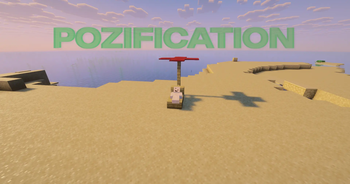
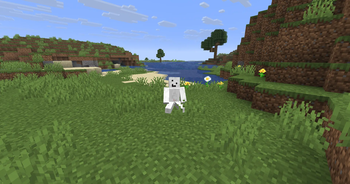
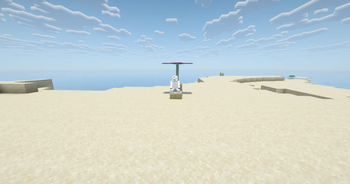
Pozitification adds a small set of practical player poses to Fabric-based Minecraft. It lets you sit, crawl, lie down and return to a normal standing position without replacing the player with a boat or relying on a crouching animation. The poses are part of the player's actual state, so they affect the way the character is positioned and rendered rather than serving only as a visual change for the local client.
The mod is intended to fit into ordinary gameplay. The controls are simple, the implementation is lightweight, and the behavior is designed to work naturally with the world around the player, including changes in height, low ceilings and partial blocks.
## Features
Sitting. Sit on the ground or on a suitable surface and remain there until you stand up or switch to another available pose.
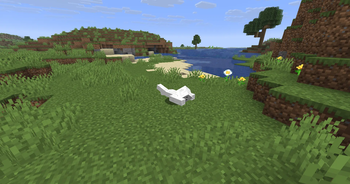
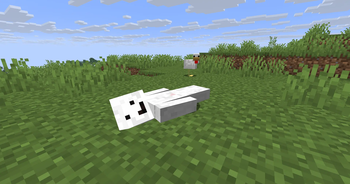
Crawling. Move while keeping the character close to the ground. Crawling is useful for narrow spaces, exploration, roleplay and screenshots, and it does not depend on the vanilla swimming animation.
Lying down. Use a lower, horizontal pose when you want the character to rest on the ground or create a more relaxed scene.
Synchronized multiplayer poses. The pose state is synchronized between all players who have the mod installed. Everyone sees each other's poses correctly.
World-aware positioning. The mod takes the actual shape of the surface into account when placing a player. Slabs, stairs, carpets, snow layers and other partial blocks are handled according to their collision or support shape rather than being treated as full blocks.
Configurable controls. Every action can be assigned to a different key through Minecraft's standard Controls menu.
## Default Controls
| Action | Default key | | --- | --- | | Sit | X | | Crawl | Z | | Lie | C | | Stand up | Left Shift |
The key bindings are not fixed. Open Options → Controls in Minecraft to change them to whatever layout is most convenient for you.
## Multiplayer
Pozitification is designed to be used on multiplayer servers as well as in single-player worlds. The mod must be installed on both the client and the server — this ensures full synchronization of poses between all players.
Because pose changes are synchronized, all players with the mod can see when you sit, crawl or lie down. This makes the mod suitable for roleplay servers, social builds, machinima, screenshots and casual interaction between players.
## Why use Pozitification?
Minecraft has only a few built-in ways for a player to change their posture. Crouching can suggest that a player is lowering themselves, but it does not provide a real sitting or crawling state, and boats are not a practical solution for most situations. Pozitification fills that gap without adding a large animation framework or changing the basic movement system.
The mod is useful wherever a player needs more physical presence in the world: sitting beside a campfire, crawling through a low passage, lying down for a scene, posing for a screenshot or simply taking a break while playing with others.
## Installation
1. Install Fabric Loader for a supported version of Minecraft 2. Place Fabric API and Pozitification in the `mods` folder 3. Launch the game
For multiplayer servers, the mod must be installed on both the server and all clients — otherwise, players won't be able to join.
## Requirements
| Component | Requirement | | --- | --- | | Minecraft | 26. 1 or newer | | Mod loader | Fabric Loader | | Dependency | Fabric API | | Java | Java 25 |
Fabric API is required. No additional optional dependencies are needed.
Does Pozitification work on servers?
Yes, but the mod must be installed on both the server and all clients. Without the mod, players cannot join the server.
Can I change the key bindings?
Yes. All pose controls can be changed in Minecraft's standard Controls menu.
Does the mod work with other Fabric mods?
It is designed to remain lightweight and use normal Minecra
📊 Mod Details
- Game
- Minecraft Mods
- Author
- kasperoid
- Version
- 0.2.1
- Downloads
- 802
- Endorsements
- 7
- Category
- adventure
- Created
- 5/30/2026
- Updated
- 8/25/2026
- Game Versions
- 26.2
- Tags
- adventure, game-mechanics, social
🔧 How to Install Minecraft Mods Mods
Download from Modrinth. Use Prism Launcher or drop into your mods folder.
📖 Full step-by-step install guide for Minecraft Mods →
Visit the official mod page for specific installation instructions for this mod.
🎮 Need cheat codes or console commands? Check ur gaming wiki for Minecraft Mods commands, item IDs, and more.
❓ Frequently Asked Questions
Which Minecraft Mods versions does Pozitification support?
The author lists 26.2. Other versions may work but are untested by the author.
What is the latest version of Pozitification?
Version 0.2.1, published 2026-08-25 with 802 downloads recorded at the source.
Keep browsing — more Minecraft Mods mods await