PortalPeek
🟡 Updated this year⚠️ Install Order · 2 steps
Install in this order, then this mod last — most mods fail to load without their framework and dependencies in place.
🖼️ Gallery (6 images)
🔍 Analysis
- 🏆 #418 of 548 adventure mods in this game by downloads
📋 About This Mod
# PortalPeek **PortalPeek** is a lightweight, client-side Minecraft mod that takes the math out of Nether portal linking. It renders a clean HUD overlay showing your corresponding coordinates in the opposite dimension — so your portal links are always perfectly aligned. Since it is entirely client-side, you can use it on any multiplayer server, realm, or singleplayer world without requiring any server-side installation. --- ## Features - **Instant Coordinate Conversion** — Displays your converted Nether coordinates when in the Overworld (divided by 8), and your converted Overworld coordinates when in the Nether (multiplied by 8). - **Clean HUD Overlay** — Semi-transparent background with drop shadows for high contrast, readable on any texture pack or background. - **Proximity Mode** — Only shows the HUD when you are within 5 blocks of a Nether Portal, keeping your screen clutter-free. - **Quick-Toggle Hotkey** — Press **H** (rebindable in Controls) to instantly toggle the HUD overlay. - **In-Game Configuration** — Full Cloth Config and ModMenu integration. Adjust HUD scale, position, and toggle settings without leaving the game. - **Command Support** — Full slash and dot-command support for flexibility on any server. --- ## Commands | Command | Description | |---|---| | `/portalpeek toggle` | Toggle the HUD on or off | | `/portalpeek proximity ` | Toggle proximity mode | | `/portalpeek pos <x> <y>` | Set custom HUD position | | `/portalpeek scale <value>` | Set HUD scale (0.2 to 5.0) | Dot-prefix support is also available — type `.portalpeek toggle` in chat to run commands client-side without sending anything to the server chat. --- ## Requirements | | | |---|---| | **Platform** | Fabric Loader 0.19.3+ | | **Side** | Client-side only | | **Java** | Java 21+ | | **Required** | Fabric API, Cloth Config API | | **Recommended** | ModMenu — required for the in-game settings screen. The mod may behave unexpectedly without it. | *Client-side only — works on any server.* --- ## My Other Mods - **(https://modrinth.com/mod/autoeater)** — Automatically eats food when your hunger drops. No more dying to starvation. - **(https://modrinth.com/mod/afk-fishing)** — Automatically reels in and recasts your fishing rod. Cast once and walk away.
# PortalPeek
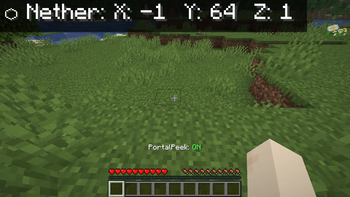
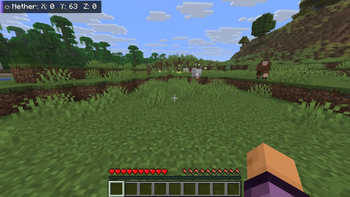
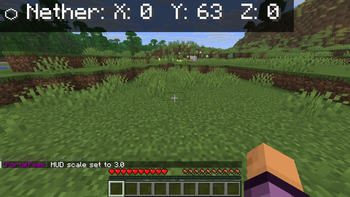
PortalPeek is a lightweight, client-side Minecraft mod that takes the math out of Nether portal linking. It renders a clean HUD overlay showing your corresponding coordinates in the opposite dimension — so your portal links are always perfectly aligned.
Since it is entirely client-side, you can use it on any multiplayer server, realm, or singleplayer world without requiring any server-side installation.
## Features
- Instant Coordinate Conversion — Displays your converted Nether coordinates when in the Overworld (divided by 8), and your converted Overworld coordinates when in the Nether (multiplied by 8).
- Clean HUD Overlay — Semi-transparent background with drop shadows for high contrast, readable on any texture pack or background.
- Proximity Mode — Only shows the HUD when you are within 5 blocks of a Nether Portal, keeping your screen clutter-free.
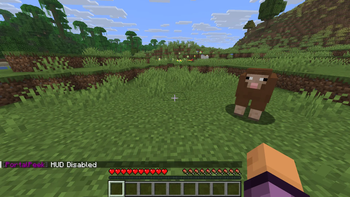
- Quick-Toggle Hotkey — Press H (rebindable in Controls) to instantly toggle the HUD overlay.
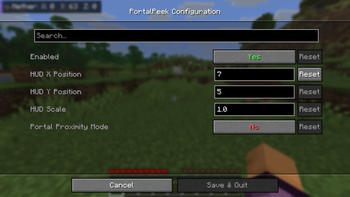
- In-Game Configuration — Full Cloth Config and ModMenu integration. Adjust HUD scale, position, and toggle settings without leaving the game.
- Command Support — Full slash and dot-command support for flexibility on any server.
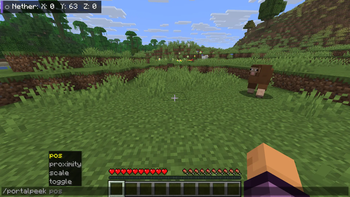
## Commands
| Command | Description |
|---|---|
| `/portalpeek toggle` | Toggle the HUD on or off |
| `/portalpeek proximity ` | Toggle proximity mode |
| `/portalpeek pos
Dot-prefix support is also available — type `.portalpeek toggle` in chat to run commands client-side without sending anything to the server chat.
## Requirements
| | | |---|---| | Platform | Fabric Loader 0. 19. 3+ | | Side | Client-side only | | Java | Java 21+ | | Required | Fabric API, Cloth Config API | | Recommended | ModMenu — required for the in-game settings screen. The mod may behave unexpectedly without it. |
Client-side only — works on any server.
## My Other Mods
- (https://modrinth.com/mod/autoeater)** — Automatically eats food when your hunger drops. No more dying to starvation.
- (https://modrinth.com/mod/afk-fishing)** — Automatically reels in and recasts your fishing rod. Cast once and walk away.
📊 Mod Details
- Game
- Minecraft Mods
- Author
- spce_man
- Version
- 26.2
- Downloads
- 316
- Endorsements
- 3
- Category
- adventure
- Created
- 6/6/2026
- Updated
- 6/29/2026
- Game Versions
- 26.2
- Tags
- adventure, utility
🔧 How to Install Minecraft Mods Mods
Download from Modrinth. Use Prism Launcher or drop into your mods folder.
📖 Full step-by-step install guide for Minecraft Mods →
Visit the official mod page for specific installation instructions for this mod.
🎮 Need cheat codes or console commands? Check ur gaming wiki for Minecraft Mods commands, item IDs, and more.
❓ Frequently Asked Questions
Which Minecraft Mods versions does PortalPeek support?
The author lists 26.2. Other versions may work but are untested by the author.
What is the latest version of PortalPeek?
Version 26.2, published 2026-06-29 with 316 downloads recorded at the source.
Keep browsing — more Minecraft Mods mods await