Pomkots World (Lost Cities add-on)
🟠 Updated over a year ago⚠️ Install Order · 2 steps
Install in this order, then this mod last — most mods fail to load without their framework and dependencies in place.
🖼️ Gallery (2 images)
🔍 Analysis
- 👍 0.3% endorsement rate
- 🏆 #35 of 359 forge mods in this game by downloads
📋 About This Mod
# What's This? This is an add-on for Lost Cities that generates a sci-fi flavored, post-apocalyptic world! This is one of the elements to support the Survival Mode integration of (https://modrinth.com/mod/pomkots-mechs), a high-speed custom mech mod # Demo Movie <iframe width="560" height="315" src="https://www.youtube-nocookie.com/embed/m9ViPblu3qs" title="YouTube video player" frameborder="0" allow="accelerometer; autoplay; clipboard-write; encrypted-media; gyroscope; picture-in-picture; web-share" allowfullscreen></iframe> # Please Read (Important!) * This is currently in super alpha. Expect rapid updates and changes. * Be sure to use it in a new world with a fresh configuration. * Does NOT include enemy mech spawns, custom recipes, or quests yet — those will come later as part of a separate modpack. * Many structures are still pretty empty inside (especially interiors). # Need Your Help! * I plan to keep adding a ton of ruined structures in future updates! * If you're interested in helping build or submitting your own ruins, I'd love to collaborate! * Please feel free to DM me on X (Twitter)! # Ruined Cities Added * Heavily decayed urban cities * Abandoned industrial factory zones * Derelict port areas * Ruined mega-solar facilities * Military base ruins # Scattered Ruins Added * Abandoned gas stations * Collapsed farming plants * Ruined garages * Process factory ruins * Lighthouse ruins * Observation towers ...and more! # How to Use (and Recommended Settings) ## Preparation * Place Lost Cities and this mod in your modpack's mods folder. * Launch Minecraft. ## Creating a New World 1. Start by creating a new world. !(https://cdn.modrinth.com/data/cached_images/39e068d8215bc0aefc716a8f96d3e8aeaf8cd240.png) 2. Set the World Type to Large Biomes (recommended). !(https://cdn.modrinth.com/data/cached_images/ebebab1bb8c3a851ecba874e5a9b7f6d0caa365d.png) 3. Go to the More tab and click the Cities button. !(https://cdn.modrinth.com/data/cached_images/df085a9501adbcb43d6c6567563ed12b32cce04f.png) 4. Click the Profile button several times until you select rarecities. (You can use other profiles too, but this one is recommended!) !(https://cdn.modrinth.com/data/cached_images/969952c87eae70d30f0c5c515cbc5d60b69ea89d.png) 5. Click the Customize button once. Then, click the setting that says standard several times until you see pomkotsmechs:pomkotsworld. !(https://cdn.modrinth.com/data/cached_images/d9ccc88ecc9ed0149eb670bfb0ccc9f1e7eea93b.png) 6. Set the Radius to 300. (Recommended: sets the max radius of a city to 300 blocks.) !(https://cdn.modrinth.com/data/cached_images/c0609d6e6ddd7a4747e9ae4359638f636fd732d8.png) 7. Click the Cities button. !(https://cdn.modrinth.com/data/cached_images/603901a025408513f6e8e92131fac9af1b089bcb.png) 8. Adjust the building generation settings to your liking. (Check the Lost Cities documentation for more detail!) !(https://cdn.modrinth.com/data/cached_images/951322bc5010227c658a2a88e1aa18680ec6e2ae.png) Reference Links Lost Cities official usage:https://www.mcjty.eu/docs/mods/lost-cities/ # Acknowledgment Huge, ultra-super thanks to McJty for creating the amazing mod Lost Cities! It’s a mod full of infinite possibilities and incredible potential. Wishing continued success and prosperity of Lost Cities! # Contributor Pine-san(@Pining_Pine on X): Thanks for providing Aircraft and Warship!
# What's This?
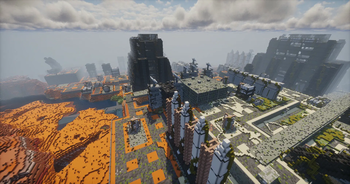
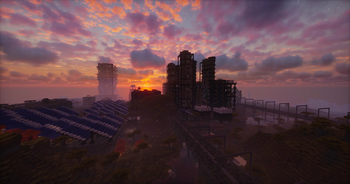
This is an add-on for Lost Cities that generates a sci-fi flavored, post-apocalyptic world!
This is one of the elements to support the Survival Mode integration of (https://modrinth.com/mod/pomkots-mechs), a high-speed custom mech mod
# Demo Movie
# Please Read (Important!)
This is currently in super alpha. Expect rapid updates and changes. Be sure to use it in a new world with a fresh configuration. Does NOT include enemy mech spawns, custom recipes, or quests yet — those will come later as part of a separate modpack. Many structures are still pretty empty inside (especially interiors).
# Need Your Help!
I plan to keep adding a ton of ruined structures in future updates! If you're interested in helping build or submitting your own ruins, I'd love to collaborate! Please feel free to DM me on X (Twitter)!
# Ruined Cities Added
Heavily decayed urban cities Abandoned industrial factory zones Derelict port areas Ruined mega-solar facilities Military base ruins
# Scattered Ruins Added
Abandoned gas stations Collapsed farming plants Ruined garages Process factory ruins Lighthouse ruins Observation towers
...and more!
# How to Use (and Recommended Settings)
## Preparation
Place Lost Cities and this mod in your modpack's mods folder. Launch Minecraft.
## Creating a New World
1. Start by creating a new world. !(https://cdn.modrinth.com/data/cached_images/39e068d8215bc0aefc716a8f96d3e8aeaf8cd240.png)
2. Set the World Type to Large Biomes (recommended). !(https://cdn.modrinth.com/data/cached_images/ebebab1bb8c3a851ecba874e5a9b7f6d0caa365d.png)
3. Go to the More tab and click the Cities button. !(https://cdn.modrinth.com/data/cached_images/df085a9501adbcb43d6c6567563ed12b32cce04f.png)
4. Click the Profile button several times until you select rarecities. (You can use other profiles too, but this one is recommended!) !(https://cdn.modrinth.com/data/cached_images/969952c87eae70d30f0c5c515cbc5d60b69ea89d.png)
5. Click the Customize button once. Then, click the setting that says standard several times until you see pomkotsmechs:pomkotsworld. !(https://cdn.modrinth.com/data/cached_images/d9ccc88ecc9ed0149eb670bfb0ccc9f1e7eea93b.png)
6. Set the Radius to 300. (Recommended: sets the max radius of a city to 300 blocks.) !(https://cdn.modrinth.com/data/cached_images/c0609d6e6ddd7a4747e9ae4359638f636fd732d8.png)
7. Click the Cities button. !(https://cdn.modrinth.com/data/cached_images/603901a025408513f6e8e92131fac9af1b089bcb.png)
8. Adjust the building generation settings to your liking. (Check the Lost Cities documentation for more detail!) !(https://cdn.modrinth.com/data/cached_images/951322bc5010227c658a2a88e1aa18680ec6e2ae.png)
Reference Links
Lost Cities official usage:https://www.mcjty.eu/docs/mods/lost-cities/
# Acknowledgment
Huge, ultra-super thanks to McJty for creating the amazing mod Lost Cities! It’s a mod full of infinite possibilities and incredible potential. Wishing continued success and prosperity of Lost Cities!
# Contributor
Pine-san(@Pining_Pine on X): Thanks for providing Aircraft and Warship!
📊 Mod Details
- Game
- Minecraft Mods
- Author
- grc_mcs
- Version
- 0.0.1-alpha.1
- Downloads
- 16,083
- Endorsements
- 49
- Category
- forge
- Created
- 8/1/2025
- Updated
- 7/28/2025
- Game Versions
- 1.20.1
- Tags
- worldgen
🔧 How to Install Minecraft Mods Mods
Download from Modrinth. Use Prism Launcher or drop into your mods folder.
📖 Full step-by-step install guide for Minecraft Mods →
Visit the official mod page for specific installation instructions for this mod.
🎮 Need cheat codes or console commands? Check ur gaming wiki for Minecraft Mods commands, item IDs, and more.
❓ Frequently Asked Questions
Which Minecraft Mods versions does Pomkots World (Lost Cities add-on) support?
The author lists 1.20.1. Other versions may work but are untested by the author.
What is the latest version of Pomkots World (Lost Cities add-on)?
Version 0.0.1-alpha.1, published 2025-07-28 with 16,083 downloads recorded at the source.
Keep browsing — more Minecraft Mods mods await