PlayerName Styler
🟡 Updated this year⚠️ Install Order · 2 steps
Install in this order, then this mod last — most mods fail to load without their framework and dependencies in place.
🖼️ Gallery (1 images)
🔍 Analysis
- 👍 0.2% endorsement rate
- 🏆 #11 of 51 neoforge mods in this game by downloads
📋 About This Mod
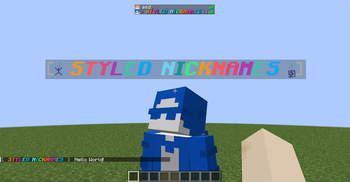
# PlayerName Styler Add configurable nicknames and styled player names across chat, tab list, and above-head nameplates. ## Features - **Per-player nicknames** (`/nickname`) - **Configurable formatting** for chat, tab list, and nameplates (TOML) - **Placeholder system** (built-ins + API for other mods to register their own placeholders) - **Styling support** - Minecraft `&` color/format codes (`&a`, `&6`, `&l`, `&r`, etc.) - Hex colors (`&#RRGGBB` and `<#RRGGBB>`) - Tags like `<bold>`, `<red>`, `<reset>` - `<gradient:#RRGGBB:#RRGGBB>text</gradient>` and `<rainbow>text</rainbow>` - **LuckPerms prefix/suffix integration** *(optional via `%prefix%` / `%suffix%`; empty when LuckPerms is not installed)* - **Simple JSON nickname storage** in your config folder (`config/nicknames.json`) - **Real username lookup** with `/realname` - **Nameplate renderer is configurable** (`text_display` default, with `armor_stand` fallback) - **Scoreboard `below_name` support** — shows the `below_name` display slot (e.g. health) as a second line under custom nameplates, which Minecraft otherwise hides once the name tag is replaced ## Commands - `/nickname` — show your current nickname - `/nickname <nickname>` — set your nickname - `/nickname clear` — clear your nickname - `/nickname set <player> <nickname>` — admin set (OP level 2) - `/nickname clear <player>` — admin clear (OP level 2) - `/nickname reload` — reload nicknames file (OP level 2) - `/nickname cleartags` — remove stuck/orphaned nameplate entities and refresh online players (OP level 2) - `/realname` — list all nicknames - `/realname <search>` — search nickname/real name ## Configuration Config file: `config/playernamestyler-common.toml` - `chatFormat`, `tabListFormat`, `nameplateFormat` accept placeholders like: - `%displayname%`, `%username%`, `%prefix%`, `%suffix%`, `%chatmessage%` - `%world%` / `%dimension%`, `%biome%`, `%ping%`, `%x%/%y%/%z%`, `%health%`, etc. - `nameplateRenderer` can be `text_display` or `armor_stand` - `showBelowName` toggles the scoreboard `below_name` line under custom nameplates (default `true`) ## Compatibility - **Loader:** NeoForge - **Minecraft:** 1.21.1–1.21.11 (separate build per listed version) !(https://cdn.modrinth.com/data/cached_images/f3ed860f50aafefa2776d13cbd735951780ad2c4.png)
# PlayerName Styler
Add configurable nicknames and styled player names across chat, tab list, and above-head nameplates.
## Features
- Per-player nicknames (`/nickname`)
- Configurable formatting for chat, tab list, and nameplates (TOML)
- Placeholder system (built-ins + API for other mods to register their own placeholders)
- Styling support
- - Minecraft `&` color/format codes (`&a`, `&6`, `&l`, `&r`, etc.)
- - Hex colors (`&#RRGGBB` and `<#RRGGBB>`)
- - Tags like `
`, ` `, ` ` - - `
text ` - LuckPerms prefix/suffix integration (optional via `%prefix%` / `%suffix%`; empty when LuckPerms is not installed)
- Simple JSON nickname storage in your config folder (`config/nicknames.json`)
- Real username lookup with `/realname`
- Nameplate renderer is configurable (`text_display` default, with `armor_stand` fallback)
- Scoreboard `below_name` support — shows the `below_name` display slot (e.g. health) as a second line under custom nameplates, which Minecraft otherwise hides once the name tag is replaced
## Commands
- `/nickname` — show your current nickname
- `/nickname
` — set your nickname - `/nickname clear` — clear your nickname
- `/nickname set
` — admin set (OP level 2) - `/nickname clear
` — admin clear (OP level 2) - `/nickname reload` — reload nicknames file (OP level 2)
- `/nickname cleartags` — remove stuck/orphaned nameplate entities and refresh online players (OP level 2)
- `/realname` — list all nicknames
- `/realname
` — search nickname/real name
## Configuration
Config file: `config/playernamestyler-common.toml`
- `chatFormat`, `tabListFormat`, `nameplateFormat` accept placeholders like:
- - `%displayname%`, `%username%`, `%prefix%`, `%suffix%`, `%chatmessage%`
- - `%world%` / `%dimension%`, `%biome%`, `%ping%`, `%x%/%y%/%z%`, `%health%`, etc.
- `nameplateRenderer` can be `text_display` or `armor_stand`
- `showBelowName` toggles the scoreboard `below_name` line under custom nameplates (default `true`)
## Compatibility
- Loader: NeoForge
- Minecraft: 1. 21. 1–1. 21. 11 (separate build per listed version)
!(https://cdn.modrinth.com/data/cached_images/f3ed860f50aafefa2776d13cbd735951780ad2c4.png)
📊 Mod Details
- Game
- Minecraft Mods
- Author
- HiSierra
- Version
- 2.0.3+mc1.21.4
- Downloads
- 5,389
- Endorsements
- 9
- Category
- neoforge
- Created
- 5/10/2025
- Updated
- 6/1/2026
- Game Versions
- 1.21.4
- Tags
- social, utility
🔧 How to Install Minecraft Mods Mods
Download from Modrinth. Use Prism Launcher or drop into your mods folder.
📖 Full step-by-step install guide for Minecraft Mods →
Visit the official mod page for specific installation instructions for this mod.
🎮 Need cheat codes or console commands? Check ur gaming wiki for Minecraft Mods commands, item IDs, and more.
❓ Frequently Asked Questions
Which Minecraft Mods versions does PlayerName Styler support?
The author lists 1.21.4. Other versions may work but are untested by the author.
What is the latest version of PlayerName Styler?
Version 2.0.3+mc1.21.4, published 2026-06-01 with 5,389 downloads recorded at the source.
Keep browsing — more Minecraft Mods mods await