philter
🟡 Updated this year⚠️ Install Order · 2 steps
Install in this order, then this mod last — most mods fail to load without their framework and dependencies in place.
🖼️ Gallery (4 images)
🔍 Analysis
- 👍 0.3% endorsement rate
- 🏆 #345 of 893 fabric mods in this game by downloads
📋 About This Mod
<p> The Philter mod gives you a filter super-hopper that works with vanilla Minecraft or any mod. Any kind of items can be diverted into a different output container. Otherwise, it just passes them along like any other hopper. <p> Here's what it looks like in action: <img src="https://claritypack.com/philter/visual.png" alt="a filter in place"> <p> Overall the filter is a steel-blue hopper, and it has a redstone insert that does the filtering. The blue tab on the filter's top shows where normal items are directed. The redstone stripe flashes when an item is instead filtered to the hopper on the right. <p> You can set up the filter using its UI: <img src="https://claritypack.com/philter/same_as.png"/> <p> The area in the upper left is the basic hopper UI, and works just the same. On the right is the filter configuration. Here it is in "Same As" mode, which means it will only put items into the filter that match examples. These examples can be set by putting objects in the filter itself. Or the items already in the object container can be used as the examples instead. So if the filter has planks of every type, or if it has nothing and the target container has them, then planks will be diverted, and other items will continue onward. <p> The "Exact" button is off, so modifications will be ignored. If the examples included iron chestplate, this would allow damaged or enchanted iron chestplates to also be put in the target. If "Exact" were on, only chestplate that had the same damage and enchantment would be diverted. <p> The other primary mode is "Match", where you specify tags and regular expressions to tell the filter what to do: <img src="https://claritypack.com/philter/matches_mode.png" alt="filter UI in 'Only Same' mode"/> <p> Here we've told the filter to match blocks that are covered by the tag "#wool" (all kinds of wool) plus anything that has "dirt" in the name. "Any of" can be switched to "All of", which would mean the item would have to both match "#wool" and have "dirt" in the name (which nothing does, so ...). <p> In "Match" mode, "Exact" means that NBT value will be included when string matching. So you could match any item that was enchanted with the pattern ".*Enchantments.*" because that string appears in the NBT of enchanted items. <p><a href="https://minecraft.fandom.com/wiki/Tag?so=search#Java_Edition_2">The list of standard tags</a> will probably be helpful. As for regular expressions, there are many tutorials on the web. Generally, text matches the same text except for special symbols. The most important are: <ul> <li><b><code>.</code></b> matches any single character, so "d.rt" matches both "dirt" and "dart". <li><b><code>*</code></b> means "zero or more repetitions", so ".*" means "zero or more of any characters". <li><b><code>^</code></b> matches the start of the text, so you could say "anything whose name starts with blue" with the pattern "^blue.*", which would not match light blue things. <li><b><code>$</code></b> matches the end of the text. </ul> The filter finds a match anywhere in the string unless you anchor it to the start and/or end of the text. It also ignores the case of the text, so "enchantments" would match both "enchantments" and "Enchantments". <p> Finally, the mode "None" just turns off the filtering entirely. <p> The third part of the UI, the part below your inventory, allows you to change the direction of the filter. Like a hopper, a filter can point in any direction but up, but also it cannot point in the same direction as the regular hopper output. When you place a filter, the filtered output is defined by how you're pointing, but you can change it afterwards using this part of the UI.
The Philter mod gives you a filter super-hopper that works with vanilla Minecraft or any mod. Any kind of items can be diverted into a different output container. Otherwise, it just passes them along like any other hopper.
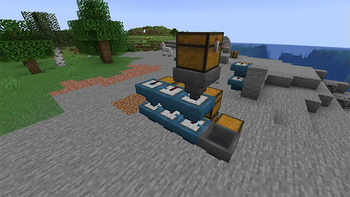
Here's what it looks like in action:
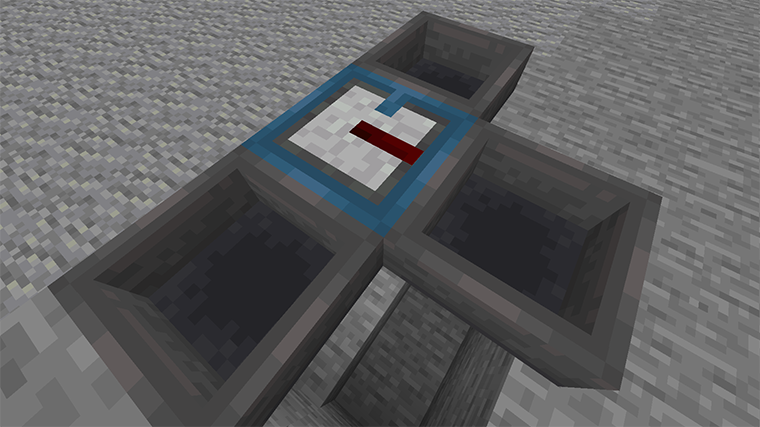
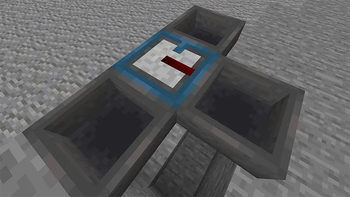
Overall the filter is a steel-blue hopper, and it has a redstone insert that does the filtering. The blue tab on the filter's top shows where normal items are directed. The redstone stripe flashes when an item is instead filtered to the hopper on the right.
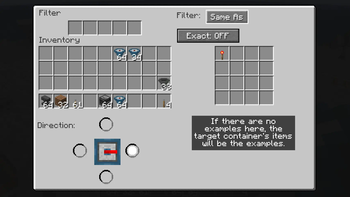
You can set up the filter using its UI:
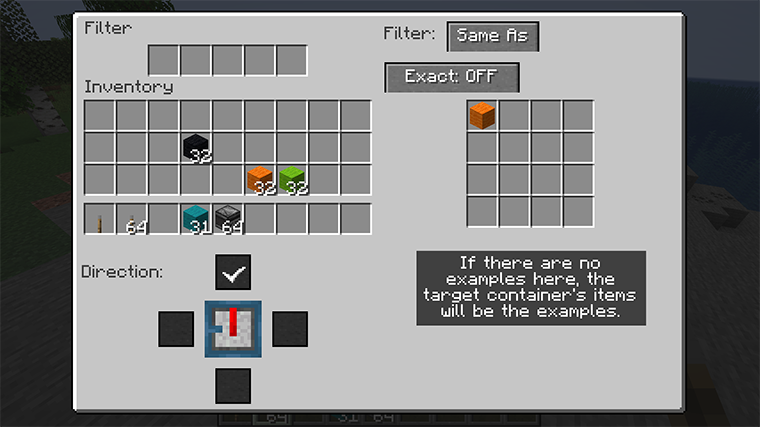
The area in the upper left is the basic hopper UI, and works just the same. On the right is the filter configuration. Here it is in "Same As" mode, which means it will only put items into the filter that match examples. These examples can be set by putting objects in the filter itself. Or the items already in the object container can be used as the examples instead. So if the filter has planks of every type, or if it has nothing and the target container has them, then planks will be diverted, and other items will continue onward.
The "Exact" button is off, so modifications will be ignored. If the examples included iron chestplate, this would allow damaged or enchanted iron chestplates to also be put in the target. If "Exact" were on, only chestplate that had the same damage and enchantment would be diverted.
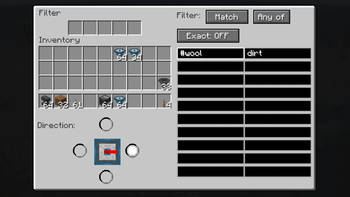
The other primary mode is "Match", where you specify tags and regular expressions to tell the
filter what to do:
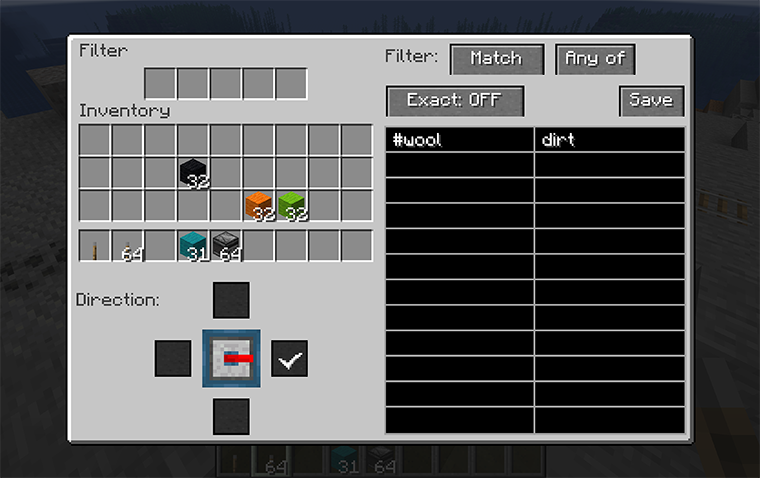
Here we've told the filter to match blocks that are covered by the tag "#wool" (all kinds of wool) plus anything that has "dirt" in the name. "Any of" can be switched to "All of", which would mean the item would have to both match "#wool" and have "dirt" in the name (which nothing does, so ...).
In "Match" mode, "Exact" means that NBT value will be included when string matching. So you could match any item that was enchanted with the pattern ".Enchantments." because that string appears in the NBT of enchanted items.
The list of standard tags will probably be helpful. As for regular expressions, there are many tutorials on the web. Generally, text matches the same text except for special symbols. The most important are:
.matches any single character, so "d.rt" matches both "dirt" and "dart".means "zero or more repetitions", so "." means "zero or more of any characters".^matches the start of the text, so you could say "anything whose name starts with blue" with the pattern "^blue.*", which would not match light blue things.$matches the end of the text.
The filter finds a match anywhere in the string unless you anchor it to the start and/or end of the text. It also ignores the case of the text, so "enchantments" would match both "enchantments" and "Enchantments".
Finally, the mode "None" just turns off the filtering entirely.
The third part of the UI, the part below your inventory, allows you to change the direction of the filter. Like a hopper, a filter can point in any direction but up, but also it cannot point in the same direction as the regular hopper output. When you place a filter, the filtered output is defined by how you're pointing, but you can change it afterwards using this part of the UI.
📊 Mod Details
- Game
- Minecraft Mods
- Author
- kcrca
- Version
- 1.3.5+26.1
- Downloads
- 8,040
- Endorsements
- 27
- Category
- fabric
- Created
- 1/19/2023
- Updated
- 5/26/2026
- Game Versions
- 26.1
- Tags
- storage, technology, utility
🔧 How to Install Minecraft Mods Mods
Download from Modrinth. Use Prism Launcher or drop into your mods folder.
📖 Full step-by-step install guide for Minecraft Mods →
Visit the official mod page for specific installation instructions for this mod.
🎮 Need cheat codes or console commands? Check ur gaming wiki for Minecraft Mods commands, item IDs, and more.
❓ Frequently Asked Questions
Which Minecraft Mods versions does philter support?
The author lists 26.1. Other versions may work but are untested by the author.
What is the latest version of philter?
Version 1.3.5+26.1, published 2026-05-26 with 8,040 downloads recorded at the source.
Keep browsing — more Minecraft Mods mods await