Pet Vault
🟢 Updated this month⚠️ Install Order · 2 steps
Install in this order, then this mod last — most mods fail to load without their framework and dependencies in place.
🖼️ Gallery (1 images)
🔍 Analysis
- 👍 0.4% endorsement rate
- 🏆 #1 of 892 fabric mods in this game by downloads
📋 About This Mod
# Pet Vault
Store, summon, and manage your tamed pets and mounts from one place. Supports any player-owned creature: wolves, cats, parrots, horses, allays, and more.
(https://modrinth.com/mod/pet-vault) | (https://www.curseforge.com/minecraft/mc-mods/pet-vault)
Features
- Store up to 10 tamed companions per player (configurable): wolves, cats, parrots, horses, donkeys, mules, llamas, allays, and any other player-owned mob.
- Right-click your tamed companion to register it to the vault.
- Right-click a summoned companion to permanently unregister it from the vault (the animal stays in the world).
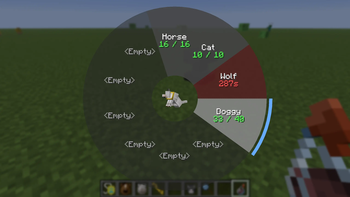
- Open the radial menu to see all stored companions with their names, health, and status.
- Companions and upgrades are bound to you, not the locket — losing or replacing the locket never affects your stored companions.
- Unlock passive healing with a Life Crystal — stored pets slowly regenerate health.
- Unlock pet revive with a Soul Crystal — if a summoned pet dies it recovers after 5 minutes at full health.
- Healing and revive timers catch up while you were offline.
- Curios / Trinkets integration — equip the locket in a dedicated equipment slot where supported (see Mod Compatibility below).
- Works out of the box with any mod's pets or mounts built on vanilla's `TamableAnimal`/`OwnableEntity` — no extra setup needed.
Requirements
- One of: (https://neoforged.net/)**, (https://files.minecraftforge.net/)**, or (https://fabricmc.net/)** with (https://modrinth.com/mod/fabric-api)**
Mod Compatibility
Optional equipment-slot mods — the locket works from your inventory without them, but a dedicated slot frees the space up:
| Mod | 26. 1.x | | | 1. 21. 1 | | | 1. 20. 1 | | | --- | --- | --- | --- | --- | --- | --- | --- | --- | | | NeoForge | Forge | Fabric | NeoForge | Forge | Fabric | Forge | Fabric | | (https://modrinth.com/mod/curios) | ✅ | ⏳ | — | ✅ | 🛠️ | — | ✅ | — | | (https://modrinth.com/mod/trinkets) | — | — | ✅ | — | — | ✅ | — | ✅ |
- ✅ Supported — implemented, works today
- 🛠️ Planned — other mod supports this loader; not yet implemented by me
- ⏳ Blocked — other mod has no build for this loader/version yet
- — Not applicable — other mod won't support this
_"Trinkets" means different mods depending on version: the original `dev.emi/trinkets` on 1. 20. 1 and 1. 21. 1, but `eu.pb4/trinkets` ("Trinkets Updated") on 26. 1.x — a from-scratch rewrite with a different API, since the original isn't maintained for that version._
_1. 20. 1 has no NeoForge column — I don't support that version._
Pets and mounts from other mods: works automatically for anything built on vanilla's `TamableAnimal`/`OwnableEntity`. Auto-riding (shift-left-click to summon and mount) is opt-in per entity type — add the entity to the `pet_vault:auto_rideable` tag or the `extraRideableEntities` config option to enable shift-click-mounting for it. Entities with no ownership concept at all (e.g. iron golems, happy ghasts) aren't storable by default — see Configuration below to opt one in via the `storableEntities` config option or the `pet_vault:storable` tag.
Getting Started
1. Craft or obtain the Keeper's Locket and keep it in your inventory. 2. Right-click any tamed companion you own to register it to the vault. 3. Press V (default) to open the radial menu and summon or store pets by clicking their slice. 4. Left-click on a slice to summon a companion. Left-click again, to store it.
Items
### Keeper's Locket
The core item. Keep it in your inventory to access the radial menu. Right-click a tamed companion you own to register it to the vault. Right-click a summoned companion to permanently unregister it from the vault (the animal stays in the world).
Radial menu controls:
- Left-click — summon or store
- Shift+left-click — summon and immediately mount (rideable companions only)
- Ctrl+left-click — force-summon directly in front of you
- Right-click — toggle bodyguard mode; the pet auto-summons when you take damage (shown with a blue line)
- Shift+right-click — select a slice (highlighted yellow); shift+right-click a second slice to swap their order; click the same slice again to deselect
### Life Crystal
Craft with a golden apple surrounded by four emeralds (shapeless). Consuming it permanently unlocks passive healing for all your stored pets — they regenerate 1% of max health every 3 seconds while stored.
### Soul Crystal
Craft with a totem of undying surrounded by four emeralds (shapeless). Consuming it permanently unlocks pet revive — if a summoned pet dies, instead of being lost
📊 Mod Details
- Game
- Minecraft Mods
- Author
- Creativity0
- Version
- 26.2
- Downloads
- 1,836
- Endorsements
- 7
- Category
- fabric
- Created
- 7/3/2026
- Updated
- 9/5/2026
- Game Versions
- 1.20.1
- Tags
- mobs, transportation, utility
🔧 How to Install Minecraft Mods Mods
Download from Modrinth. Use Prism Launcher or drop into your mods folder.
📖 Full step-by-step install guide for Minecraft Mods →
Visit the official mod page for specific installation instructions for this mod.
🎮 Need cheat codes or console commands? Check ur gaming wiki for Minecraft Mods commands, item IDs, and more.
❓ Frequently Asked Questions
Which Minecraft Mods versions does Pet Vault support?
The author lists 1.20.1. Other versions may work but are untested by the author.
What is the latest version of Pet Vault?
Version 26.2, published 2026-09-05 with 1,836 downloads recorded at the source.
Keep browsing — more Minecraft Mods mods await