PermanentSnow
🟡 Updated this year⚠️ Install Order · 2 steps
Install in this order, then this mod last — most mods fail to load without their framework and dependencies in place.
🖼️ Gallery (3 images)
🔍 Analysis
- 👍 0.8% endorsement rate
- 🏆 #317 of 551 adventure mods in this game by downloads
📋 About This Mod
# PermanentSnow PermanentSnow allows you to change the appearance of the current weather client side. By default, it does nothing. ## Configuration The configuration may be changed in-game using (https://modrinth.com/mod/modmenu) or by editing the configuration file directly. The configuration file is typically located at `config/permanentsnow.json5` in your minecraft folder, the following settings are the default: ```json5 { // Override precipitation types to render as other precipitation types. overridePrecipitationTypes: { NONE: "NONE", RAIN: "RAIN", SNOW: "SNOW" }, // Override the level of precipitation to render. overridePrecipitationLevel: false, // The higher the level of precipitation, the more intense the precipitation will be. precipitationLevel: 1.0, // The opacity of the powder snow overlay rendered by this mod. powderSnowOverlayOpacity: 0.0 } ``` ## FAQ ### Does this mod give me unfair advantages over other players? Not really, this mod only changes the visual appearance of the weather on the client side. It has no effect on gameplay or mechanics. In addition, most Minecraft players can already customize the appearance of weather particles. ### Why is there no snow, although I set every precipitation type? Make sure you also overwrite the precipitation level, as in some cases it may be too low! ### Why does my game crash with this mod? This mod is very simple and should not cause crashes if configured correctly. Try resetting the configuration in the file to the default settings. If you encounter crashes, please report them in the (https://github.com/TheOfficialSeri/PermanentSnow/issues)! ## Developers If you add a custom type of precipitation client side, make sure to set the following translations: - `config.permanentsnow.precipitation.group.types.option.<custom precipitation type>` - `config.permanentsnow.precipitation.group.types.option.<custom precipitation type>.description`
# PermanentSnow
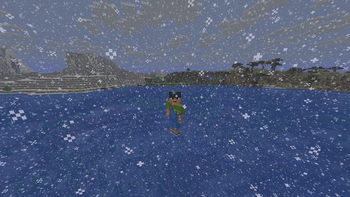
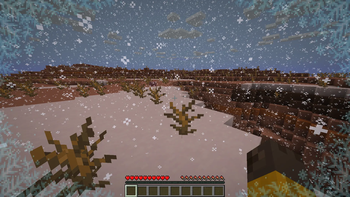
PermanentSnow allows you to change the appearance of the current weather client side. By default, it does nothing.
## Configuration
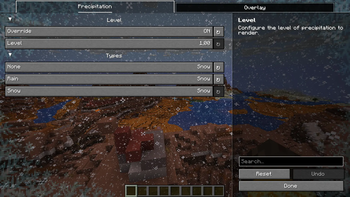
The configuration may be changed in-game using (https://modrinth.com/mod/modmenu) or by editing the configuration file directly. The configuration file is typically located at `config/permanentsnow.json5` in your minecraft folder, the following settings are the default:
```json5 { // Override precipitation types to render as other precipitation types. overridePrecipitationTypes: { NONE: "NONE", RAIN: "RAIN", SNOW: "SNOW" }, // Override the level of precipitation to render. overridePrecipitationLevel: false, // The higher the level of precipitation, the more intense the precipitation will be. precipitationLevel: 1. 0, // The opacity of the powder snow overlay rendered by this mod. powderSnowOverlayOpacity: 0. 0 } ```
### Does this mod give me unfair advantages over other players?
Not really, this mod only changes the visual appearance of the weather on the client side. It has no effect on gameplay or mechanics. In addition, most Minecraft players can already customize the appearance of weather particles.
### Why is there no snow, although I set every precipitation type?
Make sure you also overwrite the precipitation level, as in some cases it may be too low!
### Why does my game crash with this mod?
This mod is very simple and should not cause crashes if configured correctly. Try resetting the configuration in the file to the default settings. If you encounter crashes, please report them in the (https://github.com/TheOfficialSeri/PermanentSnow/issues)!
## Developers
If you add a custom type of precipitation client side, make sure to set the following translations:
- `config.permanentsnow.precipitation.group.types.option.
` - `config.permanentsnow.precipitation.group.types.option.
.description`
📊 Mod Details
- Game
- Minecraft Mods
- Author
- TheOfficialSeri
- Version
- 1.2.4
- Downloads
- 1,046
- Endorsements
- 8
- Category
- adventure
- Created
- 11/21/2025
- Updated
- 3/25/2026
- Game Versions
- 26.1
- Tags
- adventure, decoration, magic
🔧 How to Install Minecraft Mods Mods
Download from Modrinth. Use Prism Launcher or drop into your mods folder.
📖 Full step-by-step install guide for Minecraft Mods →
Visit the official mod page for specific installation instructions for this mod.
🎮 Need cheat codes or console commands? Check ur gaming wiki for Minecraft Mods commands, item IDs, and more.
❓ Frequently Asked Questions
Which Minecraft Mods versions does PermanentSnow support?
The author lists 26.1. Other versions may work but are untested by the author.
What is the latest version of PermanentSnow?
Version 1.2.4, published 2026-03-25 with 1,046 downloads recorded at the source.
Keep browsing — more Minecraft Mods mods await