Pebble's Crate
🟠 Updated over a year ago⚠️ Install Order · 2 steps
Install in this order, then this mod last — most mods fail to load without their framework and dependencies in place.
🖼️ Gallery (3 images)

🔍 Analysis
- 👍 0.4% endorsement rate
- 🏆 #335 of 893 fabric mods in this game by downloads
📋 About This Mod
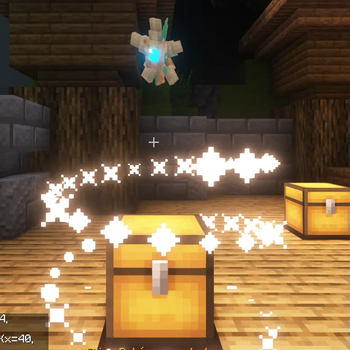
# Pebble's Lootcrate Pebble's Lootcrate mod for Fabric Minecraft version 1.19.2, 1.20.1 and 1.21.1 <p><a title="Fabric Language Kotlin" href="https://modrinth.com/mod/fabric-language-kotlin" target="_blank" rel="noopener noreferrer"><img style="display: block; margin-left: auto; margin-right: auto;" src="https://i.imgur.com/c1DH9VL.png" alt="" width="171" height="50" /></a></p> Make sure you have Fabric Language Kotlin installed! If you would like to convert your configs from AdvancedCrates to Pebble's Crate, I have written a converter that will help speed up the process a little bit, it can be found here along with a crate config creator/editor (WIP): https://pebblescrate.sethi.tech/ Go to source: <p><a title="Fabric Language Kotlin" href="https://github.com/navneetset/pebbles-crate" target="_blank" rel="noopener noreferrer"><img style="display: block; margin-left: auto; margin-right: auto;" src="https://github.githubassets.com/images/modules/logos_page/GitHub-Logo.png" alt="" width="171" height="50" /></a></p> Feel free to drop me a star on Github :) Come try out the crates on one of the servers I manage :) IP: **dynastymc.org** ## Permissions For all admin commands, if you have LuckPerm installed, the following is required:<br> `pebbles.admin.crate` ## Available Commands `/padmin crate` Displays all available crate in the config and lets you grab a crate transformer/crate key <br> `/padmin getcrate <name>` Get a crate transformer <br> `/padmin givekey <player> <amount> <cratename>` Gives cratekey to a specific player <br> ## How to use? After installing the mod, you may navigate to `/config/pebbles-crate/crates` or create the folders then create a file, for example `example.json` <br> You may use the follow example as reference for the structure: <br> ```json { "crateName": "Vanilla Items Crate", "screenName": "&6Vanilla Items Crate", "crateKey": { "material": "minecraft:tripwire_hook", "name": "&#FFBF00Vanilla Key", "lore": }, "prize": }", "commands": , "broadcast": "&6{player_name} &fhas received {prize_name} &ffrom {crate_name}", "messageToOpener": "&6 &f&lYou got {prize_name} &f&lfrom Vanilla Items Crate", "lore": , "chance": 40 }, { "name": "&rElytra", "material": "minecraft:elytra", "amount": 1, "commands": , "broadcast": "&6{player_name} &fhas received {prize_name} &ffrom {crate_name}", "messageToOpener": "&6 &f&lYou got {prize_name} &f&lfrom Vanilla Items Crate", "lore": , "chance": 5 }, { "name": "&rGolden Apple", "material": "minecraft:golden_apple", "amount": 1, "commands": , "broadcast": "&6{player_name} &fhas received {prize_name} &ffrom {crate_name}", "messageToOpener": "&6 &f&lYou got {prize_name} &f&lfrom Vanilla Items Crate", "lore": , "chance": 55 } ] } ``` Note that the mod supports legacy formatting (e.g. ?BC5D, &4, &f, &r) as demonstrated in the example. ## Todo - Admin UI for editing the loot in-game - Better/more error handling - Finish writing todos
# Pebble's Lootcrate Pebble's Lootcrate mod for Fabric Minecraft version 1. 19. 2, 1. 20. 1 and 1. 21. 1

Make sure you have Fabric Language Kotlin installed!
If you would like to convert your configs from AdvancedCrates to Pebble's Crate, I have written a converter that will help speed up the process a little bit, it can be found here along with a crate config creator/editor (WIP): https://pebblescrate.sethi.tech/
Go to source:

Feel free to drop me a star on Github :)
Come try out the crates on one of the servers I manage :) IP: dynastymc.org
## Permissions For all admin commands, if you have LuckPerm installed, the following is required:
`pebbles.admin.crate`
## Available Commands `/padmin crate` Displays all available crate in the config and lets you grab a crate transformer/crate key
`/padmin getcrate
`/padmin givekey
## How to use? After installing the mod, you may navigate to `/config/pebbles-crate/crates` or create the folders then create a file, for example `example.json`
You may use the follow example as reference for the structure:
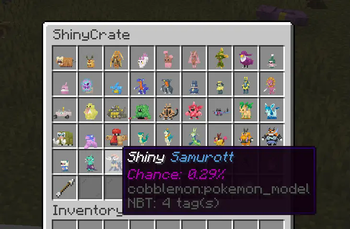
```json { "crateName": "Vanilla Items Crate", "screenName": "&6Vanilla Items Crate", "crateKey": { "material": "minecraft:tripwire_hook", "name": "&#FFBF00Vanilla Key", "lore": [ "&#FFDC73• Opens a Vanilla Items Crate" ] }, "prize": [ { "name": "?BC5DDiamond", "material": "minecraft:diamond", "amount": 1, "nbt": "{species:\"cobblemon:bulbasaur\",aspects:[\"shiny\"]}", "commands": [ "give {player_name} minecraft:diamond 1" ], "broadcast": "&6{player_name} &fhas received {prize_name} &ffrom {crate_name}", "messageToOpener": "&6 &f&lYou got {prize_name} &f&lfrom Vanilla Items Crate", "lore": [ "Chance of getting the drop: {chance}%" ], "chance": 40 }, { "name": "&rElytra", "material": "minecraft:elytra", "amount": 1, "commands": [ "give {player_name} minecraft:elytra 1" ], "broadcast": "&6{player_name} &fhas received {prize_name} &ffrom {crate_name}", "messageToOpener": "&6 &f&lYou got {prize_name} &f&lfrom Vanilla Items Crate", "lore": [ "Chance of getting the drop: {chance}%" ], "chance": 5 }, { "name": "&rGolden Apple", "material": "minecraft:golden_apple", "amount": 1, "commands": [ "give {player_name} minecraft:golden_apple 1" ], "broadcast": "&6{player_name} &fhas received {prize_name} &ffrom {crate_name}", "messageToOpener": "&6 &f&lYou got {prize_name} &f&lfrom Vanilla Items Crate", "lore": [ "Chance of getting the drop: {chance}%" ], "chance": 55 } ] } ``` Note that the mod supports legacy formatting (e.g. ?BC5D, &4, &f, &r) as demonstrated in the example.
## Todo - Admin UI for editing the loot in-game - Better/more error handling - Finish writing todos
📊 Mod Details
- Game
- Minecraft Mods
- Author
- lilpebs
- Version
- 1.1.1-1.21.1
- Downloads
- 8,061
- Endorsements
- 32
- Category
- fabric
- Created
- 5/4/2023
- Updated
- 12/27/2024
- Game Versions
- 1.21.1
- Tags
- management, minigame, utility
🔧 How to Install Minecraft Mods Mods
Download from Modrinth. Use Prism Launcher or drop into your mods folder.
📖 Full step-by-step install guide for Minecraft Mods →
Visit the official mod page for specific installation instructions for this mod.
🎮 Need cheat codes or console commands? Check ur gaming wiki for Minecraft Mods commands, item IDs, and more.
❓ Frequently Asked Questions
Which Minecraft Mods versions does Pebble's Crate support?
The author lists 1.21.1. Other versions may work but are untested by the author.
What is the latest version of Pebble's Crate?
Version 1.1.1-1.21.1, published 2024-12-27 with 8,061 downloads recorded at the source.
Keep browsing — more Minecraft Mods mods await