Paxi Plus
🟡 Updated this year⚠️ Install Order · 2 steps
Install in this order, then this mod last — most mods fail to load without their framework and dependencies in place.
🖼️ Gallery (3 images)


🔍 Analysis
- 👍 0.0% endorsement rate
- 🏆 #978 of 983 fabric mods in this game by downloads
📋 About This Mod
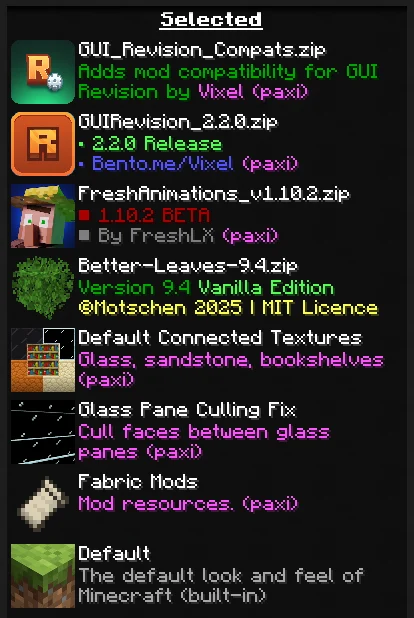
<div align=center> !(https://cdn.modrinth.com/data/cached_images/a0960b8f0e55fe286b8293de334b80482b23d9e6.png) <a href="https://modrinth.com/modpack/elysium-days" target="_blank" rel="noopener noreferrer"> <img src="https://raw.githubusercontent.com/Fyoncle/Elysium-Days/main/ed_badge.png" alt="As seen in Elysium Days" width="200"> </a> <br> <br> </div> This is an addon for (https://modrinth.com/mod/paxi), serving six purposes: - Backporting the 1.21+ Paxi feature for loading packs from any folder <sub>(See (https://github.com/YUNG-GANG/Paxi/issues/33))</sub> - <sub>Fixes a issue where developers are unable to get monetized due to Modrinth not recognizing the Paxi folder. If you use the resourcepacks folder it will embed them properly now.</sub> - Making it possible to use Paxi for built-in resourcepacks and datapacks added by mods <sub>(See (https://github.com/YUNG-GANG/Paxi/issues/27))</sub> - Restricting Paxi from auto-loading packs in `config -> paxi -> resourcepacks` and `datapacks` if they're not listed in `resourcepack_load_order.json` or `datapacks_load_order.json` for datapacks. - Letting Paxi generate datapack folder and JSON file on the start-up instead of after world generation - Removes the unnecessary arrows on the packs that are loaded with Paxi to avoid confusion for modpack users - Adding a `--user--` flag which let's you define where the user packs should go, can be helpful if you want the normally loaded packs to go above Paxi ones or anywhere you want # <div align=center> ### How to use? Unlike how old load order works, now you can specify directories in your instance's folder. Also, for using the built-in pack support, you need the ID of the pack. You can either check the mod's source code, try to guess it, or use the (https://modrinth.com/mod/resource-pack-overrides) mod and hold **D** on the resourcepack screen to see the IDs of all packs. ## Paxi Load Order JSON Example: !(https://cdn.modrinth.com/data/cached_images/d738bec5830abdb67c9b63763936276ce5ed9ead.png) ## In Game: !(https://cdn.modrinth.com/data/cached_images/402ddf12303ce35fee8938f0f6a2dc2d9c848463.png) **It is NOT required to load `fabric` and other built-in packs with Paxi, it's there as an optional feature.** </div>
!(https://cdn.modrinth.com/data/cached_images/a0960b8f0e55fe286b8293de334b80482b23d9e6.png)

This is an addon for (https://modrinth.com/mod/paxi), serving six purposes: - Backporting the 1. 21+ Paxi feature for loading packs from any folder (See [#33](https://github.com/YUNG-GANG/Paxi/issues/33)) - Fixes a issue where developers are unable to get monetized due to Modrinth not recognizing the Paxi folder. If you use the resourcepacks folder it will embed them properly now. - Making it possible to use Paxi for built-in resourcepacks and datapacks added by mods (See [#27](https://github.com/YUNG-GANG/Paxi/issues/27)) - Restricting Paxi from auto-loading packs in `config -> paxi -> resourcepacks` and `datapacks` if they're not listed in `resourcepack_load_order.json` or `datapacks_load_order.json` for datapacks. - Letting Paxi generate datapack folder and JSON file on the start-up instead of after world generation - Removes the unnecessary arrows on the packs that are loaded with Paxi to avoid confusion for modpack users - Adding a `--user--` flag which let's you define where the user packs should go, can be helpful if you want the normally loaded packs to go above Paxi ones or anywhere you want
### How to use? Unlike how old load order works, now you can specify directories in your instance's folder.
Also, for using the built-in pack support, you need the ID of the pack. You can either check the mod's source code, try to guess it, or use the (https://modrinth.com/mod/resource-pack-overrides) mod and hold D on the resourcepack screen to see the IDs of all packs. ## Paxi Load Order JSON Example: !(https://cdn.modrinth.com/data/cached_images/d738bec5830abdb67c9b63763936276ce5ed9ead.png) ## In Game: !(https://cdn.modrinth.com/data/cached_images/402ddf12303ce35fee8938f0f6a2dc2d9c848463.png)
It is NOT required to load `fabric` and other built-in packs with Paxi, it's there as an optional feature.
📊 Mod Details
- Game
- Minecraft Mods
- Author
- Lancet_
- Version
- 1.1.2
- Downloads
- 35,216
- Endorsements
- 10
- Category
- fabric
- Created
- 5/7/2025
- Updated
- 2/19/2026
- Game Versions
- 1.20.1
- Tags
- management, utility
🔧 How to Install Minecraft Mods Mods
Download from Modrinth. Use Prism Launcher or drop into your mods folder.
📖 Full step-by-step install guide for Minecraft Mods →
Visit the official mod page for specific installation instructions for this mod.
🎮 Need cheat codes or console commands? Check ur gaming wiki for Minecraft Mods commands, item IDs, and more.
❓ Frequently Asked Questions
Which Minecraft Mods versions does Paxi Plus support?
The author lists 1.20.1. Other versions may work but are untested by the author.
What is the latest version of Paxi Plus?
Version 1.1.2, published 2026-02-19 with 35,216 downloads recorded at the source.
Keep browsing — more Minecraft Mods mods await