Particle Visor
🟡 Updated this year⚠️ Install Order · 2 steps
Install in this order, then this mod last — most mods fail to load without their framework and dependencies in place.
🖼️ Gallery (2 images)
🔍 Analysis
- 👍 0.5% endorsement rate
- 🏆 #329 of 920 fabric mods in this game by downloads
📋 About This Mod
# Particle Visor Removes/fades particles based on distance ## Features - Hides particles very close to the camera (so potion particles won't get in your way in fights) - Lots of customization ## Configuration Particle Visor uses (https://modrinth.com/mod/ukulib) for its configuration. You can either: - Go to the Options menu, click the small, square button to the right of Credits and Attribution, and go into Particle Visor. - Open (https://modrinth.com/mod/modmenu) and open the configuration menu from there !(https://cdn.modrinth.com/data/cached_images/7bac98b12c692011093dccf5f8f9bcb0f77a7a63.png) - `Close Distance`: The farthest distance at which particles will still be visible. Anything closer than this won't render at all. - `Far Distance`: The closest distance at which particles will be faded. Anything in between this value and `Close Distance` will be faded. (you can set this to be the same as `Close Distance` to make particles "pop in") - `Mod Enabled`: General global toggle for the mod - `Distance Anchor`: The point on your player model where the distance will be determined - - `From Eyes`: Distance determined from the "eye level" - - `From Body`: Distance will be the same regardless of whether the particle is at your eyes or your feet, like a cylinder (though anything above or below that will be accounted for) - - `From Feet`: Distance determined from the character's feet - - `On Camera`: Distance determined from the actual camera position (so you can look through particles in third person) - `Only Potions`: Anything not considered a "spell particle" will be unaffected by the mod. - `Third Person Particles`: If this is ON, the mod will do nothing in third person. ## Compatibility I've verified that the mod works with (https://modrinth.com/mod/sodium) and (https://modrinth.com/mod/particle-core) (and whatever else is in (https://modrinth.com/project/particle-visor)), so I don't think there will be many incompatibilities. Feel free to (https://github.com/sylvxa/particle-visor/issues/new) if you find any! ## License This mod is under the (https://github.com/sylvxa/particle-visor/blob/main/LICENSE.txt). Feel free to include this mod in your modpack!
# Particle Visor
Removes/fades particles based on distance
## Features
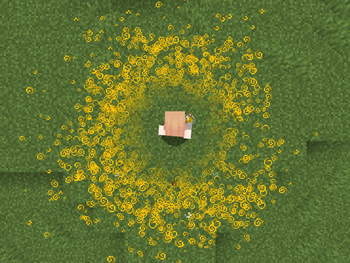
- Hides particles very close to the camera (so potion particles won't get in your way in fights)
- Lots of customization
## Configuration Particle Visor uses (https://modrinth.com/mod/ukulib) for its configuration.
You can either: - Go to the Options menu, click the small, square button to the right of Credits and Attribution, and go into Particle Visor. - Open (https://modrinth.com/mod/modmenu) and open the configuration menu from there
!(https://cdn.modrinth.com/data/cached_images/7bac98b12c692011093dccf5f8f9bcb0f77a7a63.png)
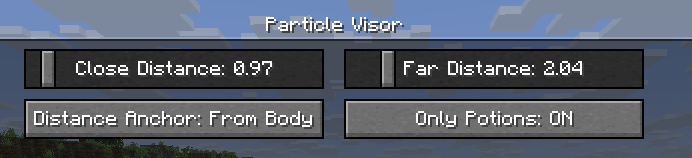
- `Close Distance`: The farthest distance at which particles will still be visible. Anything closer than this won't render at all.
- `Far Distance`: The closest distance at which particles will be faded. Anything in between this value and `Close Distance` will be faded. (you can set this to be the same as `Close Distance` to make particles "pop in")
- `Mod Enabled`: General global toggle for the mod
- `Distance Anchor`: The point on your player model where the distance will be determined
- - `From Eyes`: Distance determined from the "eye level"
- - `From Body`: Distance will be the same regardless of whether the particle is at your eyes or your feet, like a cylinder (though anything above or below that will be accounted for)
- - `From Feet`: Distance determined from the character's feet
- - `On Camera`: Distance determined from the actual camera position (so you can look through particles in third person)
- `Only Potions`: Anything not considered a "spell particle" will be unaffected by the mod.
- `Third Person Particles`: If this is ON, the mod will do nothing in third person.
## Compatibility
I've verified that the mod works with (https://modrinth.com/mod/sodium) and (https://modrinth.com/mod/particle-core) (and whatever else is in (https://modrinth.com/project/particle-visor)), so I don't think there will be many incompatibilities. Feel free to (https://github.com/sylvxa/particle-visor/issues/new) if you find any!
This mod is under the (https://github.com/sylvxa/particle-visor/blob/main/LICENSE.txt). Feel free to include this mod in your modpack!
📊 Mod Details
- Game
- Minecraft Mods
- Author
- sylvxa
- Version
- 1.1
- Downloads
- 5,233
- Endorsements
- 24
- Category
- fabric
- Created
- 9/7/2025
- Updated
- 4/14/2026
- Game Versions
- 26.1, 26.1.1, 26.1.2, 26.2
- Tags
- game-mechanics, optimization, utility
🔧 How to Install Minecraft Mods Mods
Download from Modrinth. Use Prism Launcher or drop into your mods folder.
📖 Full step-by-step install guide for Minecraft Mods →
Visit the official mod page for specific installation instructions for this mod.
🎮 Need cheat codes or console commands? Check ur gaming wiki for Minecraft Mods commands, item IDs, and more.
❓ Frequently Asked Questions
Which Minecraft Mods versions does Particle Visor support?
The author lists 26.1, 26.1.1, 26.1.2, 26.2. Other versions may work but are untested by the author.
What is the latest version of Particle Visor?
Version 1.1, published 2026-04-14 with 5,233 downloads recorded at the source.
Keep browsing — more Minecraft Mods mods await