Painted Biomes
⚪ Last updated 2023⚠️ Install Order · 2 steps
Install in this order, then this mod last — most mods fail to load without their framework and dependencies in place.
🖼️ Gallery (1 images)
🔍 Analysis
- 👍 0.1% endorsement rate
- 🏆 #330 of 346 forge mods in this game by downloads
📋 About This Mod
## Description Painted Biomes allows using image templates for the biome layout of the world. (See at the bottom of this page for a quick start quide for basic operation.) There are two different template image modes: * Use a single template image, which can be positioned in the world using three config options for the coordinates and the alignment * Use separate template images per regions. These follow the Minecraft McRegion/Anvil regions. This allows you to theoretically map the entire Minecraft world's biomes (if you just had enough time to make the templates and enough disk space to store the images) ## Template Repeating In the Single Template mode you can optionally use template repeating. * It can be enabled or disabled individually in all four directions (+x, -x, +z, -z). * There are two modes when enabling repeating: * Repeat the entire template image * Repeat the biome from the edge-most pixel of the template image **Note:** The areas of world beyond the corner of the template image are only handled by the repeating, if the two sides that are adjacent to that area also have template repeating enabled, and are using the same mode, be it repeat the entire template, or repeat the edge pixel's biome. ## About the biome replacement * Before release `0.4.0` Painted Biomes used a biome `GenLayer` override. Unfortunately that only worked in very limited number of cases (mostly overworld, and only with some WorldTypes/BiomeProviders like the vanilla `DEFAULT` and also `BIOMESOP` from the Biomes O' Plenty mod). It also did not allow per-dimension settings or templates. * As of version `0.4.0` the main method of replacing the biomes is via a custom `BiomeProvider` wrapper. This should allow using Painted Biomes in any dimension. * **Note:** If you are using other tweak mods for replacing the `BiomeProvider` (formerly called `WorldChunkManager` in MCP), then there is a possibility for incompatibilities here. If you encounter any, please report them and I'll see if they can be fixed. At least the Dimensional Control mod should work for this, but I haven't personally tested it. * You can set the dimensions you want Painted Biomes to work in via the configuration file (the `enabledInDimensions` setting, which is a list of the dimension numbers). * Replacing the biome in itself doesn't have any effect to the terrain generation in some cases, for example the vanilla Nether and End look exactly the same after replacing the biome. * To enable biome-based terrain generation, there is now also the option to override the used `ChunkProvider`. * For the overridden ChunkProvider there are four options available: * `VANILLA_DEFAULT` * `VANILLA_FLAT` * `VANILLA_NETHER` * `VANILLA_END` * **Note:** If you are using other tweak mods like Dimensional Control, it's then most likely best to use that mod for replacing the `ChunkProvider`, and leave those options disabled in Painted Biomes. The override option in this mod is provided as sort of a backup, in case you aren't using or simply can't use Dimensional Control or some other similar tweak mod. * **Note:** By default, leave the `B:overrideChunkProvider` option to `false`! It is mostly of use if you want custom terrain based on the biomes in the Nether or the End. And even so, see the note above. ## Configuration overriding * As of the `0.4.0` release, the configurations can be overridden in a few different ways. * The main configuration file is at `config/paintedbiomes/paintedbiomes.cfg` * The main configuration can be overridden *per-world* by placing a config file in `<worldsavedirectory>/paintedbiomes/paintedbiomes.cfg` * Those "main" configurations can be overridden *per-dimension*, both globally and per-world. * Global *per-dimension* configuration overrides are at `config/paintedbiomes/paintedbiomes_dim<dimension number>.cfg` (for example `paintedbiomes_dim0.cfg` or `paintedbiomes_dim-1.cfg`) * *Per-world, per-dimension* configuration overrides are at `<worldsavedirectory>/paintedbiomes/paintedbiomes_dim<dimension number>.cfg` * The overriding config files are not created/filled if they don't exist in the first place. To get them populated, create an empty file in the correct location. * Not all values can be overridden per-dimension. Create an empty file to get it populated to see which ones are available. * Basically the `useGenLayer`, `enabledInDimensions` and the color definitions are only available in the global and the per-world main configuration files. ## Required configuration values * Since the 0.4.0 version, for the mod to actually do anything, you have to enable it in the dimensions where you want it to handle the biome overriding (or alternatively use the old method of operation via the `useGenLayer` config value, but this is not recommended in most cases due to the limitations of it). * To enable the mod in some dimensions, add the dimension ID (= number) of those dimensions to the `enabledInDimensions` list. * Fo
## Description
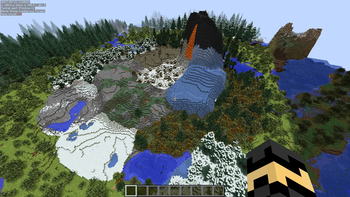
Painted Biomes allows using image templates for the biome layout of the world.
(See at the bottom of this page for a quick start quide for basic operation.)
There are two different template image modes:
Use a single template image, which can be positioned in the world using three config options for the coordinates and the alignment Use separate template images per regions. These follow the Minecraft McRegion/Anvil regions. This allows you to theoretically map the entire Minecraft world's biomes (if you just had enough time to make the templates and enough disk space to store the images)
## Template Repeating
In the Single Template mode you can optionally use template repeating.
It can be enabled or disabled individually in all four directions (+x, -x, +z, -z). There are two modes when enabling repeating: Repeat the entire template image Repeat the biome from the edge-most pixel of the template image
## About the biome replacement
Before release `0. 4. 0` Painted Biomes used a biome `GenLayer` override. Unfortunately that only worked in very limited number of cases (mostly overworld, and only with some WorldTypes/BiomeProviders like the vanilla `DEFAULT` and also `BIOMESOP` from the Biomes O' Plenty mod). It also did not allow per-dimension settings or templates. As of version `0. 4. 0` the main method of replacing the biomes is via a custom `BiomeProvider` wrapper. This should allow using Painted Biomes in any dimension. Note: If you are using other tweak mods for replacing the `BiomeProvider` (formerly called `WorldChunkManager` in MCP), then there is a possibility for incompatibilities here. If you encounter any, please report them and I'll see if they can be fixed. At least the Dimensional Control mod should work for this, but I haven't personally tested it. You can set the dimensions you want Painted Biomes to work in via the configuration file (the `enabledInDimensions` setting, which is a list of the dimension numbers). Replacing the biome in itself doesn't have any effect to the terrain generation in some cases, for example the vanilla Nether and End look exactly the same after replacing the biome. To enable biome-based terrain generation, there is now also the option to override the used `ChunkProvider`. For the overridden ChunkProvider there are four options available: `VANILLA_DEFAULT` `VANILLA_FLAT` `VANILLA_NETHER` `VANILLA_END` Note: If you are using other tweak mods like Dimensional Control, it's then most likely best to use that mod for replacing the `ChunkProvider`, and leave those options disabled in Painted Biomes. The override option in this mod is provided as sort of a backup, in case you aren't using or simply can't use Dimensional Control or some other similar tweak mod. Note: By default, leave the `B:overrideChunkProvider` option to `false`! It is mostly of use if you want custom terrain based on the biomes in the Nether or the End. And even so, see the note above.
## Configuration overriding
As of the `0. 4. 0` release, the configurations can be overridden in a few different ways.
The main configuration file is at `config/paintedbiomes/paintedbiomes.cfg`
The main configuration can be overridden per-world by placing a config file in `
## Required configuration values
Since the 0. 4. 0 version, for the mod to actually do anything, you have to enable it in the dimensions where you want it to handle the biome overriding (or alternatively use the old method of operation via the `useGenLayer` config value, but this is not recommended in most cases due to the limitations of it). To enable the mod in some dimensions, add the dimension ID (= number) of those dimensions to the `enabledInDimensions` list. * Fo
📊 Mod Details
- Game
- Minecraft Mods
- Author
- masa
- Version
- 0.5.4
- Downloads
- 2,942
- Endorsements
- 4
- Category
- forge
- Created
- 10/17/2023
- Updated
- 10/16/2023
- Game Versions
- 1.12, 1.12.1, 1.12.2
- Tags
- worldgen
🔧 How to Install Minecraft Mods Mods
Download from Modrinth. Use Prism Launcher or drop into your mods folder.
📖 Full step-by-step install guide for Minecraft Mods →
Visit the official mod page for specific installation instructions for this mod.
🎮 Need cheat codes or console commands? Check ur gaming wiki for Minecraft Mods commands, item IDs, and more.
❓ Frequently Asked Questions
Which Minecraft Mods versions does Painted Biomes support?
The author lists 1.12, 1.12.1, 1.12.2. Other versions may work but are untested by the author.
What is the latest version of Painted Biomes?
Version 0.5.4, published 2023-10-16 with 2,942 downloads recorded at the source.
Keep browsing — more Minecraft Mods mods await