Overpacked
🟡 Updated this year⚠️ Install Order · 2 steps
Install in this order, then this mod last — most mods fail to load without their framework and dependencies in place.
🖼️ Gallery (7 images)


🔍 Analysis
- 👍 0.9% endorsement rate
- 🏆 #9 of 602 adventure mods in this game by downloads
📋 About This Mod
!(https://media.forgecdn.net/attachments/description/1432167/description_a503f5ff-2ffe-46f3-a60d-852ce136a466.png) ## Overpacked adds huge backpacks with a capacity roughly equal to four chests, allowing you to carry many more items on your adventures. The backpack helps you store loot and organize it into different sections, making inventory management more convenient and well-structured. !(https://media.forgecdn.net/attachments/description/1432167/description_9827cad1-794e-4eab-8b83-7a4ca1c74e0a.png) (https://media.forgecdn.net/attachments/description/1432167/description_e5504b6a-726a-409c-91cc-c83b66cfb534.png)](https://modrinth.com/mod/curios) (https://media.forgecdn.net/attachments/description/1432167/description_42198a1c-cdaf-4db5-8f33-a713fabb8763.png)](https://modrinth.com/mod/bobo-lib) ### <span style="font-family: Sitka Display;"><img src="https://media.forgecdn.net/attachments/description/1432167/description_50389969-2c3a-44b0-9002-278002b46613.png"></span> <div class="spoiler"><h3><span style="font-family: Sitka Display;"><span style="color: #fff;">•</span> </span>To obtain a giant backpack, you need to purchase it from a Wandering Trader.</h3><h3> <img src="https://media.forgecdn.net/attachments/description/1432167/description_b3767c16-99a9-4112-bfe2-347537c4e4bf.png" alt="Replace this with a description"><br><br></h3><h3><span style="color: #fff;"><span style="font-family: Sitka Display;">• </span><strong>Customization:</strong></span> You can recolor the backpack in any of the Vanilla and<strong><span style="color: #fbeeb8;"> <a style="color: #fbeeb8;" href="https://modrinth.com/mod/dye-depot" target="_blank" rel="nofollow noopener">Dye Depot</a> <img src="https://media.forgecdn.net/avatars/thumbnails/965/649/64/64/638464547907988573.png" alt="Dye Depot logo" width="25" height="25"> </span></strong>colors or decorate it with a sleeping bag by clicking on it with a bed or a sleeping bag from the <span style="color: #f8cac6;"><strong><a href="https://modrinth.com/mod/comforts" target="_blank" rel="nofollow noopener">Comforts</a> </strong></span><img src="https://media.forgecdn.net/avatars/thumbnails/203/105/64/64/636930549407382137.png" alt="Comforts logo" width="25" height="25">or <a href="https://modrinth.com/mod/upgrade-aquatic" target="_blank" rel="nofollow noopener"><span style="color: #c2e0f4;"><strong>Upgrade Aquatic</strong></span></a> <img src="https://media.forgecdn.net/avatars/thumbnails/311/849/64/64/637403908713441065.png" alt="Upgrade Aquatic logo" width="25" height="25"> mods.</h3><h3><span style="color: #fff;"><span style="font-family: Sitka Display;">• </span><strong>Beautiful animations:</strong></span> Animations are played while walking and when opening the backpack.</h3><h3><span style="color: #fff;"><span style="font-family: Sitka Display;">• </span><strong>Roomy inventory:</strong></span> Each backpack consists of three sections: one large section with 54 slots and two smaller sections with 27 slots each (these are crafted on a workbench by placing a chest in the center and surrounding it with eight pieces of leather). All sections represents a separate inventory. </h3><h3><span style="color: #fff;"><span style="font-family: Sitka Display;">• </span><strong>Balance:</strong></span> The backpack will start to slow you down if you fill it with too many items. The slowdown depends on the number of occupied slots: for every 27 filled slots, you lose 10% of your speed.<br><span style="color: #fff;"><span style="font-family: Sitka Display;">• </span><strong>Funny mechanics:</strong></span> You can stand on the backpack, and if you sit in a boat with a mob and then put the backpack on, the mob will be pushed out of the boat.</h3></div> ### <span style="color: #fff;"><span style="font-family: Sitka Display;"><img src="https://media.forgecdn.net/attachments/description/1432167/description_7c5ec55c-01fa-4bca-81f7-1f00b9b0d74c.png"></span></span> ### <span style="color: #fff;"><span style="font-family: Sitka Display;">• </span><strong>Are there any backports? Fabric support?</strong></span> Support for ports and other bootloaders is planned for a later time. ### <span style="color: #fff;"><span style="font-family: Sitka Display;">• </span><strong>Can I use Overpacked in a modpack or other content?</strong></span> Yes! Just don’t forget to credit us properly. ### <span style="color: #fff;"><span style="font-family: Sitka Display;">• </span><strong>Can I use Overpacked textures or other assets?</strong></span> Only in certain cases — please contact us via our <span style="color: #3598db;"><a style="color: #3598db;" href="https://discord.gg/YpxAffGBEW" target="_blank" rel="nofollow noopener"><strong>Discord server</strong></a></span>. ### [<span style="color: #fff;"><span style="font-family: Sitka Display;"><img src="https://media.forgecdn.net/attachments/description/1432167/descri
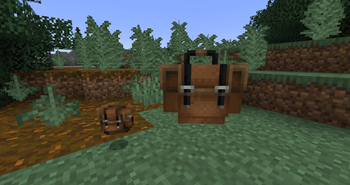
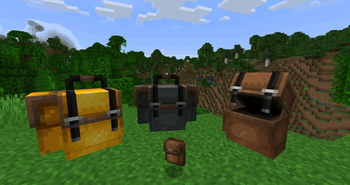
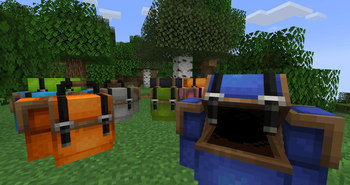
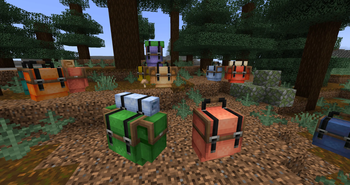
## Overpacked adds huge backpacks with a capacity roughly equal to four chests, allowing you to carry many more items on your adventures. The backpack helps you store loot and organize it into different sections, making inventory management more convenient and well-structured.

[](https://modrinth.com/mod/curios)
[](https://modrinth.com/mod/bobo-lib)
### 
• To obtain a giant backpack, you need to purchase it from a Wandering Trader.
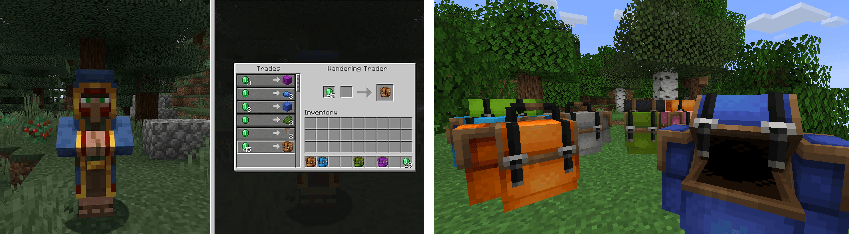
• Customization: You can recolor the backpack in any of the Vanilla and Dye Depot  colors or decorate it with a sleeping bag by clicking on it with a bed or a sleeping bag from the Comforts
  or Upgrade Aquatic
  mods.
mods.
• Beautiful animations: Animations are played while walking and when opening the backpack.
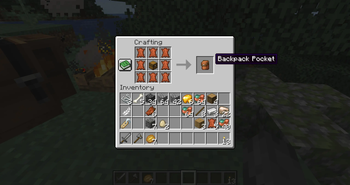
• Roomy inventory: Each backpack consists of three sections: one large section with 54 slots and two smaller sections with 27 slots each (these are crafted on a workbench by placing a chest in the center and surrounding it with eight pieces of leather). All sections represents a separate inventory.
• Balance: The backpack will start to slow you down if you fill it with too many items. The slowdown depends on the number of occupied slots: for every 27 filled slots, you lose 10% of your speed.
### 
### • Are there any backports? Fabric support? Support for ports and other bootloaders is planned for a later time.
### • Can I use Overpacked in a modpack or other content? Yes! Just don’t forget to credit us properly.
### • Can I use Overpacked textures or other assets? Only in certain cases — please contact us via our Discord server.
### [
📊 Mod Details
- Game
- Minecraft Mods
- Author
- Ktotachka
- Version
- 2.0.1-1.21.1
- Downloads
- 9,644
- Endorsements
- 82
- Category
- adventure
- Created
- 1/25/2026
- Updated
- 6/22/2026
- Game Versions
- 1.21.1
- Tags
- adventure, equipment, storage
🔧 How to Install Minecraft Mods Mods
Download from Modrinth. Use Prism Launcher or drop into your mods folder.
📖 Full step-by-step install guide for Minecraft Mods →
Visit the official mod page for specific installation instructions for this mod.
🎮 Need cheat codes or console commands? Check ur gaming wiki for Minecraft Mods commands, item IDs, and more.
❓ Frequently Asked Questions
Which Minecraft Mods versions does Overpacked support?
The author lists 1.21.1. Other versions may work but are untested by the author.
What is the latest version of Overpacked?
Version 2.0.1-1.21.1, published 2026-06-22 with 9,644 downloads recorded at the source.
Keep browsing — more Minecraft Mods mods await