OreDictTips
⚪ Last updated 2023⚠️ Install Order · 2 steps
Install in this order, then this mod last — most mods fail to load without their framework and dependencies in place.
🖼️ Gallery (1 images)
🔍 Analysis
- 👍 0.0% endorsement rate
- 🏆 #208 of 400 forge mods in this game by downloads
📋 About This Mod
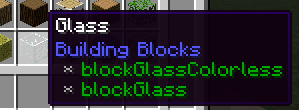
This is a simple mod that displays OreDictionary entries in item tooltips. It has 4 toggle modes: Always: Always displayed Debug: Only displayed when advanced tooltips are shown (F3+H) Keybind: Only displayed while holding down a specified keybinding (changeable in Controls, defaults to LSHIFT) Keybind+Debug: Combination of Keybind and Debug; advanced tooltips must be enabled and the keybind must be held. The mode can be set in the oredicttips.cfg configuration file. The tooltips are in green because it looks nice. This CurseForge page is no longer updated. All future versions are available exclusively on Modrinth ! Sorry for any inconveniences.
📊 Mod Details
- Game
- Minecraft Mods
- Author
- SatanicSanta
- Version
- 2.0.2
- Downloads
- 847
- Endorsements
- 0
- Category
- forge
- Created
- 11/7/2023
- Updated
- 11/6/2023
- Game Versions
- 1.12, 1.12.1, 1.12.2
- Tags
- utility
🔧 How to Install Minecraft Mods Mods
Download from Modrinth. Use Prism Launcher or drop into your mods folder.
📖 Full step-by-step install guide for Minecraft Mods →
Visit the official mod page for specific installation instructions for this mod.
🎮 Need cheat codes or console commands? Check ur gaming wiki for Minecraft Mods commands, item IDs, and more.
❓ Frequently Asked Questions
Which Minecraft Mods versions does OreDictTips support?
The author lists 1.12, 1.12.1, 1.12.2. Other versions may work but are untested by the author.
What is the latest version of OreDictTips?
Version 2.0.2, published 2023-11-06 with 847 downloads recorded at the source.
Keep browsing — more Minecraft Mods mods await