Optiscale
🟡 Updated this year⚠️ Install Order · 2 steps
Install in this order, then this mod last — most mods fail to load without their framework and dependencies in place.
🖼️ Gallery (1 images)
🔍 Analysis
- 👍 0.1% endorsement rate
- 🏆 #52 of 346 forge mods in this game by downloads
📋 About This Mod
Requires Forge Client-side mod **New to version 1.03** ``` Add new config option 'Override List': Allows you to override specific screens with custom scaling. E.g., Make chest screens bigger: net.minecraft.client.gui.screens.inventory.ContainerScreen=500 Above sets Chest screen to use 500% scaling To help with setting the above, there is a new DEBUG level log that the mod prints whenever you open a new screen with the screen name: Detected new screen=net.minecraft.client.gui.screens.inventory.InventoryScreen Use this to set a custom scale or set this to 0 to blacklist Optiscale from scaling this screen You can also give the name of the package instead of the screen, e.g., net.minecraft.client.gui.screens.inventory.*=200 to rescale all screens that are in that specific package 1.04: Add the ability to override screens based on their "menu name" or the title of the screen. e.g., To enlarge the 'Modern Life' mod Printer screen, you can write Printer=600 ``` ------------------------- Note: Mod is totally resigned for 1.20.1. Instead of integrating with the video screen, the scaling is now only configurable with a hotkey (default: F7, change in Key Bindings menu). This is so that it can work even with custom video screen UIs such as Iris/Oculus. ------------------------- This mod will change your Video Settings "GUI Scale" option into a slider that allows for a wider range of configurations. Other mods exist with this functionality but this mod is compatible with both vanilla and optifine. This mod also allows a much more fine-grained tuning than others which only give integer values like 0, 1, 2, 3, whereas this offers any value you want like 1.7x for example. In vanilla the scaling options are but with this mod you can choose between 150% to 450% using a slider. The vanilla scaling options correspond to the following percentages: 1: 200% 2: 300% 3: 400%
Requires Forge
Client-side mod
New to version 1. 03
``` Add new config option 'Override List': Allows you to override specific screens with custom scaling.
E.g., Make chest screens bigger: net.minecraft.client.gui.screens.inventory. ContainerScreen=500 Above sets Chest screen to use 500% scaling To help with setting the above, there is a new DEBUG level log that the mod prints whenever you open a new screen with the screen name: Detected new screen=net.minecraft.client.gui.screens.inventory. InventoryScreen Use this to set a custom scale or set this to 0 to blacklist Optiscale from scaling this screen You can also give the name of the package instead of the screen, e.g., net.minecraft.client.gui.screens.inventory.*=200 to rescale all screens that are in that specific package
1. 04: Add the ability to override screens based on their "menu name" or the title of the screen. e.g., To enlarge the 'Modern Life' mod Printer screen, you can write Printer=600 ```
-------------------------
Instead of integrating with the video screen, the scaling is now only configurable with a hotkey (default: F7, change in Key Bindings menu).
This is so that it can work even with custom video screen UIs such as Iris/Oculus.
-------------------------
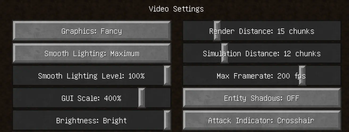
This mod will change your Video Settings "GUI Scale" option into a slider that allows for a wider range of configurations.
Other mods exist with this functionality but this mod is compatible with both vanilla and optifine. This mod also allows a much more fine-grained tuning than others which only give integer values like 0, 1, 2, 3, whereas this offers any value you want like 1. 7x for example.
In vanilla the scaling options are but with this mod you can choose between 150% to 450% using a slider.
The vanilla scaling options correspond to the following percentages:
📊 Mod Details
- Game
- Minecraft Mods
- Author
- darimus
- Version
- 1.21.1-1.02
- Downloads
- 3,898
- Endorsements
- 5
- Category
- forge
- Created
- 3/16/2024
- Updated
- 6/27/2026
- Game Versions
- 1.21.1
- Tags
- utility
🔧 How to Install Minecraft Mods Mods
Download from Modrinth. Use Prism Launcher or drop into your mods folder.
📖 Full step-by-step install guide for Minecraft Mods →
Visit the official mod page for specific installation instructions for this mod.
🎮 Need cheat codes or console commands? Check ur gaming wiki for Minecraft Mods commands, item IDs, and more.
❓ Frequently Asked Questions
Which Minecraft Mods versions does Optiscale support?
The author lists 1.21.1. Other versions may work but are untested by the author.
What is the latest version of Optiscale?
Version 1.21.1-1.02, published 2026-06-27 with 3,898 downloads recorded at the source.
Keep browsing — more Minecraft Mods mods await