Options Enforcer
⚪ Last updated 2022⚠️ Install Order · 2 steps
Install in this order, then this mod last — most mods fail to load without their framework and dependencies in place.
🖼️ Gallery (3 images)
🔍 Analysis
- 👍 0.0% endorsement rate
- 🏆 #294 of 386 forge mods in this game by downloads
📋 About This Mod
!(https://cdn.modrinth.com/data/qVP3xNMe/images/a9848fc305285a034c1dc3d7e977dbd349de0a1d.png)
### NOTE: This mod will not be updating past 1. 19.
This is due to Minecraft's draconic and overbearing report system, which can be tricked and exploited, and can result in the user being unable to play on their own private servers.
I am against this awful system on principle, and so long as I never run my game past 1. 19, I will taint my account with the possibility.
Luckily, Option Enforcer's code is (https://gitgud.io/AstroTibs/options-enforcer), and so you can port it forward yourself!
Sorry for any inconvenience.
Options Enforcer (OE) is a client-side only mod, and is designed primarily with modpacks in mind. It does two things.
## Thing 1—config/options enforcement (primarily for the modpack owner)

OE allows you to overwrite values in options.txt and other configuration files so that you don't have to bundle those files with every pack update. Why does that matter?
Problem 1. 1: If you include the full options.txt in your modpack, then it overwrites the user's copy, resetting all of their values (keybinds, sound, rendering, etc.) to the modpack defaults.
Problem 1. 2: If you include an *options.txt8 with only some values, then it overwrites the user's copy, resetting all non-included values to the Minecraft defaults.
Problem 1. 3: If you do not include options.txt in your modpack, then the user's values will never be overwritten, but it will be up to them to resolve keybind conflicts and apply resourcepacks and set important values, etc.
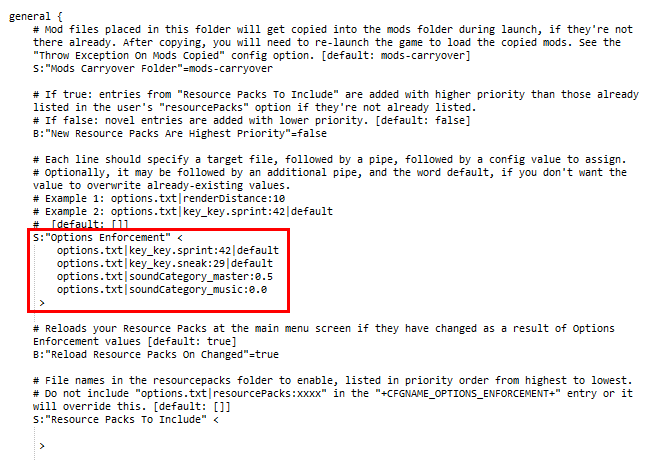
With Options Enforcer, first, the modpack owner simply adds values he wishes to enforce to the optionsenforcer.cfg file such as: `options.txt|renderDistance:10` Second, the owner simply does not include options.txt in the modpack.
Now, every time the user updates or launches the pack, the value `renderDistance:10` will be inserted into file options.txt, leaving all other values exactly as the user last left them.
Alternately, as of OE version 1. 4, you can append `|default` to the end of the enforcement entry: doing so will ONLY set that value on first launch, but never when there is already a value!
OE is designed for use with options.txt, optionsof.txt, smart_moving_options.txt, etc. located in the root minecraft directory, but can even modify other mod config files such as, e.g. `config/VillageNames4/general.cfg`
This mod was created with the (https://www.technicpack.net/modpack/galaxy-odyssey. 1592370) of my modpack, (https://modrinth.com/modpack/galaxy-odyssey) in mind, but may be useful for multiple pack platforms.
## Thing 2—mods carryover (primarily for the modpack user)
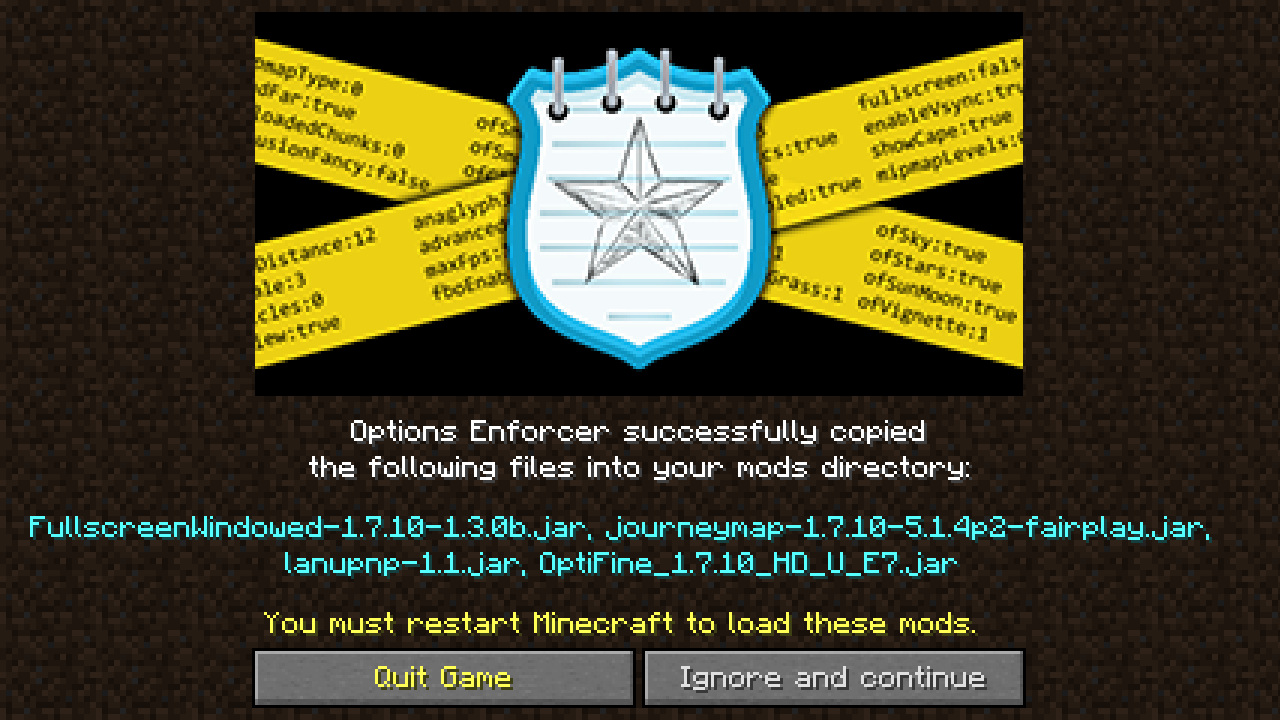
!(https://cdn.modrinth.com/data/qVP3xNMe/images/6df19b44dc2f5ccbdf579e59a4c7fb838b9b87bc.png)
Perhaps you, the modpack user, would like to use mods such as (https://www.curseforge.com/linkout?remoteUrl=https%253a%252f%252fwww.optifine.net%252fhome), (https://www.curseforge.com/minecraft/mc-mods/waila), (https://www.curseforge.com/minecraft/mc-mods/fullscreen-windowed-borderless-for-minecraft), (https://www.curseforge.com/minecraft/mc-mods/real-first-person-render) etc. which aren't included in the modpack. However, every time you update the modpack, it wipes and replaces all the mods in the mods folder, forcing you to download those ancillary mods again.
On launch, OE will copy all .jar and .zip files from the `mods-carryover` folder (will be created by OE if it's not there) into the regular `mods` folder, if they're not present there already.
Generally, the modpack owner does not need to do anything with this config value, apart from renaming it to another folder name. It will be up to the user to manage the mods they'd like copied over betwe
📊 Mod Details
- Game
- Minecraft Mods
- Author
- AstroTibs
- Version
- 1.4-1.19
- Downloads
- 44,447
- Endorsements
- 4
- Category
- forge
- Created
- 6/2/2022
- Updated
- 8/22/2022
- Game Versions
- 1.19
🔧 How to Install Minecraft Mods Mods
Download from Modrinth. Use Prism Launcher or drop into your mods folder.
📖 Full step-by-step install guide for Minecraft Mods →
Visit the official mod page for specific installation instructions for this mod.
🎮 Need cheat codes or console commands? Check ur gaming wiki for Minecraft Mods commands, item IDs, and more.
❓ Frequently Asked Questions
Which Minecraft Mods versions does Options Enforcer support?
The author lists 1.19. Other versions may work but are untested by the author.
What is the latest version of Options Enforcer?
Version 1.4-1.19, published 2022-08-22 with 44,447 downloads recorded at the source.
Keep browsing — more Minecraft Mods mods await