Open Lights Controller
⚪ Last updated 2022⚠️ Install Order · 2 steps
Install in this order, then this mod last — most mods fail to load without their framework and dependencies in place.
🖼️ Gallery (1 images)
🔍 Analysis
- 👍 0.3% endorsement rate
- 🏆 #10 of 331 forge mods in this game by downloads
📋 About This Mod
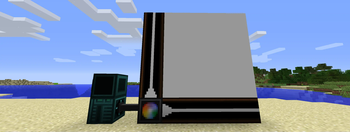
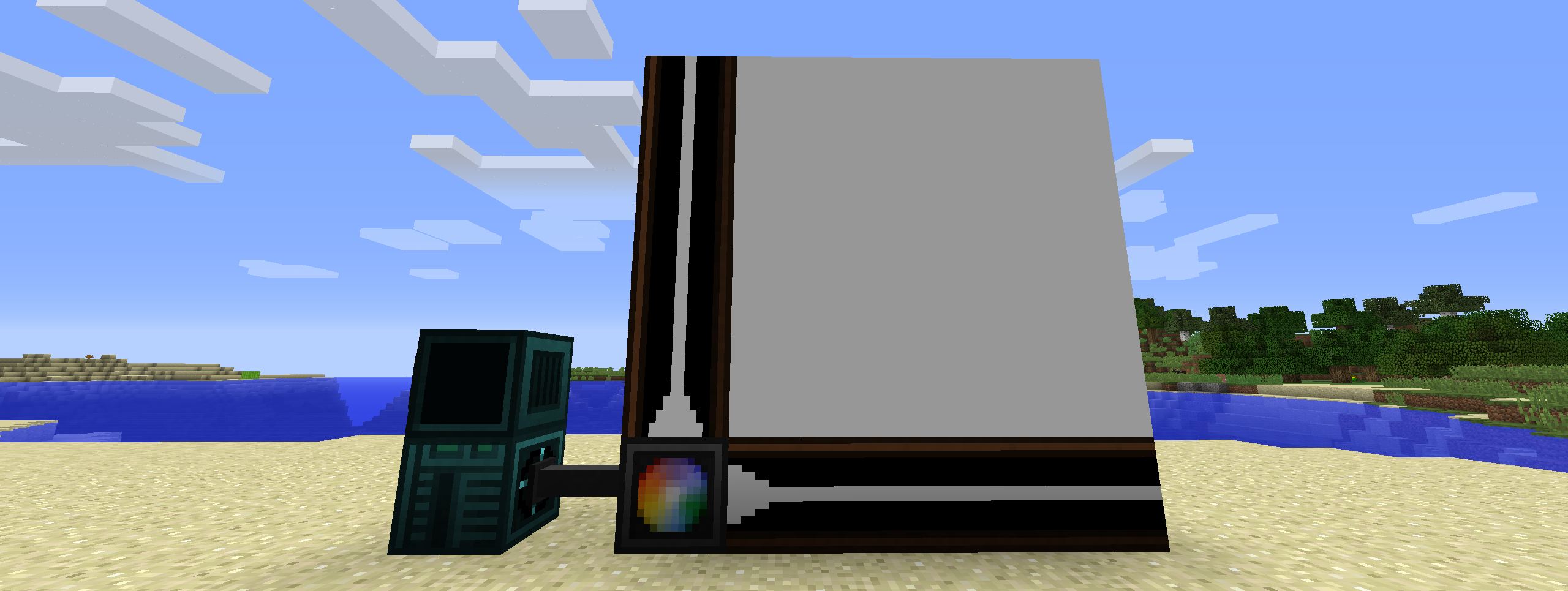
# Open Lights Controller (https://ko-fi.com/img/githubbutton_sm.svg)](https://ko-fi.com/W7W1607S8) Requires (https://www.curseforge.com/minecraft/mc-mods/opencomputers) and (https://www.curseforge.com/minecraft/mc-mods/openlights) ## Setup - Drop the mod in the mods folder ## Blocks - Open Lights Controller (4 block range) - Open Lights Controller (8 block range) - Open Lights Controller (16 block range) - Open Lights Controller Border ## Usage <p align="center"> <img src="https://raw.githubusercontent.com/MrMelon54/open-lights-controller-forge/master/images/screen setup.png" alt="Block layout" width="738"> </p> ```lua -- Require component and event component = require("component") event = require("event") -- Get the attached Open Lights Controller component lc = component.openlightscontroller -- The letters define which axis the coordinates are for -- The value on that axis increases as it follows the border blocks away from the controller lc.calibrate("ZY") w,h = lc.getSize() -- The whole grid of lights is filled with yellow and set to brightness 15 lc.fillColor(0xffff00) lc.fillBrightness(15) -- The light at (1,1) is set to black lc.setColor(0x000000,1,1) -- The lights in the area defined by (2,2) and (w,h) are set to red lc.fillColor(0xff0000,2,2,w,h) -- The changes are applied to the lights lc.apply() -- Wait until the interrupt event event.pull('interrupt') -- The whole grid of lights is filled with black lc.fillColor(0x000000) -- The changes are applied to the lights lc.apply() ``` ## LUA API - `` means these arguments are optional - `{x:number}` means that the arguments are repeatable, or the return value is an array | Method | Description | | ------------------------------------------------------------------------------------------------ | ------------------------------------------------------------------------------------------------------------------------------------------------------------------------------------------------------------------------------------------------- | | function apply():string; | Applies the current cached lighting data to the lights. | | function isCalibrated():bool; | Checks if the light controller is calibrated. | | function calibrate(direction:string):string; | Calibrate light controller. | | function getBorderAxes():string, string; | Get border axes. | | function getBorderDirections():string, string; | Get active border directions. | | function getSize():number, number; | Get size of light grid. | | function setColor(color:number, {x:number, y:number}):string; | Set the light color as an RGB value. Returns the new color as an RGB hex string. Use `tonumber(value, 16)` to convert return value to a usable numeric value. The controller caches this until `apply()` is called. | | function fillColor(color:number, ):string; | Fills a specific region or the whole grid to a specific RGB value. Re
# Open Lights Controller
[!(https://ko-fi.com/img/githubbutton_sm.svg)](https://ko-fi.com/W7W1607S8)
Requires (https://www.curseforge.com/minecraft/mc-mods/opencomputers) and (https://www.curseforge.com/minecraft/mc-mods/openlights)
- Drop the mod in the mods folder
- Open Lights Controller (4 block range)
- Open Lights Controller (8 block range)
- Open Lights Controller (16 block range)
- Open Lights Controller Border
```lua -- Require component and event component = require("component") event = require("event")
- - Get the attached Open Lights Controller component
- lc = component.openlightscontroller
- - The letters define which axis the coordinates are for
- - The value on that axis increases as it follows the border blocks away from the controller
- lc.calibrate("ZY")
- w,h = lc.getSize()
- - The whole grid of lights is filled with yellow and set to brightness 15
- lc.fillColor(0xffff00)
- lc.fillBrightness(15)
- - The light at (1,1) is set to black
- lc.setColor(0x000000,1,1)
- - The lights in the area defined by (2,2) and (w,h) are set to red
- lc.fillColor(0xff0000,2,2,w,h)
- - The changes are applied to the lights
- lc.apply()
- - Wait until the interrupt event
- event.pull('interrupt')
- - The whole grid of lights is filled with black
- lc.fillColor(0x000000)
- - The changes are applied to the lights
- lc.apply()
- ```
- `` means these arguments are optional
- `{x:number}` means that the arguments are repeatable, or the return value is an array
| Method | Description | | ------------------------------------------------------------------------------------------------ | ------------------------------------------------------------------------------------------------------------------------------------------------------------------------------------------------------------------------------------------------- | | function apply():string; | Applies the current cached lighting data to the lights. | | function isCalibrated():bool; | Checks if the light controller is calibrated. | | function calibrate(direction:string):string; | Calibrate light controller. | | function getBorderAxes():string, string; | Get border axes. | | function getBorderDirections():string, string; | Get active border directions. | | function getSize():number, number; | Get size of light grid. | | function setColor(color:number, {x:number, y:number}):string; | Set the light color as an RGB value. Returns the new color as an RGB hex string. Use `tonumber(value, 16)` to convert return value to a usable numeric value. The controller caches this until `apply()` is called. | | function fillColor(color:number, ):string; | Fills a specific region or the whole grid to a specific RGB value. Re
📊 Mod Details
- Game
- Minecraft Mods
- Author
- mrmelon54
- Version
- v1.0.1
- Downloads
- 582
- Endorsements
- 2
- Category
- forge
- Created
- 11/26/2022
- Updated
- 8/15/2022
- Game Versions
- 1.12.2
- Tags
- technology, utility
🔧 How to Install Minecraft Mods Mods
Download from Modrinth. Use Prism Launcher or drop into your mods folder.
📖 Full step-by-step install guide for Minecraft Mods →
Visit the official mod page for specific installation instructions for this mod.
🎮 Need cheat codes or console commands? Check ur gaming wiki for Minecraft Mods commands, item IDs, and more.
❓ Frequently Asked Questions
Which Minecraft Mods versions does Open Lights Controller support?
The author lists 1.12.2. Other versions may work but are untested by the author.
What is the latest version of Open Lights Controller?
Version v1.0.1, published 2022-08-15 with 582 downloads recorded at the source.
Keep browsing — more Minecraft Mods mods await