OfflinePlayers
🟡 Updated this year⚠️ Install Order · 2 steps
Install in this order, then this mod last — most mods fail to load without their framework and dependencies in place.
🖼️ Gallery (3 images)

🔍 Analysis
- 👍 1.2% endorsement rate — high engagement, a strong quality signal
- 🏆 #642 of 896 fabric mods in this game by downloads
📋 About This Mod
## Goal This mod allows players to go AFK on a server without leaving their computers on. Simply use the `/offline` command to spawn an exact copy of your player, called an offline player. Depending on the configuration, you'll be kicked after the offline player has spawned. If the offline player is killed, it won't drop loot but will be kicked from the server. When you rejoin, the inventory and XP levels from the offline player are copied to you, and you'll be killed. This gives you time to retrieve your items. If the offline player survives until you rejoin, its inventory and gained experience will be transferred to you. ## How to Use Type `/offline` to spawn an offline player. ### Actions You can add actions to your offline player. Available actions include: | Name | Description | |---------------|-------------------------------------------------------------------| | attack | Player left click | | break | Player left click, but wait for block to fully break. | | place / use | Player right click | | crouch | Player crouching | | jump | Player jumping | | eat | Player eating (only if hungry & having food in one hand) | | drop_item | Drops an item from the active slot | | drop_stack | Drops all items from the active slot | | move_forward | Moves the player forward | | move_backward | Moves the player backwards | | disconnect | Automatically disconnects the offline player after a set interval | To use an action, type `/offline `, e.g., `/offline attack`. > Tip: use `/offline actions` to see a list of available actions ### Interval/Offset You can execute actions with set intervals or offsets: - Interval: `/offline break:20` (20 tick or 1 second interval between breaking blocks) - Offset: `/offline attack:20:10` (10 tick offset added to the action) #### Time Parsing Besides using ticks (the default), it is also possible to set the interval and offset to milliseconds, seconds, minutes, hours, and even days. Example: `/offline use:100ms`, `/offline attack:1s`, `/offline attack:1.5m`, `/offline eat:0.25h`, `/offline disconnect:1d` ### Chaining You can chain actions, for example: - `/offline attack move_forward` - `/offline attack:100 jump eat:20:10` - `/offline jump:20 attack eat move_backward` Actions are executed in the order specified. ## Config After initialization, the configuration file is located at `config/OfflinePlayersReworked.json` in your Minecraft server's root folder. The configuration looks as follows: ```json { "opRequired": false, "autoOp": true, "autoWhitelist": false, "autoDisconnect": true, "killOnDeath": true, "respawnKickedPlayers": true, "informAboutKickedPlayer": true, "copySkin": true, "databaseLocation": "./offlineplayersreworked/", "offlinePlayerPrefix": "", "availableOptions": } ``` - `opRequired`: If true, only OPs can use `/offline`. - `autoOp`: If true, offline players of OPs are automatically made OPs. - `autoWhitelist`: If true and whitelist is enabled, offline players are auto-whitelisted. (Default value is false at it doesn't seem necessary) - `autoDisconnect`: If true, players automatically disconnect after using `/offline`. (Use false at your own risk) - `killOnDeath`: If true, players automatically die upon reconnecting if their offline player died. - `respawnKickedPlayers`: If true, offline players automatically respawn on server restart when kicked - `informAboutKickedPlayer`: If true, if offline player was kicked and player rejoins, player will be informed about offlline player being kicked - `copySkin`: If true, offline players copy the original player's skin. - `databaseLocation`: Folder location for the database. Default is `./offlinePlayersReworked/`. - `offlinePlayerPrefix`: Sets the prefix for the offline player. - `availableOptions`: A list of the available action options that can be used. ## Reporting Issues If you encounter any bugs or have suggestions for improvements, please create an issue on our GitHub repository. To create an issue: 1. Go to the (https://github.com/lilfish/Fabric_OfflinePlayersReworked/issues) tab of this repository. 2. Click on "New Issue". 3. Choose between "Bug report" or "Feature request" template. 4. Fill out the template with as much detail as possible. 5. Submit the issue.
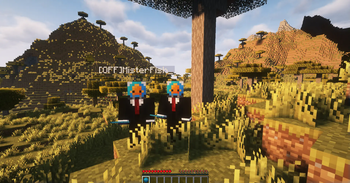
This mod allows players to go AFK on a server without leaving their computers on. Simply use the `/offline` command to spawn an exact copy of your player, called an offline player. Depending on the configuration, you'll be kicked after the offline player has spawned.
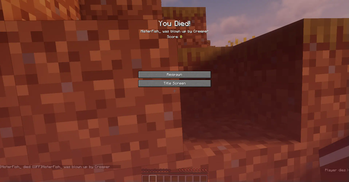
If the offline player is killed, it won't drop loot but will be kicked from the server. When you rejoin, the inventory and XP levels from the offline player are copied to you, and you'll be killed. This gives you time to retrieve your items.
If the offline player survives until you rejoin, its inventory and gained experience will be transferred to you.
## How to Use
Type `/offline` to spawn an offline player.
### Actions
You can add actions to your offline player. Available actions include:
| Name | Description | |---------------|-------------------------------------------------------------------| | attack | Player left click | | break | Player left click, but wait for block to fully break. | | place / use | Player right click | | crouch | Player crouching | | jump | Player jumping | | eat | Player eating (only if hungry & having food in one hand) | | drop_item | Drops an item from the active slot | | drop_stack | Drops all items from the active slot | | move_forward | Moves the player forward | | move_backward | Moves the player backwards | | disconnect | Automatically disconnects the offline player after a set interval |
To use an action, type `/offline `, e.g., `/offline attack`.
> Tip: use `/offline actions` to see a list of available actions
### Interval/Offset
You can execute actions with set intervals or offsets:
- Interval: `/offline break:20` (20 tick or 1 second interval between breaking blocks)
- Offset: `/offline attack:20:10` (10 tick offset added to the action)
#### Time Parsing
Besides using ticks (the default), it is also possible to set the interval and offset to milliseconds, seconds, minutes, hours, and even days.
Example: `/offline use:100ms`, `/offline attack:1s`, `/offline attack:1. 5m`, `/offline eat:0. 25h`, `/offline disconnect:1d`
### Chaining
You can chain actions, for example:
- `/offline attack move_forward`
- `/offline attack:100 jump eat:20:10`
- `/offline jump:20 attack eat move_backward`
Actions are executed in the order specified.
After initialization, the configuration file is located at `config/OfflinePlayersReworked.json` in your Minecraft server's root folder.
The configuration looks as follows: ```json { "opRequired": false, "autoOp": true, "autoWhitelist": false, "autoDisconnect": true, "killOnDeath": true, "respawnKickedPlayers": true, "informAboutKickedPlayer": true, "copySkin": true, "databaseLocation": "./offlineplayersreworked/", "offlinePlayerPrefix": "", "availableOptions": ["attack", "break", "use","etc..."] } ``` - `opRequired`: If true, only OPs can use `/offline`. - `autoOp`: If true, offline players of OPs are automatically made OPs. - `autoWhitelist`: If true and whitelist is enabled, offline players are auto-whitelisted. (Default value is false at it doesn't seem necessary) - `autoDisconnect`: If true, players automatically disconnect after using `/offline`. (Use false at your own risk) - `killOnDeath`: If true, players automatically die upon reconnecting if their offline player died. - `respawnKickedPlayers`: If true, offline players automatically respawn on server restart when kicked - `informAboutKickedPlayer`: If true, if offline player was kicked and player rejoins, player will be informed about offlline player being kicked - `copySkin`: If true, offline players copy the original player's skin. - `databaseLocation`: Folder location for the database. Default is `./offlinePlayersReworked/`. - `offlinePlayerPrefix`: Sets the prefix for the offline player. - `availableOptions`: A list of the available action options that can be used.
## Reporting Issues
If you encounter any bugs or have suggestions for improvements, please create an issue on our GitHub repository. To create an issue:
1. Go to the (https://github.com/lilfish/Fabric_OfflinePlayersReworked/issues) tab of this repository. 2. Click on "New Issue". 3. Choose between "Bug report" or "Feature request" template. 4. Fill out the template with as much detail as possible. 5. Submit the issue.
📊 Mod Details
- Game
- Minecraft Mods
- Author
- MisterFish
- Version
- 1.4.0_26.1-26.1.2
- Downloads
- 3,182
- Endorsements
- 39
- Category
- fabric
- Created
- 8/16/2024
- Updated
- 4/15/2026
- Game Versions
- 26.1, 26.1.1, 26.1.2
- Tags
- utility
🔧 How to Install Minecraft Mods Mods
Download from Modrinth. Use Prism Launcher or drop into your mods folder.
📖 Full step-by-step install guide for Minecraft Mods →
Visit the official mod page for specific installation instructions for this mod.
🎮 Need cheat codes or console commands? Check ur gaming wiki for Minecraft Mods commands, item IDs, and more.
❓ Frequently Asked Questions
Which Minecraft Mods versions does OfflinePlayers support?
The author lists 26.1, 26.1.1, 26.1.2. Other versions may work but are untested by the author.
What is the latest version of OfflinePlayers?
Version 1.4.0_26.1-26.1.2, published 2026-04-15 with 3,182 downloads recorded at the source.
Keep browsing — more Minecraft Mods mods await