OfflineLAN
🟡 Updated this year⚠️ Install Order · 2 steps
Install in this order, then this mod last — most mods fail to load without their framework and dependencies in place.
🖼️ Gallery (4 images)

🔍 Analysis
- 👍 0.1% endorsement rate
- 🏆 #597 of 983 fabric mods in this game by downloads
📋 About This Mod
## OfflineLAN: a Fabric mod that brings the online-mode server config into the client via in-game GUI
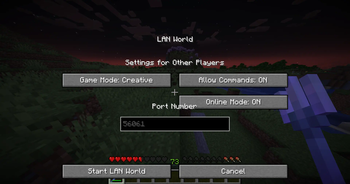
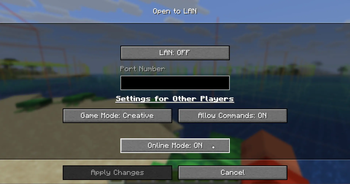
OfflineLAN is a Fabric mod that gives you the power to manage your online-mode configuration directly that is usually accessed from server.properties to your client where it was previously inaccessible.
Online-mode is a sever-side config that dictates whether players need to authenticate with Mojang's servers before joining. When online mode is enabled, players must verify their Minecraft accounts, ensuring they have logged in and can access their profile. If online mode is disabled, the authentication process is skipped entirely, useful if you want a second minecraft instance to join your world that is ran with "offline mode" in MultiMC.
This mod works with vanilla clients!, you would only need the mod if you're hosting the world.
This mod DOES NOT need any other dependencies!, its completely standalone and i will keep it updated for older versions just like (https://modrinth.com/mod/syncedadvancements), version 1. 18 and prior is coming someday.
## How to use: - Just.. Open To Lan and it'll show you the options, and make sure you read the Caveats below!
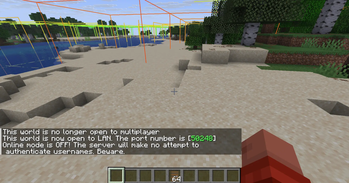
## Additional Infos/Caveats: - The toggle for the Online-mode DEFAULTS TO ON (just like in server.properties), So you have to deliberately turn it OFF for the mod to take effect. - This mod takes effect ONLY when you Open To Lan, it wouldn't make your world insecure just by having it installed. - This works exactly like it would work on dedicated servers (if port-forwarded, or using (https://modrinth.com/mod/e4mc)/(https://github.com/duncanruns/e4mcbiat)) - BE wary that Online-mode is a dangerous option to toggle, i am not responsible if your world gets griefed by malicious actors. Always have a backup of your world and have a security layer ready. - if Online-mode is toggled OFF, External playersdatas will be identified with a locally generated UUID, which means a player who was playing with Online-mode toggled ON, might lose their entire progress on the world if Online-mode was suddenly toggled OFF. to mitigate this, you can migrate the old playerdata to the new UUID _(yes this is possible, my friend who wasn't as tech savvy could figure it out, it doesnt need rocket science)_. This does not affect the host, as playerdata of the host is stored in level.dat, and that playerdata is presistent regardless of UUID. Turning Online-mode back ON will make it resolve to their account UUID again, restoring their progress.
📊 Mod Details
- Game
- Minecraft Mods
- Author
- Aeroshide
- Version
- 1.2.1
- Downloads
- 48,213
- Endorsements
- 36
- Category
- fabric
- Created
- 4/23/2025
- Updated
- 6/17/2026
- Game Versions
- 26.2
- Tags
- management, social, utility
🔧 How to Install Minecraft Mods Mods
Download from Modrinth. Use Prism Launcher or drop into your mods folder.
📖 Full step-by-step install guide for Minecraft Mods →
Visit the official mod page for specific installation instructions for this mod.
🎮 Need cheat codes or console commands? Check ur gaming wiki for Minecraft Mods commands, item IDs, and more.
❓ Frequently Asked Questions
Which Minecraft Mods versions does OfflineLAN support?
The author lists 26.2. Other versions may work but are untested by the author.
What is the latest version of OfflineLAN?
Version 1.2.1, published 2026-06-17 with 48,213 downloads recorded at the source.
Keep browsing — more Minecraft Mods mods await