OFF Client
🟡 Updated this year⚠️ Install Order · 2 steps
Install in this order, then this mod last — most mods fail to load without their framework and dependencies in place.
🖼️ Gallery (1 images)
🔍 Analysis
- 👍 0.2% endorsement rate
- 🏆 #209 of 282 decoration mods in this game by downloads
📋 About This Mod
# OFF Client OFF Client is a lightweight client-side Fabric utility mod for Minecraft 1.21.11. It adds a compact neon-styled module panel, configurable keybinds, and practical client-side tools for readability, inventory comfort, HUD information, and quality-of-life gameplay. The mod is designed to be transparent and easy to understand: every feature is listed below, every module can be configured in-game, and newly added informational modules are disabled by default until the player enables them. ## Features - **Fullbright** Brightens caves and dark areas on the client side without x-ray, block transparency, or see-through rendering. - **Auto Totem** Automatically prepares a totem in dangerous situations. This is an automated client-side utility; use it only on servers where this behavior is allowed. - **Zoom** Smoothly focuses the camera on distant objects with configurable zoom strength, smooth transition, mouse-wheel zoom adjustment, and relative mouse sensitivity while zooming. - **Elytra Swap** Swaps between an elytra and a chestplate from any inventory slot using a configurable keybind. - **Auto Clicker** Configurable automatic actions for left click, right click, and jump. Left and right click support Hold and Spam modes, with an optional setting to keep automation active while a screen is open. This is not intended for unfair PvP use; follow the rules of the server you join. - **Armor HUD** Shows the armor you are wearing near the player HUD. - **HP Indicator** Shows health above players, mobs, or both. It supports Hearts/Number modes, size, separate player/mob height controls, percentage-based health, number color, poison/wither colors, yellow absorption hearts, regeneration vibration, hardcore-style hearts, and an optional self indicator for third person. - **Better F3** A compact debug overlay with configurable sections such as coordinates, location, target details, system information, background, shadow, and scale. - **Mouse Tweaks** Adds inventory mouse gestures: right-button drag to place items, left-button drag to move stacks, Shift-drag quick move, and mouse-wheel transfer between inventories. - **Inventory Manager** Sorts the currently opened player inventory or storage container by item ID or display name. The hotbar can be protected, and sorting requires an inventory/container screen to be open. - **Effect Timers** Shows potion effect duration, effect level, warning color before expiration, and an optional blinking frame before an effect ends. When enabled, it hides the vanilla effect display to avoid duplicate HUD elements. - **Food Info** Shows a visual preview on the vanilla food/health HUD for held food: restored hunger, saturation gain, and estimated regeneration when it is safe to estimate. It does not render in creative mode and does not show fake gain when hunger/health are already full. - **Chat Tools** Adds optional timestamps to chat messages and click-to-copy behavior for chat text. - **Numeric Ping** Replaces the player-list ping bars with a numeric latency value. It supports auto-colored ping text, custom HEX colors for each latency range, manual text color, custom text format, and an option to keep the vanilla ping bars visible. - **Information** Shows compact information for the block or entity under the crosshair. It can show block IDs, position, hit side, distance, state properties, container slot usage, entity health/armor/effects, and horse stats such as speed, jump strength, temper, taming state, variant, markings, and chest state. The panel supports preset positions, manual on-screen placement, and separate visibility switches. Right-click the selected Manual position to edit it again. - **Keybinds** Each module can be assigned its own key directly from the OFF Client panel. Additional informational modules are unbound by default and can be bound manually. - **Chat feedback** Short in-game messages in the style `OFF Client | action`. ## Default controls - Open panel: **Right Shift** - Fullbright: **B** - Auto Totem: **V** - Elytra Swap: **G** - Auto Clicker: **C** - Armor HUD: **H** - HP Indicator: **J** - Sort opened inventory/container: **K** ## Commands - `/off` opens the panel - `/off toggle` toggles Fullbright - `/off totem` toggles Auto Totem - `/off elytra` performs Elytra Swap - `/off clicker` toggles Auto Clicker - `/off armor` toggles Armor HUD - `/off hearts` toggles HP Indicator - `/off debug` toggles Better F3 - `/off mouse` toggles Mouse Tweaks - `/off inventory` toggles Inventory Manager - `/off effects` toggles Effect Timers - `/off food` toggles Food Info - `/off chat` toggles Chat Tools - `/off ping` toggles Numeric Ping - `/off target` toggles Information - `/off zoom` toggles zoom - `/off sort` sorts the currently opened inventory/container - `/off messages true|false` changes Fullbright chat messages - `/off reload` reloads the config ## Server transpare
# OFF Client
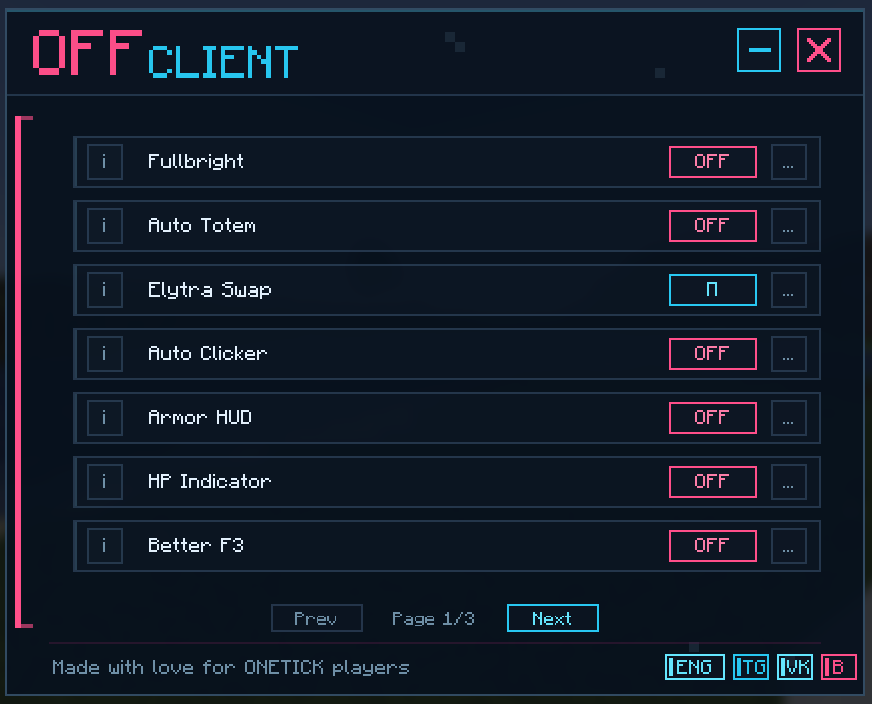
OFF Client is a lightweight client-side Fabric utility mod for Minecraft 1. 21. 11. It adds a compact neon-styled module panel, configurable keybinds, and practical client-side tools for readability, inventory comfort, HUD information, and quality-of-life gameplay.
The mod is designed to be transparent and easy to understand: every feature is listed below, every module can be configured in-game, and newly added informational modules are disabled by default until the player enables them.
## Features
- Fullbright
- Brightens caves and dark areas on the client side without x-ray, block transparency, or see-through rendering.
- Auto Totem
- Automatically prepares a totem in dangerous situations. This is an automated client-side utility; use it only on servers where this behavior is allowed.
- Zoom
- Smoothly focuses the camera on distant objects with configurable zoom strength, smooth transition, mouse-wheel zoom adjustment, and relative mouse sensitivity while zooming.
- Elytra Swap
- Swaps between an elytra and a chestplate from any inventory slot using a configurable keybind.
- Auto Clicker
- Configurable automatic actions for left click, right click, and jump. Left and right click support Hold and Spam modes, with an optional setting to keep automation active while a screen is open. This is not intended for unfair PvP use; follow the rules of the server you join.
- Armor HUD
- Shows the armor you are wearing near the player HUD.
- HP Indicator
- Shows health above players, mobs, or both. It supports Hearts/Number modes, size, separate player/mob height controls, percentage-based health, number color, poison/wither colors, yellow absorption hearts, regeneration vibration, hardcore-style hearts, and an optional self indicator for third person.
- Better F3
- A compact debug overlay with configurable sections such as coordinates, location, target details, system information, background, shadow, and scale.
- Mouse Tweaks
- Adds inventory mouse gestures: right-button drag to place items, left-button drag to move stacks, Shift-drag quick move, and mouse-wheel transfer between inventories.
- Inventory Manager
- Sorts the currently opened player inventory or storage container by item ID or display name. The hotbar can be protected, and sorting requires an inventory/container screen to be open.
- Effect Timers
- Shows potion effect duration, effect level, warning color before expiration, and an optional blinking frame before an effect ends. When enabled, it hides the vanilla effect display to avoid duplicate HUD elements.
- Food Info
- Shows a visual preview on the vanilla food/health HUD for held food: restored hunger, saturation gain, and estimated regeneration when it is safe to estimate. It does not render in creative mode and does not show fake gain when hunger/health are already full.
- Chat Tools
- Adds optional timestamps to chat messages and click-to-copy behavior for chat text.
- Numeric Ping
- Replaces the player-list ping bars with a numeric latency value. It supports auto-colored ping text, custom HEX colors for each latency range, manual text color, custom text format, and an option to keep the vanilla ping bars visible.
- Information
- Shows compact information for the block or entity under the crosshair. It can show block IDs, position, hit side, distance, state properties, container slot usage, entity health/armor/effects, and horse stats such as speed, jump strength, temper, taming state, variant, markings, and chest state. The panel supports preset positions, manual on-screen placement, and separate visibility switches. Right-click the selected Manual position to edit it again.
- Keybinds
- Each module can be assigned its own key directly from the OFF Client panel. Additional informational modules are unbound by default and can be bound manually.
- Chat feedback
- Short in-game messages in the style `OFF Client | action`.
## Default controls
- Open panel: Right Shift
- Fullbright: B
- Auto Totem: V
- Elytra Swap: G
- Auto Clicker: C
- Armor HUD: H
- HP Indicator: J
- Sort opened inventory/container: K
## Commands
- `/off` opens the panel
- `/off toggle` toggles Fullbright
- `/off totem` toggles Auto Totem
- `/off elytra` performs Elytra Swap
- `/off clicker` toggles Auto Clicker
- `/off armor` toggles Armor HUD
- `/off hearts` toggles HP Indicator
- `/off debug` toggles Better F3
- `/off mouse` toggles Mouse Tweaks
- `/off inventory` toggles Inventory Manager
- `/off effects` toggles Effect Timers
- `/off food` toggles Food Info
- `/off chat` toggles Chat Tools
- `/off ping` toggles Numeric Ping
- `/off target` toggles Information
- `/off zoom` toggles zoom
- `/off sort` sorts the currently opened inventory/container
- `/off messages true|false` changes Fullbright chat messages
- `/off reload` reloads the config
## Server transpare
📊 Mod Details
- Game
- Minecraft Mods
- Author
- YaraBaby
- Version
- 1.0.7
- Downloads
- 4,506
- Endorsements
- 9
- Category
- decoration
- Created
- 6/5/2026
- Updated
- 8/3/2026
- Game Versions
- 26.2
- Tags
- decoration, management, technology
🔧 How to Install Minecraft Mods Mods
Download from Modrinth. Use Prism Launcher or drop into your mods folder.
📖 Full step-by-step install guide for Minecraft Mods →
Visit the official mod page for specific installation instructions for this mod.
🎮 Need cheat codes or console commands? Check ur gaming wiki for Minecraft Mods commands, item IDs, and more.
❓ Frequently Asked Questions
Which Minecraft Mods versions does OFF Client support?
The author lists 26.2. Other versions may work but are untested by the author.
What is the latest version of OFF Client?
Version 1.0.7, published 2026-08-03 with 4,506 downloads recorded at the source.
Keep browsing — more Minecraft Mods mods await