OBSCraft
🟡 Updated this year⚠️ Install Order · 2 steps
Install in this order, then this mod last — most mods fail to load without their framework and dependencies in place.
🖼️ Gallery (3 images)
🔍 Analysis
- 👍 1.3% endorsement rate — high engagement, a strong quality signal
- 🏆 #862 of 885 fabric mods in this game by downloads
📋 About This Mod
**Right now this is in active development and still in alpha, please report any bugs you find!** Connect Minecraft directly to OBS Studio using the OBS WebSocket plugin. Allows using command blocks, datapacks, and plugins to trigger various actions in OBS Studio. This works by listening for a specially formatted translatable chat message, which is decoded then acted upon. You can generate a tellraw command using the `/obscraft` command. ## Demo Video <iframe width="560" height="315" src="https://www.youtube.com/embed/iM5pzSq7dtU?si=CchAkCgFsPzkmhRx" title="YouTube video player" frameborder="0" allow="accelerometer; autoplay; clipboard-write; encrypted-media; gyroscope; picture-in-picture; web-share" referrerpolicy="strict-origin-when-cross-origin" allowfullscreen></iframe> ## Features - Set the active scene from in-game! - Update a Text source's text. - Set a source's visibility in a given scene. - Set the visible status of a filter on a source. (Also works with plugin filters such as the Move plugin) Each of these options support both typing literal names as well as looking up names from a scoreboard objective. You can either search for the first player with a specific score or search for the score of a specific player. (Works with both dummy objectives and "real" scoreboards) **NOTE: To have the client "see" a scoreboard objective for use in this mod, the scoreboard must be attached to a display. It can be any display, even if it's not visible to the player, like a different teams's sidebar.** ## Commands - `/obscraft listConnections` - List all OBS connections by ID. Gives connection status for each one. - `/obscraft reconnect <id>` - Reconnect to an OBS connection by ID. - There are more commands to generate tellraw commands and save actions, but the in-game documentation is setup to show them all as you type. ## Setup ### OBS Studio First, we need to make sure the websocket server is enabled. In OBS go to `Tools -> WebSocket Server Settings`. Make sure of the following: - `Enable WebSocket Server` is checked. - `Enable Authentification` is checked. - Note down the `Server Port` and `Server Password` Press `Show Connect Info` to see it. ### Minecraft Note: The mod required the (https://modrinth.com/mod/architectury-api) installed to load. Launch the game once to generate the config file, it should be with other configuration files for you mods. It should look like this: ```json { "connections": , "savedActions": {}, "savedActionKeys": {} } ``` - `ID` is a unique identifier for the connection. You can have multiple connections to different OBS instances. - `host` is the IP address of the computer running OBS. If it's on the same computer, use `127.0.0.1` - `port` is the port number from the OBS WebSocket settings. - `password` is the password from the OBS WebSocket settings. For a simple setup just make sure port and password match the OBS settings. After that restart the game and you should be good to go! Make sure everything is connected by running `/obscraft listConnections` and `default` should show up under Available Connections.
Right now this is in active development and still in alpha, please report any bugs you find!
Connect Minecraft directly to OBS Studio using the OBS WebSocket plugin. Allows using command blocks, datapacks, and plugins to trigger various actions in OBS Studio.
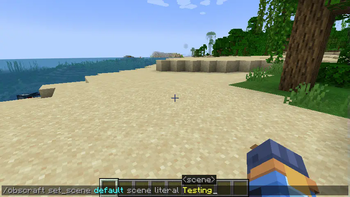
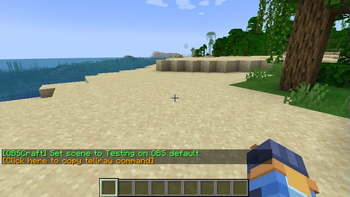
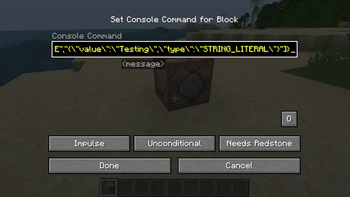
This works by listening for a specially formatted translatable chat message, which is decoded then acted upon. You can generate a tellraw command using the `/obscraft` command.
## Demo Video
## Features
- Set the active scene from in-game!
- Update a Text source's text.
- Set a source's visibility in a given scene.
- Set the visible status of a filter on a source. (Also works with plugin filters such as the Move plugin)
Each of these options support both typing literal names as well as looking up names from a scoreboard objective. You can either search for the first player with a specific score or search for the score of a specific player. (Works with both dummy objectives and "real" scoreboards)
## Commands
- `/obscraft listConnections` - List all OBS connections by ID. Gives connection status for each one.
- `/obscraft reconnect
` - Reconnect to an OBS connection by ID. - There are more commands to generate tellraw commands and save actions, but the in-game documentation is setup to show them all as you type.
### OBS Studio
First, we need to make sure the websocket server is enabled.
In OBS go to `Tools -> WebSocket Server Settings`.
Make sure of the following: - `Enable WebSocket Server` is checked. - `Enable Authentification` is checked. - Note down the `Server Port` and `Server Password` Press `Show Connect Info` to see it.
### Minecraft
Launch the game once to generate the config file, it should be with other configuration files for you mods.
It should look like this: ```json { "connections": [ { "ID": "default", "host": "127. 0. 0. 1", "port": 4455, "password": "password" } ], "savedActions": {}, "savedActionKeys": {} } ```
- `ID` is a unique identifier for the connection. You can have multiple connections to different OBS instances.
- `host` is the IP address of the computer running OBS. If it's on the same computer, use `127. 0. 0. 1`
- `port` is the port number from the OBS WebSocket settings.
- `password` is the password from the OBS WebSocket settings.
For a simple setup just make sure port and password match the OBS settings.
After that restart the game and you should be good to go! Make sure everything is connected by running `/obscraft listConnections` and `default` should show up under Available Connections.
📊 Mod Details
- Game
- Minecraft Mods
- Author
- MoSadie
- Version
- 0.2.2-NeoForge
- Downloads
- 949
- Endorsements
- 12
- Category
- fabric
- Created
- 1/1/2025
- Updated
- 11/7/2025
- Game Versions
- 1.21.9, 1.21.10
- Tags
- utility
🔧 How to Install Minecraft Mods Mods
Download from Modrinth. Use Prism Launcher or drop into your mods folder.
📖 Full step-by-step install guide for Minecraft Mods →
Visit the official mod page for specific installation instructions for this mod.
🎮 Need cheat codes or console commands? Check ur gaming wiki for Minecraft Mods commands, item IDs, and more.
❓ Frequently Asked Questions
Which Minecraft Mods versions does OBSCraft support?
The author lists 1.21.9, 1.21.10. Other versions may work but are untested by the author.
What is the latest version of OBSCraft?
Version 0.2.2-NeoForge, published 2025-11-07 with 949 downloads recorded at the source.
Keep browsing — more Minecraft Mods mods await