npc2
🟡 Updated this year⚠️ Install Order · 2 steps
Install in this order, then this mod last — most mods fail to load without their framework and dependencies in place.
🖼️ Gallery (3 images)
🔍 Analysis
- 🏆 #127 of 517 adventure mods in this game by downloads
📋 About This Mod
# npc2 <iframe width="560" height="315" src="https://www.youtube-nocookie.com/embed/WFPWRAS1np4" title="YouTube video player" frameborder="0" allow="accelerometer; autoplay; clipboard-write; encrypted-media; gyroscope; picture-in-picture; web-share" allowfullscreen></iframe> **npc2** is an experimental Fabric mod that adds autonomous survival NPCs. Each NPC has a weighted survival plan, persistent memories, vanilla mob physics, and a node-based logic graph for gathering, crafting, combat, storage, movement, and sleep. **npc2 can be used in singleplayer worlds, LAN, and multiplayer servers.** > npc2 is under active development. Back up important worlds before installing it because NPCs can mine and place blocks. ## Requirements npc2 requires Fabric API and Fabric Language Kotlin. Version `0.3.0-alpha+26.2` supports Fabric API `0.154.2+26.2` and compatible newer Fabric API releases for Minecraft 26.2. For Servers: Install npc2 and its dependencies on both the server and every connecting client. Singleplayer: Install npc2 and its dependencies on your Minecraft client. LAN: Install npc2 and its dependencies on every player's client. ## Quick start ### Version 0.3.0-alpha and newer Open the vanilla Creative inventory's **Spawn Eggs** tab and use the **Survivor NPC Spawn Egg** on solid, open ground. Players with permission to use commands can also click or enter: `/give @s npc2:fake_npc_spawn_egg` When you enter a world, npc2 displays a formatted quick-start message in chat containing the spawn command, debug controls, and issue-tracker link. ### Version 0.2.1-alpha and earlier Open npc2's Creative inventory tab and use the **Survivor NPC Spawn Egg** on solid ground. You may need to use the inventory arrows to find the tab. Alternatively, enter: `/give @s npc2:fake_npc_spawn_egg` ## Debug panel — 0.3.0-alpha and newer Aim near a living NPC to display a compact debug panel containing its name, entity ID, health, and debug controls. - Press `X` to pin the selected NPC and expand the panel. - Press `X` again to unpin it. - Press `F8` to toggle all npc2 debugging, including the panel, glowing outline, and path visualization. - Both controls can be rebound under the **Debug** category in Minecraft's Controls menu. The expanded panel displays the NPC's current decisions, movement and path state, resource requirements, equipment, inventory, and other AI information. For the cleanest layout, use a GUI scale of 3 or lower. ## Player interaction — 0.3.0-alpha and newer NPCs are friendly toward players by default. An NPC only retaliates against a Survival or Adventure player who harms that specific NPC. Creative and Spectator players are never targeted. The retaliation duration can be changed in: `.minecraft/config/npc2/npc2.properties` ## Known issues in 0.3.0-alpha - The debug overlay may appear uneven at GUI scales above 3. - NPCs move very slowly while floating in water. - NPCs may occasionally freeze while retaliating against a player. They resume once the player leaves their detection range, enters Creative mode, or the configured `player_retaliation_ticks` duration expires. These issues are planned to be fixed in future releases. ## More documentation Visit the (https://github.com/oofman124/npc2/blob/main/README.md) for installation instructions, configuration options, gameplay details, troubleshooting, and development documentation. Report bugs through the (https://github.com/oofman124/npc2/issues). !(https://cdn.modrinth.com/data/wNhugV7Z/images/59962ec50d0c6dc35d9cfe6989f064ad7b7e54f1.png)
# npc2
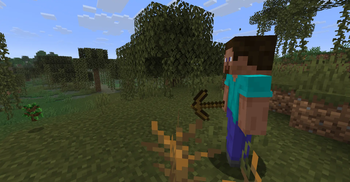
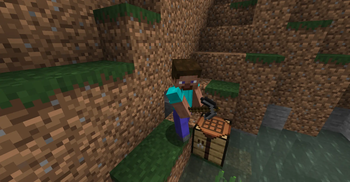
npc2 is an experimental Fabric mod that adds autonomous survival NPCs. Each NPC has a weighted survival plan, persistent memories, vanilla mob physics, and a node-based logic graph for gathering, crafting, combat, storage, movement, and sleep.
npc2 can be used in singleplayer worlds, LAN, and multiplayer servers.
> npc2 is under active development. Back up important worlds before installing it because NPCs can mine and place blocks.
## Requirements
npc2 requires Fabric API and Fabric Language Kotlin. Version `0. 3. 0-alpha+26. 2` supports Fabric API `0. 154. 2+26. 2` and compatible newer Fabric API releases for Minecraft 26. 2.
For Servers: Install npc2 and its dependencies on both the server and every connecting client.
Singleplayer: Install npc2 and its dependencies on your Minecraft client.
LAN: Install npc2 and its dependencies on every player's client.
## Quick start
### Version 0. 3. 0-alpha and newer
Open the vanilla Creative inventory's Spawn Eggs tab and use the Survivor NPC Spawn Egg on solid, open ground.
Players with permission to use commands can also click or enter:
`/give @s npc2:fake_npc_spawn_egg`
When you enter a world, npc2 displays a formatted quick-start message in chat containing the spawn command, debug controls, and issue-tracker link.
### Version 0. 2. 1-alpha and earlier
Open npc2's Creative inventory tab and use the Survivor NPC Spawn Egg on solid ground. You may need to use the inventory arrows to find the tab.
Alternatively, enter:
`/give @s npc2:fake_npc_spawn_egg`
## Debug panel — 0. 3. 0-alpha and newer
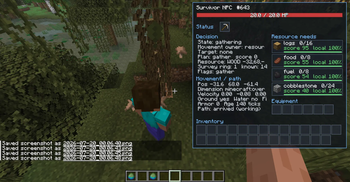
Aim near a living NPC to display a compact debug panel containing its name, entity ID, health, and debug controls.
- Press `X` to pin the selected NPC and expand the panel.
- Press `X` again to unpin it.
- Press `F8` to toggle all npc2 debugging, including the panel, glowing outline, and path visualization.
- Both controls can be rebound under the Debug category in Minecraft's Controls menu.
The expanded panel displays the NPC's current decisions, movement and path state, resource requirements, equipment, inventory, and other AI information.
For the cleanest layout, use a GUI scale of 3 or lower.
## Player interaction — 0. 3. 0-alpha and newer
NPCs are friendly toward players by default. An NPC only retaliates against a Survival or Adventure player who harms that specific NPC. Creative and Spectator players are never targeted.
The retaliation duration can be changed in:
`.minecraft/config/npc2/npc2.properties`
## Known issues in 0. 3. 0-alpha
- The debug overlay may appear uneven at GUI scales above 3.
- NPCs move very slowly while floating in water.
- NPCs may occasionally freeze while retaliating against a player. They resume once the player leaves their detection range, enters Creative mode, or the configured `player_retaliation_ticks` duration expires.
These issues are planned to be fixed in future releases.
## More documentation
Visit the (https://github.com/oofman124/npc2/blob/main/README.md) for installation instructions, configuration options, gameplay details, troubleshooting, and development documentation.
Report bugs through the (https://github.com/oofman124/npc2/issues).
!(https://cdn.modrinth.com/data/wNhugV7Z/images/59962ec50d0c6dc35d9cfe6989f064ad7b7e54f1.png)
📊 Mod Details
- Game
- Minecraft Mods
- Author
- oofman124
- Version
- 0.3.0-alpha+26.2
- Downloads
- 181
- Endorsements
- 2
- Category
- adventure
- Created
- 7/24/2026
- Updated
- 7/25/2026
- Game Versions
- 26.2
- Tags
- adventure, mobs, technology
🔧 How to Install Minecraft Mods Mods
Download from Modrinth. Use Prism Launcher or drop into your mods folder.
📖 Full step-by-step install guide for Minecraft Mods →
Visit the official mod page for specific installation instructions for this mod.
🎮 Need cheat codes or console commands? Check ur gaming wiki for Minecraft Mods commands, item IDs, and more.
❓ Frequently Asked Questions
Which Minecraft Mods versions does npc2 support?
The author lists 26.2. Other versions may work but are untested by the author.
What is the latest version of npc2?
Version 0.3.0-alpha+26.2, published 2026-07-25 with 181 downloads recorded at the source.
Keep browsing — more Minecraft Mods mods await