Notica
🟡 Updated this year⚠️ Install Order · 2 steps
Install in this order, then this mod last — most mods fail to load without their framework and dependencies in place.
🖼️ Gallery (1 images)
🔍 Analysis
- 👍 0.4% endorsement rate
- 🏆 #853 of 893 fabric mods in this game by downloads
📋 About This Mod
# Notica A Fabric mod for playing note block songs in the .nbs file format to your players. This mod is vanilla compatible on the server-side, which means that vanilla players can join without this mod installed as well. Players with the mod installed benefit from reduced network-usage, as well as better playback quality. ## Demo <iframe width="560" height="315" src="https://www.youtube-nocookie.com/embed/A3R6314RqFg" title="YouTube video player" frameborder="0" allow="accelerometer; autoplay; clipboard-write; encrypted-media; gyroscope; picture-in-picture; web-share" allowfullscreen></iframe> ## Features ### NBS file playback Play any song created with (https://opennbs.org/) on a server or in single player. Place the .nbs files in the `config/notica/songs` directory. Use the `/music play <song> for ` command to play a song. !(https://i.imgur.com/ihCc1gY.gif) **Note: This mod does not include any song files, you need download them yourself. You can find many NBS songs at (https://noteblock.world/).** ### Clientside song playback On a vanilla client connection, each note is sent to the player with a separate packet. This creates huge amounts of packets being sent, which causes lag and reduced playback quality. However, if a player has the mod installed, the song notes are packed into chunks and sent in larger, but way less packets. This process is similar to video buffering. !(https://i.imgur.com/rZMliF9.png) ### Improved playback quality Vanilla Minecraft has some limitations that impact the playback quality of songs. For one, notes can only be played in a certain octave range (F#3 to F#5). For another, sounds must have an integer position in the world, which causes audio artifacts when the player is moving during playback. Additionally, stereo panning of notes is significantly worse because note positions are clamped to the nearest integer values. Clients with Notica installed do not have these limitations, as notes are played directly via OpenAL, the audio engine used by Minecraft: Java Edition. Song playback will thereby sound similar to the playback within Open Note Block Studio. ### Custom instruments Any Minecraft sound can be used as a custom instrument in .nbs files. Notica supports all custom instrument related features of the (https://opennbs.org/nbs) (up to version 5). ### Arbitrary song tempo Much like other server-sided nbs players, Notica is not limited to specific song tempos. This mod makes sure that the song playback timings are accurate, by running song playbacks asynchronously. Packets are sent without server-thread synchronization, which would limit the tempo to 20 ticks per second again. ### Song Looping NBS format version 4 introduces loop-options like on/off, max loop count and loop start tick. This mod supports these options and will automatically loop accordingly. Hint: If a song loops indefinitely, you can stop it using `/music stop` in-game. ### Extended octave range As mentioned earlier, Minecraft imposes a limit to the note pitch, limiting the octave range to F#3 until F#5. Modded players do not have this limitation, but vanilla players are still impacted. Notes outside the vanilla range will be transposed for vanilla players by default, so that can be played. Vanilla clients are still able to play notes outside the vanilla range, by installing the extended notes resource pack. The extra notes resource pack can be installed by using `/music set extended_range true` to enable the extended range playback (**vanilla players only**). ### Positional music playing Songs can be played through "speakers" at positions in the world. A speaker may either have a fixed position or may be attached to an entity. If the entity of a speaker moves, the song moves as well. #### Doppler effect Songs attached to entities may enable the doppler effect which distorts the audio pitch depending on the entity motion relative to the player. In the mod settings this may be extended to use the player's motion as well. This will enable a complete doppler effect simulation using OpenAL. ## Commands All `/music` commands require OP or the corresponding permission listed in the table above. ### Playing Play a song for yourself: ``` /music play <song> ``` Play a song for specific players or all online players: ``` /music play MySong.nbs for @a /music play MySong.nbs global ``` The `<song>` argument is the path to a `.nbs` file relative to the `config/notica/songs` directory. Tab-completion will suggest available files. Songs started with `global` are also automatically played for players who join the server while the song is running. #### Volume and playback options Specify a volume between `0.0` and `1.0` after the listener argument: ``` /music play MySong.nbs for @a 0.7 ``` Two playback variants are available: `individual` and `streamed`. `strea
# Notica A Fabric mod for playing note block songs in the .nbs file format to your players. This mod is vanilla compatible on the server-side, which means that vanilla players can join without this mod installed as well. Players with the mod installed benefit from reduced network-usage, as well as better playback quality.
## Demo
## Features
### NBS file playback
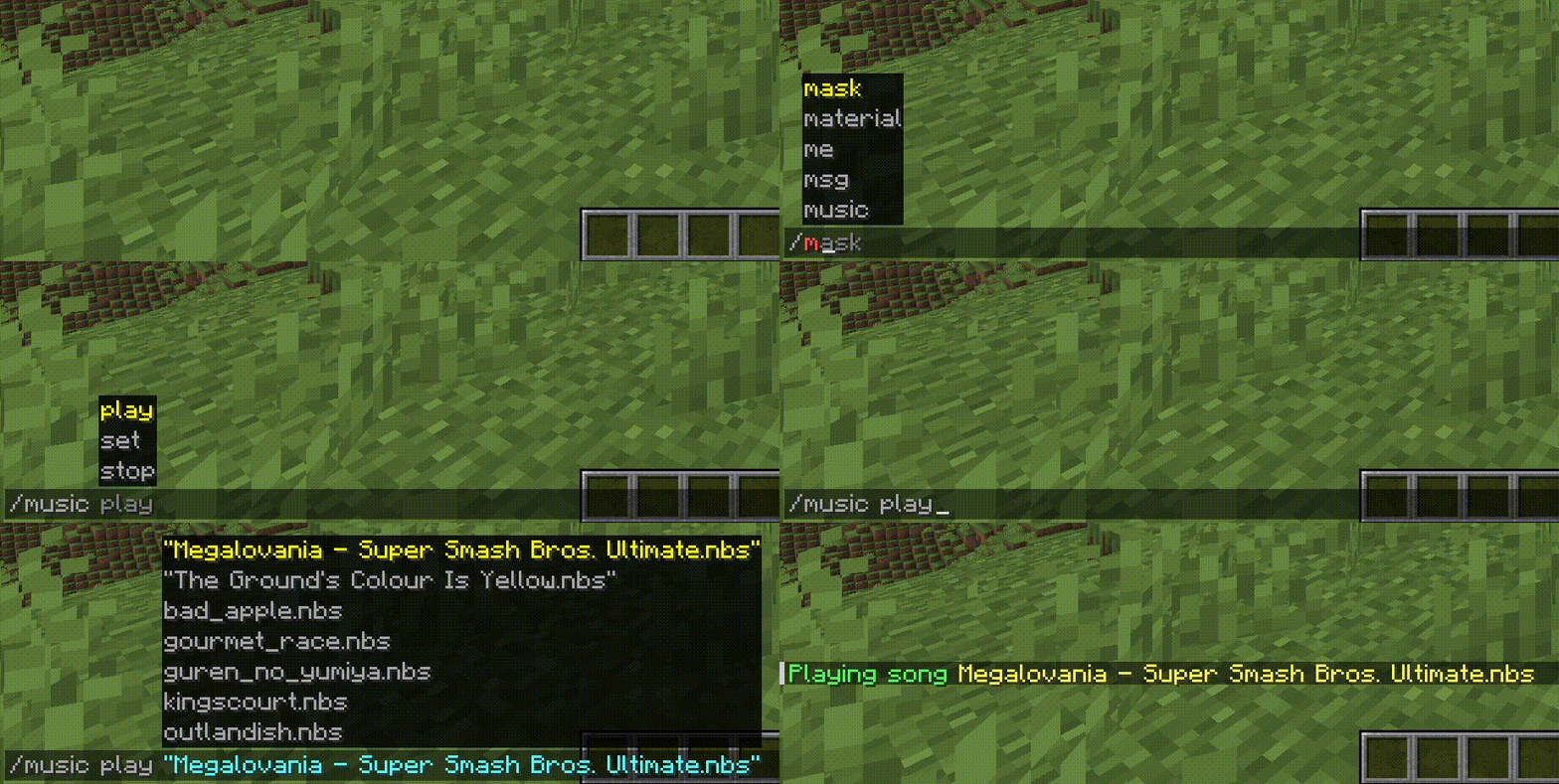
Play any song created with (https://opennbs.org/) on a server or in single player.
Place the .nbs files in the `config/notica/songs` directory.
Use the `/music play
!(https://i.imgur.com/ihCc1gY.gif)
### Clientside song playback On a vanilla client connection, each note is sent to the player with a separate packet. This creates huge amounts of packets being sent, which causes lag and reduced playback quality.
However, if a player has the mod installed, the song notes are packed into chunks and sent in larger, but way less packets. This process is similar to video buffering.
!(https://i.imgur.com/rZMliF9.png)
### Improved playback quality Vanilla Minecraft has some limitations that impact the playback quality of songs. For one, notes can only be played in a certain octave range (F#3 to F#5). For another, sounds must have an integer position in the world, which causes audio artifacts when the player is moving during playback. Additionally, stereo panning of notes is significantly worse because note positions are clamped to the nearest integer values.
Clients with Notica installed do not have these limitations, as notes are played directly via OpenAL, the audio engine used by Minecraft: Java Edition. Song playback will thereby sound similar to the playback within Open Note Block Studio.
### Custom instruments Any Minecraft sound can be used as a custom instrument in .nbs files. Notica supports all custom instrument related features of the (https://opennbs.org/nbs) (up to version 5).
### Arbitrary song tempo Much like other server-sided nbs players, Notica is not limited to specific song tempos. This mod makes sure that the song playback timings are accurate, by running song playbacks asynchronously. Packets are sent without server-thread synchronization, which would limit the tempo to 20 ticks per second again.
### Song Looping NBS format version 4 introduces loop-options like on/off, max loop count and loop start tick. This mod supports these options and will automatically loop accordingly.
Hint: If a song loops indefinitely, you can stop it using `/music stop` in-game.
### Extended octave range As mentioned earlier, Minecraft imposes a limit to the note pitch, limiting the octave range to F#3 until F#5. Modded players do not have this limitation, but vanilla players are still impacted. Notes outside the vanilla range will be transposed for vanilla players by default, so that can be played. Vanilla clients are still able to play notes outside the vanilla range, by installing the extended notes resource pack. The extra notes resource pack can be installed by using `/music set extended_range true` to enable the extended range playback (vanilla players only**).
### Positional music playing Songs can be played through "speakers" at positions in the world. A speaker may either have a fixed position or may be attached to an entity. If the entity of a speaker moves, the song moves as well.
#### Doppler effect Songs attached to entities may enable the doppler effect which distorts the audio pitch depending on the entity motion relative to the player. In the mod settings this may be extended to use the player's motion as well. This will enable a complete doppler effect simulation using OpenAL.
## Commands
All `/music` commands require OP or the corresponding permission listed in the table above.
### Playing
Play a song for yourself:
```
/music play
Play a song for specific players or all online players: ``` /music play MySong.nbs for @a /music play MySong.nbs global ```
The `
Songs started with `global` are also automatically played for players who join the server while the song is running.
#### Volume and playback options
Specify a volume between `0. 0` and `1. 0` after the listener argument: ``` /music play MySong.nbs for @a 0. 7 ```
Two playback variants are available: `individual` and `streamed`. `strea
📊 Mod Details
- Game
- Minecraft Mods
- Author
- LCLPYT
- Version
- 2.1.0+26.2
- Downloads
- 6,188
- Endorsements
- 25
- Category
- fabric
- Created
- 3/17/2024
- Updated
- 6/18/2026
- Game Versions
- 26.2
- Tags
- library, technology, utility
🔧 How to Install Minecraft Mods Mods
Download from Modrinth. Use Prism Launcher or drop into your mods folder.
📖 Full step-by-step install guide for Minecraft Mods →
Visit the official mod page for specific installation instructions for this mod.
🎮 Need cheat codes or console commands? Check ur gaming wiki for Minecraft Mods commands, item IDs, and more.
❓ Frequently Asked Questions
Which Minecraft Mods versions does Notica support?
The author lists 26.2. Other versions may work but are untested by the author.
What is the latest version of Notica?
Version 2.1.0+26.2, published 2026-06-18 with 6,188 downloads recorded at the source.
Keep browsing — more Minecraft Mods mods await