NoRealmsFix
🟡 Updated this year⚠️ Install Order · 2 steps
Install in this order, then this mod last — most mods fail to load without their framework and dependencies in place.
🖼️ Gallery (1 images)
🔍 Analysis
- 👍 0.4% endorsement rate
- 🏆 #346 of 894 fabric mods in this game by downloads
📋 About This Mod
<div align="center"> !(https://cdn.modrinth.com/data/cached_images/10b17fc472bea9c985d84de517d9035f015ee47e.png) !(https://img.shields.io/badge/version-1.1.1-1E90FF?style=for-the-badge) !(https://img.shields.io/badge/Minecraft-26.1.x+-4C9A2A?style=for-the-badge) !(https://img.shields.io/badge/Loader-Fabric-DBD0B4?style=for-the-badge) !(https://img.shields.io/badge/Java-25%2B-ED8B00?style=for-the-badge&logo=openjdk&logoColor=white) (https://img.shields.io/modrinth/dt/norealmsfix?style=for-the-badge&logo=modrinth&logoColor=white&color=00AF5C&label=downloads)](https://modrinth.com/mod/norealmsfix) !(https://img.shields.io/badge/side-client-9B4DCA?style=for-the-badge) (https://img.shields.io/badge/Telegram-channel-26A5E4?style=for-the-badge&logo=telegram&logoColor=white)](https://t.me/prostoimpery) </div> > **Completely strips Minecraft Realms out of your client** — no more log errors, no authentication spam, and no Realms button on the title screen. > > A lightweight client-side Fabric mod. It breaks nothing, requires no account login, and works the moment you install it. --- ## What it does - Disables all Realms network checks — `RealmsServiceException`, `NullPointerException`, and `Failed to fetch Realms feature flags` are gone - Cleans your logs — no more Realms spam in the console - Removes the "Minecraft Realms" button from the title screen - Cleanly re-lays out the menu — no empty gap left behind; other buttons shift up to fill it - Full Mod Menu compatibility — the "Mods" tab stays right where it belongs --- ## Configuration <details> <summary><b>config/norealmsfix.json</b></summary> ```json { "disableRealmsChecks": true, "hideRealmsButton": true } ``` | Option | Default | Description | |--------|---------|-------------| | `disableRealmsChecks` | `true` | Disables Realms network checks | | `hideRealmsButton` | `true` | Hides the Realms button from the title screen | Just want to silence the errors but keep the button? Set `hideRealmsButton` to `false`. </details> --- ## Compatibility | | | |:---:|:---:| | **Minecraft** | 26.1.x | | **Loader** | Fabric Loader 0.16.0+ | | **Dependencies** | Fabric API | | **Java** | 25+ | | **Side** | client | Tested with Sodium, Iris, Mod Menu, and Cloth Config — no conflicts. --- ## Installation 1. Install Fabric Loader and Fabric API 2. Download `NoRealmsFix-1.0.0.jar` 3. Drop the `.jar` into your `mods/` folder 4. Launch the game — Realms won't bother you anymore --- ## FAQ <details> <summary><b>Does this break multiplayer?</b></summary> No — regular multiplayer servers work exactly as before. Only Realms is affected. </details> <details> <summary><b>Do I need a Microsoft account?</b></summary> No — the mod works offline as well. No account checks are performed. </details> <details> <summary><b>Will this stop working after a Minecraft update?</b></summary> It's designed for 26.1.x. For future versions — the mod will need an update if Mojang changes the Realms code. </details> --- ## Links <div align="center"> (https://img.shields.io/badge/Modrinth-Download-00AF5C?style=for-the-badge&logo=modrinth&logoColor=white)](https://modrinth.com/mod/norealmsfix) (https://img.shields.io/badge/Telegram-channel-26A5E4?style=for-the-badge&logo=telegram&logoColor=white)](https://t.me/prostoimpery) (https://img.shields.io/badge/GitHub-kasperoid31-181717?style=for-the-badge&logo=github&logoColor=white)](https://github.com/kasperoid31) (https://img.shields.io/badge/CurseForge-NoRealmsFix-F16436?style=for-the-badge&logo=curseforge&logoColor=white)](https://www.curseforge.com/minecraft/mc-mods/norealmsfix) </div> --- © 2026 kasperoid — All Rights Reserved
!(https://cdn.modrinth.com/data/cached_images/10b17fc472bea9c985d84de517d9035f015ee47e.png)
!(https://img.shields.io/badge/version-1. 1. 1-1E90FF?style=for-the-badge) !(https://img.shields.io/badge/Minecraft-26. 1.x+-4C9A2A?style=for-the-badge) !(https://img.shields.io/badge/Loader-Fabric-DBD0B4?style=for-the-badge) !(https://img.shields.io/badge/Java-25%2B-ED8B00?style=for-the-badge&logo=openjdk&logoColor=white)
[!(https://img.shields.io/modrinth/dt/norealmsfix?style=for-the-badge&logo=modrinth&logoColor=white&color=00AF5C&label=downloads)](https://modrinth.com/mod/norealmsfix) !(https://img.shields.io/badge/side-client-9B4DCA?style=for-the-badge) [!(https://img.shields.io/badge/Telegram-channel-26A5E4?style=for-the-badge&logo=telegram&logoColor=white)](https://t.me/prostoimpery)
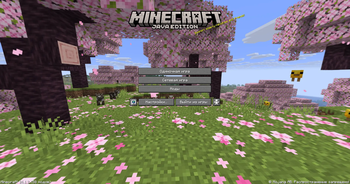
> Completely strips Minecraft Realms out of your client — no more log errors, no authentication spam, and no Realms button on the title screen. > > A lightweight client-side Fabric mod. It breaks nothing, requires no account login, and works the moment you install it.
## What it does
- Disables all Realms network checks — `RealmsServiceException`, `NullPointerException`, and `Failed to fetch Realms feature flags` are gone
- Cleans your logs — no more Realms spam in the console
- Removes the "Minecraft Realms" button from the title screen
- Cleanly re-lays out the menu — no empty gap left behind; other buttons shift up to fill it
- Full Mod Menu compatibility — the "Mods" tab stays right where it belongs
## Configuration
config/norealmsfix.json
```json { "disableRealmsChecks": true, "hideRealmsButton": true } ```
| Option | Default | Description | |--------|---------|-------------| | `disableRealmsChecks` | `true` | Disables Realms network checks | | `hideRealmsButton` | `true` | Hides the Realms button from the title screen |
Just want to silence the errors but keep the button? Set `hideRealmsButton` to `false`.
## Compatibility
| | | |:---:|:---:| | Minecraft | 26. 1.x | | Loader | Fabric Loader 0. 16. 0+ | | Dependencies | Fabric API | | Java | 25+ | | Side | client |
Tested with Sodium, Iris, Mod Menu, and Cloth Config — no conflicts.
## Installation
1. Install Fabric Loader and Fabric API 2. Download `NoRealmsFix-1. 0. 0.jar` 3. Drop the `.jar` into your `mods/` folder 4. Launch the game — Realms won't bother you anymore
Does this break multiplayer?
No — regular multiplayer servers work exactly as before. Only Realms is affected.
Do I need a Microsoft account?
No — the mod works offline as well. No account checks are performed.
Will this stop working after a Minecraft update?
It's designed for 26. 1.x. For future versions — the mod will need an update if Mojang changes the Realms code.
[!(https://img.shields.io/badge/Modrinth-Download-00AF5C?style=for-the-badge&logo=modrinth&logoColor=white)](https://modrinth.com/mod/norealmsfix) [!(https://img.shields.io/badge/Telegram-channel-26A5E4?style=for-the-badge&logo=telegram&logoColor=white)](https://t.me/prostoimpery) [!(https://img.shields.io/badge/GitHub-kasperoid31-181717?style=for-the-badge&logo=github&logoColor=white)](https://github.com/kasperoid31) [!(https://img.shields.io/badge/CurseForge-NoRealmsFix-F16436?style=for-the-badge&logo=curseforge&logoColor=white)](https://www.curseforge.com/minecraft/mc-mods/norealmsfix)
© 2026 kasperoid — All Rights Reserved
📊 Mod Details
- Game
- Minecraft Mods
- Author
- kasperoid
- Version
- 1.1.1
- Downloads
- 676
- Endorsements
- 3
- Category
- fabric
- Created
- 6/13/2026
- Updated
- 6/28/2026
- Game Versions
- 26.1, 26.1.1, 26.1.2
- Tags
- optimization, utility
🔧 How to Install Minecraft Mods Mods
Download from Modrinth. Use Prism Launcher or drop into your mods folder.
📖 Full step-by-step install guide for Minecraft Mods →
Visit the official mod page for specific installation instructions for this mod.
🎮 Need cheat codes or console commands? Check ur gaming wiki for Minecraft Mods commands, item IDs, and more.
❓ Frequently Asked Questions
Which Minecraft Mods versions does NoRealmsFix support?
The author lists 26.1, 26.1.1, 26.1.2. Other versions may work but are untested by the author.
What is the latest version of NoRealmsFix?
Version 1.1.1, published 2026-06-28 with 676 downloads recorded at the source.
Keep browsing — more Minecraft Mods mods await