Noob's Container Searcher
🟡 Updated this year⚠️ Install Order · 2 steps
Install in this order, then this mod last — most mods fail to load without their framework and dependencies in place.
🖼️ Gallery (2 images)
🔍 Analysis
- 🏆 #193 of 909 fabric mods in this game by downloads
📋 About This Mod
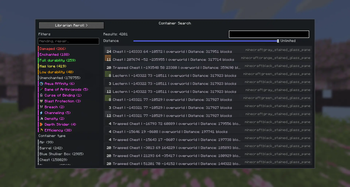
# Noob's Container Searcher Noob's Container Searcher is a client-side Fabric mod that helps you find items inside containers you have already opened before. Basically a Item Finder The mod saves container contents locally when you open a physical container such as a chest, double chest, barrel, furnace, shulker box, or other storage block. It does not scan unopened containers, does not reveal hidden inventories, and only searches through data that your client has already seen. ## How to Use 1. Open a physical container first, such as a chest, barrel, furnace, or shulker box. 2. The mod saves the container contents locally after your client sees them. 3. Press `G` to open the search GUI. 4. Search for an item by name, item id, lore, durability, or enchantment. 5. Click a result in the GUI to show the matching saved container coordinates and highlight the matching item when you open that container. You can also search the item in your main hand with `Left Alt + S`. All keybinds can be changed from Minecraft's Controls menu under `Noob's Container Searcher`. ## Commands - `/containersearch <item>` searches nearby saved containers. - `/containersearch <item> global` searches all saved containers in the current server/world. - `/containersearch gui` opens the search GUI. - `/containersearch menu` also opens the search GUI. - `/containersearch clearhighlight` clears active container highlights. - `/csr` is a short alias for `/containersearch`. ## Features - Saves opened container contents on the client side - Supports singleplayer and multiplayer worlds separately - Supports dimensions/worlds separately - In-game GUI for browsing saved container items - Search saved items by name or item id - Search using item details such as lore and durability - Filter saved items by enchantments, lore, durability, and enchanted status - Search the filter list by enchantment name or id, such as `Mending`, `Unbreaking`, or `minecraft:mending` - Click a GUI result to focus the matching saved containers - Shows matching container coordinates in chat - Shows how many of the searched item are saved in each matching container - Highlights matching items while the saved container screen is open - Highlights the matching container in the world (visible through walls) when you focus a search result - One-click button in the search GUI to delete all saved container data for the current server !(https://cdn.modrinth.com/data/cached_images/0c75d5d8fbeb65561c5c620620b1d6b278a08fbf.png) ## Support: https://discord.gg/SSwGQZp4gQ ## Important Notes This mod only works with containers you have manually opened before. It does not search the world for unopened containers and does not read server-side inventories that were never shown to your client. Virtual menus such as server shops, markets, or trader menus are ignored when possible, because the mod is intended for physical storage containers only.
# Noob's Container Searcher
Noob's Container Searcher is a client-side Fabric mod that helps you find items inside containers you have already opened before. Basically a Item Finder
The mod saves container contents locally when you open a physical container such as a chest, double chest, barrel, furnace, shulker box, or other storage block. It does not scan unopened containers, does not reveal hidden inventories, and only searches through data that your client has already seen.
## How to Use
1. Open a physical container first, such as a chest, barrel, furnace, or shulker box. 2. The mod saves the container contents locally after your client sees them. 3. Press `G` to open the search GUI. 4. Search for an item by name, item id, lore, durability, or enchantment. 5. Click a result in the GUI to show the matching saved container coordinates and highlight the matching item when you open that container.
You can also search the item in your main hand with `Left Alt + S`.
All keybinds can be changed from Minecraft's Controls menu under `Noob's Container Searcher`.
## Commands
- `/containersearch
- ` searches nearby saved containers.
- `/containersearch
- global` searches all saved containers in the current server/world.
- `/containersearch gui` opens the search GUI.
- `/containersearch menu` also opens the search GUI.
- `/containersearch clearhighlight` clears active container highlights.
- `/csr` is a short alias for `/containersearch`.
## Features
- Saves opened container contents on the client side
- Supports singleplayer and multiplayer worlds separately
- Supports dimensions/worlds separately
- In-game GUI for browsing saved container items
- Search saved items by name or item id
- Search using item details such as lore and durability
- Filter saved items by enchantments, lore, durability, and enchanted status
- Search the filter list by enchantment name or id, such as `Mending`, `Unbreaking`, or `minecraft:mending`
- Click a GUI result to focus the matching saved containers
- Shows matching container coordinates in chat
- Shows how many of the searched item are saved in each matching container
- Highlights matching items while the saved container screen is open
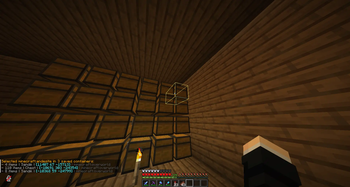
- Highlights the matching container in the world (visible through walls) when you focus a search result
- One-click button in the search GUI to delete all saved container data for the current server
!(https://cdn.modrinth.com/data/cached_images/0c75d5d8fbeb65561c5c620620b1d6b278a08fbf.png)
## Support: https://discord.gg/SSwGQZp4gQ
## Important Notes
This mod only works with containers you have manually opened before. It does not search the world for unopened containers and does not read server-side inventories that were never shown to your client.
Virtual menus such as server shops, markets, or trader menus are ignored when possible, because the mod is intended for physical storage containers only.
📊 Mod Details
- Game
- Minecraft Mods
- Author
- noobfly
- Version
- 1.9
- Downloads
- 286
- Endorsements
- 3
- Category
- fabric
- Created
- 7/15/2026
- Updated
- 8/18/2026
- Game Versions
- 1.21.1, 1.21.4, 1.21.8, 1.21.10, 1.21.11
- Tags
- management, storage, utility
🔧 How to Install Minecraft Mods Mods
Download from Modrinth. Use Prism Launcher or drop into your mods folder.
📖 Full step-by-step install guide for Minecraft Mods →
Visit the official mod page for specific installation instructions for this mod.
🎮 Need cheat codes or console commands? Check ur gaming wiki for Minecraft Mods commands, item IDs, and more.
❓ Frequently Asked Questions
Which Minecraft Mods versions does Noob's Container Searcher support?
The author lists 1.21.1, 1.21.4, 1.21.8, 1.21.10, 1.21.11, 26.1. Other versions may work but are untested by the author.
What is the latest version of Noob's Container Searcher?
Version 1.9, published 2026-08-18 with 286 downloads recorded at the source.
Keep browsing — more Minecraft Mods mods await