Nilcord
🟢 Updated this month⚠️ Install Order · 2 steps
Install in this order, then this mod last — most mods fail to load without their framework and dependencies in place.
🖼️ Gallery (1 images)
🔍 Analysis
- 👍 0.3% endorsement rate
- 🏆 #29 of 896 fabric mods in this game by downloads
📋 About This Mod
What started as a niche project for a niche modloader for a niche Minecraft version has now been extended to all Minecraft versions (that I personally care about)!
# Nilcord | Yet another Discord bridge for Minecraft
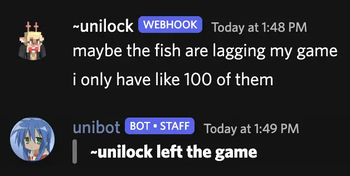
Nilcord connects the chat of your Minecraft server to a specified (https://en.wikipedia.org/wiki/Discord) text channel, using a Discord bot and (optionally) webhook.
## Installation
To get the mod set up, simply place the mod file in the `mods` directory (or `nilmods` with (https://git.sleeping.town/Nil/NilLoader)), start your Minecraft server, and wait for it to generate the config file (and crash because it's not yet populated).
The config file, named `nilcord.toml`, is found in the `config` folder, and is pretty self-explanatory.
(default configuration)
```toml # Settings pertaining to Discord itself
# The Discord bot token to use # default: token = "" # The default Discord channel ID for the bot to send messages to / receive messages from. Used ALONGSIDE send_to and receive_from. Can be blank! # default: channel_id = "" # Other Discord channel ID(s) for the bot to send messages to send_to = [] # Other Discord channel ID(s) for the bot to receive messages from receive_from = []
# Settings pertaining to the Discord webhook # Whether to use a webhook for sending players' chat messages to Discord # default: false enabled = false # The webhook URL to use # default: url = ""
# Settings pertaining to Minecraft itself
# Whether to allow mentioning Discord users from Minecraft # default: false enable_mentions = false # Whether to allow mentioning @everyone and @here from Minecraft # default: false enable_everyone_and_here = false # Whether to show Discord message attachments in-game # default: true show_attachments = true # Whether to show messages from other Discord bots in-game # default: false show_bot_messages = false # Whether to show messages from Discord webhooks in-game # default: true show_webhook_messages = true # Application / User IDs to ignore messages from ignored_ids = ["000000000000000000"]
# Settings pertaining to message formatting
# Settings pertaining to messages visible in Discord
# Available placeholders:
# Settings pertaining to messages sent from the webhook, if enabled # The URL to use for
📊 Mod Details
- Game
- Minecraft Mods
- Author
- unilock
- Version
- 26.2
- Downloads
- 4,047
- Endorsements
- 11
- Category
- fabric
- Created
- 4/11/2024
- Updated
- 9/5/2026
- Game Versions
- 26.2
- Tags
- management, social, utility
🔧 How to Install Minecraft Mods Mods
Download from Modrinth. Use Prism Launcher or drop into your mods folder.
📖 Full step-by-step install guide for Minecraft Mods →
Visit the official mod page for specific installation instructions for this mod.
🎮 Need cheat codes or console commands? Check ur gaming wiki for Minecraft Mods commands, item IDs, and more.
❓ Frequently Asked Questions
Which Minecraft Mods versions does Nilcord support?
The author lists 26.2. Other versions may work but are untested by the author.
What is the latest version of Nilcord?
Version 26.2, published 2026-09-05 with 4,047 downloads recorded at the source.
Keep browsing — more Minecraft Mods mods await