NoHassleQuickConnect
🟠 Updated over a year ago⚠️ Install Order · 2 steps
Install in this order, then this mod last — most mods fail to load without their framework and dependencies in place.
🖼️ Gallery (2 images)
🔍 Analysis
- 🏆 #778 of 909 fabric mods in this game by downloads
📋 About This Mod
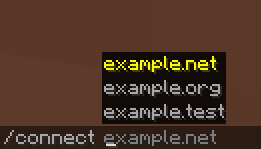
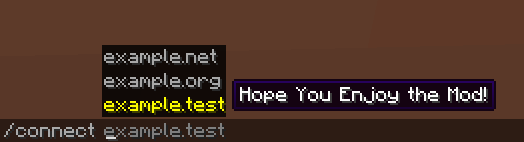
# What does NoHassleQuickConnect (aka. NHQC) do: Adds a /connect command that lets you quickly connect to Minecraft servers Includes tab completion for servers from your server list Provides instant server switching without going through menus ## 1. Keyboard-only navigation: > Switch servers without touching your mouse > Perfect for players who prefer keyboard controls or have limited mouse mobility > Great for accessibility when mouse usage is difficult or uncomfortable ## 2. Time-saving: > No need to: > Exit to main menu, > Click multiplayer, > Scroll through server list, > Click connect. > Just type /connect + server address and you're there ## 3. Server list integration: > Press TAB after /connect to see all your saved servers > Start typing a server name/address and use TAB to auto-complete > No need to remember exact server addresses ## 4. Basicly Instant switching: > Switch between servers quickly without menu transitions > Useful for server hopping, when playing on multiple servers, aswell as pvp scenarios
# What does NoHassleQuickConnect (aka. NHQC) do:
Adds a /connect command that lets you quickly connect to Minecraft servers Includes tab completion for servers from your server list Provides instant server switching without going through menus
## 1. Keyboard-only navigation:
> Switch servers without touching your mouse
> Perfect for players who prefer keyboard controls or have limited mouse mobility
> Great for accessibility when mouse usage is difficult or uncomfortable
## 2. Time-saving: > No need to: > Exit to main menu, > Click multiplayer, > Scroll through server list, > Click connect.
> Just type /connect + server address and you're there ## 3. Server list integration: > Press TAB after /connect to see all your saved servers
> Start typing a server name/address and use TAB to auto-complete
> No need to remember exact server addresses ## 4. Basicly Instant switching: > Switch between servers quickly without menu transitions
> Useful for server hopping, when playing on multiple servers, aswell as pvp scenarios
📊 Mod Details
- Game
- Minecraft Mods
- Author
- Rieversed
- Version
- 1.0.0
- Downloads
- 198
- Endorsements
- 0
- Category
- fabric
- Created
- 11/12/2024
- Updated
- 11/10/2024
- Game Versions
- 1.20.1, 1.20.2, 1.20.3, 1.20.4, 1.20.5
- Tags
- game-mechanics, management, utility
🔧 How to Install Minecraft Mods Mods
Download from Modrinth. Use Prism Launcher or drop into your mods folder.
📖 Full step-by-step install guide for Minecraft Mods →
Visit the official mod page for specific installation instructions for this mod.
🎮 Need cheat codes or console commands? Check ur gaming wiki for Minecraft Mods commands, item IDs, and more.
❓ Frequently Asked Questions
Which Minecraft Mods versions does NoHassleQuickConnect support?
The author lists 1.20.1, 1.20.2, 1.20.3, 1.20.4, 1.20.5, 1.20.6. Other versions may work but are untested by the author.
What is the latest version of NoHassleQuickConnect?
Version 1.0.0, published 2024-11-10 with 198 downloads recorded at the source.
Keep browsing — more Minecraft Mods mods await