NeoGeckoJS
🟡 Updated this year⚠️ Install Order · 2 steps
Install in this order, then this mod last — most mods fail to load without their framework and dependencies in place.
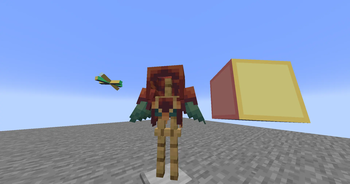
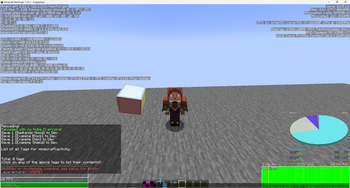
🖼️ Gallery (2 images)
🔍 Analysis
- 👍 0.0% endorsement rate
- 🏆 #7 of 8 library mods in this game by downloads
📋 About This Mod
# Gecko JS Use GeckoLib to create animatable block/item/armor by simply using KubeJS! This mod was originally made for Forge 1.20.1 and had no Modrinth Version, however this both ports and updates the mod for NeoForge 1.21.1 with just about perfect 1:1 replication so any original scripts and assets work almost the same! # What're some examples? Any of the original examples should work pretty much the exact same, again it's just about 1:1. ## Startup Script: ``` StartupEvents.registry("block", event => { const rotating = RawAnimation.begin().thenLoop("rotating"); event.create("geckojs:example_block", "animatable") .box(1, 1, 1, 15, 15, 15, true) .animatableBlockEntity(blockEntity => { blockEntity.addController(state => state.setAndContinue(rotating)) }) .defaultGeoModel() }) ``` ## Item Example: ``` StartupEvents.registry('item', event => { event.create('cool_sword', 'anim_sword') .tier('diamond') .defaultGeoModel() .addController(controller => { controller.addAnimation(state => { if (state.isMoving()) { return state.setAndContinue(RawAnimation.begin().thenLoop("walk")) } return state.setAndContinue(RawAnimation.begin().thenLoop("idle")) }) }) }) ``` ## Armor Example: ``` event.create('fancy_helmet', 'anim_helmet') .material('iron') .defaultGeoModel() .armorItemUseGeoModel() // Makes the item icon use the 3D model .boneVisibility((renderer, slot) => { // Hide a specific bone on the armor model renderer.hideBone("extra_antenna") }) ``` ## Blocks Example: ``` StartupEvents.registry('block', event => { event.create('animated_pillar', 'animatable') .defaultGeoModel() .addController(controller => { controller.addAnimation(state => { return state.setAndContinue(RawAnimation.begin().thenLoop("spin")) }) }) }) ```
Use GeckoLib to create animatable block/item/armor by simply using KubeJS!
This mod was originally made for Forge 1. 20. 1 and had no Modrinth Version, however this both ports and updates the mod for NeoForge 1. 21. 1 with just about perfect 1:1 replication so any original scripts and assets work almost the same!
# What're some examples?
Any of the original examples should work pretty much the exact same, again it's just about 1:1.
## Startup Script:
``` StartupEvents.registry("block", event => {
const rotating = RawAnimation.begin().thenLoop("rotating");
event.create("geckojs:example_block", "animatable")
.box(1, 1, 1, 15, 15, 15, true)
.animatableBlockEntity(blockEntity => {
blockEntity.addController(state => state.setAndContinue(rotating))
.defaultGeoModel()
## Item Example:
``` StartupEvents.registry('item', event => { event.create('cool_sword', 'anim_sword') .tier('diamond') .defaultGeoModel() .addController(controller => { controller.addAnimation(state => { if (state.isMoving()) { return state.setAndContinue(RawAnimation.begin().thenLoop("walk")) } return state.setAndContinue(RawAnimation.begin().thenLoop("idle")) }) }) })
## Armor Example:
``` event.create('fancy_helmet', 'anim_helmet') .material('iron') .defaultGeoModel() .armorItemUseGeoModel() // Makes the item icon use the 3D model .boneVisibility((renderer, slot) => { // Hide a specific bone on the armor model renderer.hideBone("extra_antenna") })
## Blocks Example:
``` StartupEvents.registry('block', event => { event.create('animated_pillar', 'animatable') .defaultGeoModel() .addController(controller => { controller.addAnimation(state => { return state.setAndContinue(RawAnimation.begin().thenLoop("spin")) }) }) })
📊 Mod Details
- Game
- Minecraft Mods
- Author
- MrClockwork
- Version
- 1.0.1
- Downloads
- 7,131
- Endorsements
- 2
- Category
- library
- Created
- 6/14/2026
- Updated
- 6/15/2026
- Game Versions
- 1.21.1
- Tags
- library, utility
🔧 How to Install Minecraft Mods Mods
Download from Modrinth. Use Prism Launcher or drop into your mods folder.
📖 Full step-by-step install guide for Minecraft Mods →
Visit the official mod page for specific installation instructions for this mod.
🎮 Need cheat codes or console commands? Check ur gaming wiki for Minecraft Mods commands, item IDs, and more.
❓ Frequently Asked Questions
Which Minecraft Mods versions does NeoGeckoJS support?
The author lists 1.21.1. Other versions may work but are untested by the author.
What is the latest version of NeoGeckoJS?
Version 1.0.1, published 2026-06-15 with 7,131 downloads recorded at the source.
Keep browsing — more Minecraft Mods mods await