Nemo's Inventory Sorting
🟡 Updated this year⚠️ Install Order · 2 steps
Install in this order, then this mod last — most mods fail to load without their framework and dependencies in place.
🖼️ Gallery (8 images)
🔍 Analysis
- 👍 0.0% endorsement rate
- 🏆 #781 of 1284 fabric mods in this game by downloads
📋 About This Mod
# Nemo's Inventory Sorting ## Description **Nemo's Inventory Sorting** is a _client-side_ mod that adds buttons to your inventory GUI. Sort your inventory, move all matching or all items, or drop everything at once — all with a single click. It also improves quick moving with drag, split-stack, and single-item scroll transfer. You can even filter and highlight items in containers by typing part of their name! Quickly filter items by pressing **Ctrl + F** (or **Command + F** on macOS). You can change the key binding in the settings. For more information and to see how to configure the components check the (https://wiki.nemonotfound.com/projects/minecraft-mods/nemos-inventory-sorting/general). > **Tip:** If you're a dark mode enthusiast, you can use the built-in dark mode resource pack. ## Features - Sort inventories - Move matching items between inventories - Move all items between inventories - Drop all items from an inventory - Lock slots to prevent sorting, moving and dropping - Search & highlight items - Quick move items with **Shift + Drag** - Quick move half items with **Shift + Right-Click/Drag** - Scroll transfer items between inventory/container or inventory/hotbar - Built-in dark mode resource pack ## ⚠ Disclaimer This is a **client-only mod**, which means it can give you an advantage over other players. Using it on public servers *may* get you banned depending on the server’s rules. Use at your own risk — or check with the server admins beforehand. ## How to Use ### Sort, Drop or Move Items Simply click the buttons or use your custom keybinds. In the player inventory, clicking the buttons does not include the hotbar. To include it, use **Shift + Click** (or **Shift + keybind**). ### Quick Move Items - **Shift + Drag**: quick-move hovered items - **Shift + Right-Click/Drag**: quick-move half items - **Scroll Up/Down**: move one item between inventory/container or inventory/hotbar > **Note:** Split and scroll actions keep at least one item in the source slot. ### Search Items Click the search bar or press **Ctrl + ** (or **Command + ** on macOS), then start typing. #### Filter by (Custom) Name - `Golden` - `Diamond Sword` - `Super Cool Sword` #### Filter by Tooltip (Enchantment, Music Disc Song, Potions) - `Sharpness` - `Efficiency V` - `Hyper Potions - Lava Chicken` - `Lava Chicken` - `Invisibility` #### Filter by Item Tag - `#minecraft:planks` - `#nemos:planks` #### Filter for multiple items - `Stick,#minecraft:planks` ### Lock Slots from Sorting To lock slots from sorting, use **Alt + Click/Drag** (or **Option + Click/Drag** on macOS). To display locked slots, hold **Alt** (or **Option** on macOS). ### Dark Mode Enable the built-in **Nemo's Inventory Sorting Dark Mode** resource pack in Minecraft's resource pack menu. ## Compatibility Nemo's Inventory Sorting is compatible with: - **Iron Chests** *(since version 1.11)* - **Nemo's Backpacks** *(since version 1.13)* - **Better Chests, Barrels & Shulker Boxes** *(since version 1.14)* ## Third-Party Components - Uses (https://github.com/jaredlll08/MultiLoader-Template) for multiple loader support. ## Join my Discord! Join my Discord to meet new people and stay up to date with all of my mods! (https://github.com/NemoNotFound/NemoNotFound/blob/master/resources/svg/join_discord_button.svg?raw=true)](https://discord.com/invite/yxs9dga) ## Support Me I love to create mods for Minecraft and wish to live off it one day, so I hope you like what I do. <br> Either way feel free to give me your feedback and suggestions, either on my Discord or the (https://github.com/NemoNotFound/NemosInventorySorting/discussions/) :) (https://ko-fi.com/img/githubbutton_sm.svg)](https://ko-fi.nemonotfound.com) ## Get a Minecraft Server Looking for a Minecraft Server? Check out (https://bisecthosting.com/Nemo404)! <br> Use my code **Nemo404** to get a 25% discount on your first month with any of their gaming servers. <br><br> By using my code, you'll also be supporting my work as a Minecraft modder, helping me to pursue this passion full-time. Thank you! (https://www.bisecthosting.com/partners/custom-banners/e6d95b5e-b7fb-47eb-ad78-4dc6071a6171.png)**](https://bisecthosting.com/Nemo404)
# Nemo's Inventory Sorting
## Description
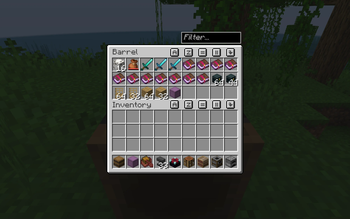
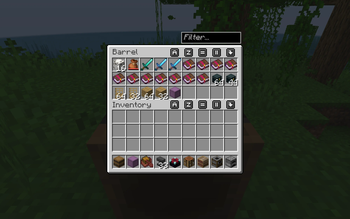
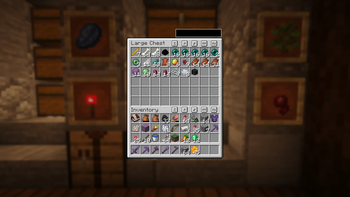
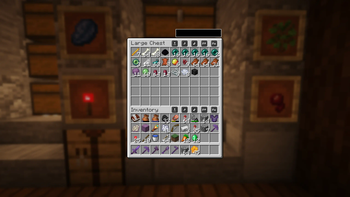
Nemo's Inventory Sorting is a _client-side_ mod that adds buttons to your inventory GUI. Sort your inventory, move all matching or all items, or drop everything at once — all with a single click. It also improves quick moving with drag, split-stack, and single-item scroll transfer.
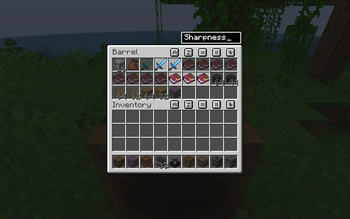
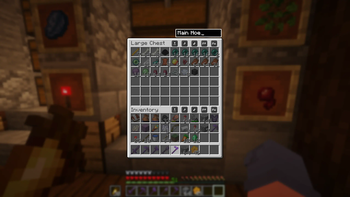
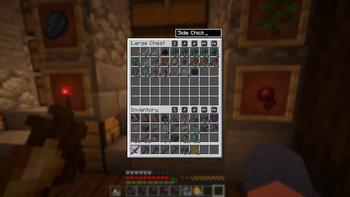
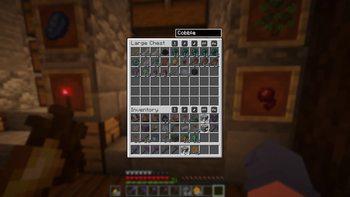
You can even filter and highlight items in containers by typing part of their name! Quickly filter items by pressing Ctrl + F (or Command + F on macOS). You can change the key binding in the settings.
For more information and to see how to configure the components check the (https://wiki.nemonotfound.com/projects/minecraft-mods/nemos-inventory-sorting/general).
> Tip: If you're a dark mode enthusiast, you can use the built-in dark mode resource pack.
## Features
- Sort inventories
- Move matching items between inventories
- Move all items between inventories
- Drop all items from an inventory
- Lock slots to prevent sorting, moving and dropping
- Search & highlight items
- Quick move items with Shift + Drag
- Quick move half items with Shift + Right-Click/Drag
- Scroll transfer items between inventory/container or inventory/hotbar
- Built-in dark mode resource pack
## ⚠ Disclaimer
This is a client-only mod, which means it can give you an advantage over other players. Using it on public servers may get you banned depending on the server’s rules. Use at your own risk — or check with the server admins beforehand.
## How to Use
### Sort, Drop or Move Items
Simply click the buttons or use your custom keybinds. In the player inventory, clicking the buttons does not include the hotbar. To include it, use Shift + Click (or Shift + keybind).
### Quick Move Items
- Shift + Drag: quick-move hovered items
- Shift + Right-Click/Drag: quick-move half items
- Scroll Up/Down: move one item between inventory/container or inventory/hotbar
> Note: Split and scroll actions keep at least one item in the source slot.
### Search Items Click the search bar or press Ctrl + (or Command + on macOS), then start typing.
#### Filter by (Custom) Name - `Golden` - `Diamond Sword` - `Super Cool Sword`
#### Filter by Tooltip (Enchantment, Music Disc Song, Potions) - `Sharpness` - `Efficiency V` - `Hyper Potions - Lava Chicken` - `Lava Chicken` - `Invisibility`
#### Filter by Item Tag - `#minecraft:planks` - `#nemos:planks`
#### Filter for multiple items - `Stick,#minecraft:planks`
### Lock Slots from Sorting To lock slots from sorting, use Alt + Click/Drag (or Option + Click/Drag on macOS). To display locked slots, hold Alt (or Option on macOS).
### Dark Mode
Enable the built-in Nemo's Inventory Sorting Dark Mode resource pack in Minecraft's resource pack menu.
## Compatibility
Nemo's Inventory Sorting is compatible with: - Iron Chests (since version 1. 11) - Nemo's Backpacks (since version 1. 13) - Better Chests, Barrels & Shulker Boxes (since version 1. 14)
## Third-Party Components
- Uses (https://github.com/jaredlll08/MultiLoader-Template) for multiple loader support.
## Join my Discord!
Join my Discord to meet new people and stay up to date with all of my mods!
[!(https://github.com/NemoNotFound/NemoNotFound/blob/master/resources/svg/join_discord_button.svg?raw=true)](https://discord.com/invite/yxs9dga)
## Support Me
I love to create mods for Minecraft and wish to live off it one day, so I hope you like what I do.
Either way feel free to give me your feedback and suggestions, either on my Discord or the (https://github.com/NemoNotFound/NemosInventorySorting/discussions/) :)
[!(https://ko-fi.com/img/githubbutton_sm.svg)](https://ko-fi.nemonotfound.com)
## Get a Minecraft Server
Looking for a Minecraft Server? Check out (https://bisecthosting.com/Nemo404)!
Use my code Nemo404 to get a 25% discount on your first month with any of their gaming servers.
By using my code, you'll also be supporting my work as a Minecraft modder, helping me to pursue this passion full-time. Thank you!
[**!(https://www.bisecthosting.com/partners/custom-banners/e6d95b5e-b7fb-47eb-ad78-4dc6071a6171.png)**](https://bisecthosting.com/Nemo404)
📊 Mod Details
- Game
- Minecraft Mods
- Author
- NemoNotFound
- Version
- 26.2-1.21.3
- Downloads
- 1,259,885
- Endorsements
- 423
- Category
- fabric
- Created
- 11/28/2024
- Updated
- 8/16/2026
- Game Versions
- 26.2
- Tags
- storage, utility
🔧 How to Install Minecraft Mods Mods
Download from Modrinth. Use Prism Launcher or drop into your mods folder.
📖 Full step-by-step install guide for Minecraft Mods →
Visit the official mod page for specific installation instructions for this mod.
🎮 Need cheat codes or console commands? Check ur gaming wiki for Minecraft Mods commands, item IDs, and more.
❓ Frequently Asked Questions
Which Minecraft Mods versions does Nemo's Inventory Sorting support?
The author lists 26.2. Other versions may work but are untested by the author.
What is the latest version of Nemo's Inventory Sorting?
Version 26.2-1.21.3, published 2026-08-16 with 1.3M downloads recorded at the source.
Keep browsing — more Minecraft Mods mods await