Music Machine
🟡 Updated this year⚠️ Install Order · 2 steps
Install in this order, then this mod last — most mods fail to load without their framework and dependencies in place.
🖼️ Gallery (1 images)
🔍 Analysis
- 🏆 #185 of 909 fabric mods in this game by downloads
📋 About This Mod
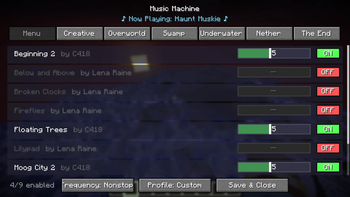
# Music Machine Music Machine is a client-side mod that gives you complete, granular control over Minecraft's dynamic background music. Tired of hearing the same track play when you're building? Wish the game played music a bit more often? Want to listen exclusively to the classic C418 soundtrack? Music Machine lets you do exactly that through an easy-to-use in-game configuration menu. ## 🎵 Features ### 🎛️ Complete Track Control The mod automatically hooks into the game's music system and provides a categorized list of every single vanilla music track (Menu, Creative, Overworld, Nether, The End, etc.). From the config menu, you can: * **Toggle Tracks**: Turn individual songs ON or OFF. Dislike a specific ambient track? Disable it forever. * **Weight Sliders**: Adjust the "weight" of each track to increase or decrease its chance of playing. Boost the odds of hearing your favorite songs! * **Resource Pack Support**: Playing with custom music from resource packs? Music Machine automatically detects and registers custom tracks from your `sounds.json` files so you can toggle and weigh them just like vanilla tracks! ### ⏱️ Music Frequency Settings Take control of how often music actually plays in your world. The config allows you to switch between four distinct modes: * **Never**: Completely mutes all background music. * **Sometimes**: The standard vanilla pacing with long delays between tracks. * **Often**: Shortens the delays so music plays more frequently. * **Nonstop**: Music loops continuously with almost zero downtime between tracks. ### 🎭 Pre-Configured Profiles Don't want to manually tweak every song? Use the built-in music profiles to instantly change the vibe: * **Default**: Plays all tracks exactly as vanilla Minecraft intended. * **Legacy**: Automatically restricts all music to only tracks composed by C418. * **Custom**: Activates your personalized settings, custom toggles, and track weights. ### 💿 "Now Playing" Display When opening the configuration menu, a stylish animated display will show you the exact title and author of the song currently playing in the background. ## ⚙️ How to Use 1. Install the mod on your client. 2. Launch the game and load into a world. 3. Press **`M`** on your keyboard (rebindable in the Controls menu) to open the music management screen. 4. Adjust the settings to your liking—changes apply instantly! ## 🛠️ Compatibility & Installation * **Supported Loaders**: Available for Fabric, Forge, and NeoForge (refer to the downloads section for specific Minecraft versions). *Note: Fabric users must install the Fabric API.* * **Environment**: Client-Side Only. You can install this on your client and safely connect to vanilla servers, realms, or modded servers without the server needing the mod installed. (https://github.com/misikonik/Music-Machine)
# Music Machine Music Machine is a client-side mod that gives you complete, granular control over Minecraft's dynamic background music.
Tired of hearing the same track play when you're building? Wish the game played music a bit more often? Want to listen exclusively to the classic C418 soundtrack? Music Machine lets you do exactly that through an easy-to-use in-game configuration menu.
## 🎵 Features
### 🎛️ Complete Track Control The mod automatically hooks into the game's music system and provides a categorized list of every single vanilla music track (Menu, Creative, Overworld, Nether, The End, etc.). From the config menu, you can: Toggle Tracks: Turn individual songs ON or OFF. Dislike a specific ambient track? Disable it forever. Weight Sliders: Adjust the "weight" of each track to increase or decrease its chance of playing. Boost the odds of hearing your favorite songs! Resource Pack Support: Playing with custom music from resource packs? Music Machine automatically detects and registers custom tracks from your `sounds.json` files so you can toggle and weigh them just like vanilla tracks!
### ⏱️ Music Frequency Settings Take control of how often music actually plays in your world. The config allows you to switch between four distinct modes: Never: Completely mutes all background music. Sometimes: The standard vanilla pacing with long delays between tracks. Often: Shortens the delays so music plays more frequently. Nonstop: Music loops continuously with almost zero downtime between tracks.
### 🎭 Pre-Configured Profiles Don't want to manually tweak every song? Use the built-in music profiles to instantly change the vibe: Default: Plays all tracks exactly as vanilla Minecraft intended. Legacy: Automatically restricts all music to only tracks composed by C418. Custom: Activates your personalized settings, custom toggles, and track weights.
### 💿 "Now Playing" Display When opening the configuration menu, a stylish animated display will show you the exact title and author of the song currently playing in the background.
## ⚙️ How to Use 1. Install the mod on your client. 2. Launch the game and load into a world. 3. Press `M` on your keyboard (rebindable in the Controls menu) to open the music management screen. 4. Adjust the settings to your liking—changes apply instantly!
## 🛠️ Compatibility & Installation Supported Loaders: Available for Fabric, Forge, and NeoForge (refer to the downloads section for specific Minecraft versions). Note: Fabric users must install the Fabric API. Environment: Client-Side Only. You can install this on your client and safely connect to vanilla servers, realms, or modded servers without the server needing the mod installed.
(https://github.com/misikonik/Music-Machine)
📊 Mod Details
- Game
- Minecraft Mods
- Author
- misikon
- Version
- 1.0.1
- Downloads
- 286
- Endorsements
- 0
- Category
- fabric
- Created
- 6/7/2026
- Updated
- 6/9/2026
- Game Versions
- 1.20.1, 1.20.2, 1.20.3, 1.20.4, 1.20.5
- Tags
- game-mechanics, utility
🔧 How to Install Minecraft Mods Mods
Download from Modrinth. Use Prism Launcher or drop into your mods folder.
📖 Full step-by-step install guide for Minecraft Mods →
Visit the official mod page for specific installation instructions for this mod.
🎮 Need cheat codes or console commands? Check ur gaming wiki for Minecraft Mods commands, item IDs, and more.
❓ Frequently Asked Questions
Which Minecraft Mods versions does Music Machine support?
The author lists 1.20.1, 1.20.2, 1.20.3, 1.20.4, 1.20.5, 1.20.6. Other versions may work but are untested by the author.
What is the latest version of Music Machine?
Version 1.0.1, published 2026-06-09 with 286 downloads recorded at the source.
Keep browsing — more Minecraft Mods mods await