More Debug + Screenshot
⚪ Last updated 2024⚠️ Install Order · 2 steps
Install in this order, then this mod last — most mods fail to load without their framework and dependencies in place.
🖼️ Gallery (3 images)
🔍 Analysis
- 👍 0.3% endorsement rate
📋 About This Mod
# More Debug + Screenshot! Alpha 1.0.4, 1.0.5_01, 1.0.11, 1.0.14, 1.0.15, 1.0.16, 1.0.17_04, 1.1.0, 1.1.2_01 and 1.2.6; Beta 1.1_02, 1.2_02, 1.3_01, 1.4_01, 1.5_01, 1.6.6, 1.7.3 and 1.8.1 **MORE DEBUG IS TAKEN FROM A BIGGER PROJECT I AM WORKING ON, THIS ISN'T INHERENTLY COMPATIBLE OR INCOMPATIBLE WITH OTHER MODS** More Debug aims to actually be a useful debug screen for alpha! + Screenshot! More debug is inspired from BetterF3 by TreyRuffy and Coordinates by TheZyga. Verisons Beta 1.2_02 onway don't not touch screenshotting at all, for it is perfect. Verison Beta 1.8.1 re-introduces the F key feature for fog, I was already jacking up the Controls GUI. Features <details> <summary>Spoiler</summary> **Game Version + FPS + Chunk Updates** **Rendered/total** - Number of chunk sections rendered over total number of chunks **Culled Renders** - Number of chunk sections loaded outside the viewing distance **Removed Renders** - Number of chunk sections removed through occlusion culling, commonly 0 **Skipped Renders** - Number of empty chunk sections **Rendered Entities** - Number of rendered entities over total entities **Entities Hidden** - Vanilla Minecraft, _at least this version doesn't have invisible entites_. So unless a mod you have installed does this number will always be 0 **Culled Entities** - Entites in the loaded chunks that aren't rendered **Particles** - Rendered particle effects such as, Smoke, Breaking Blocks, Bubbles or splashing **Total Entites** - Entites in all chunks that could possibly be rendered **XYZ** - Current coordinates **SPAWN XYZ** - Coordinates you spawned at **Direction** - Currect direction you are facing, North, West, South, East **Block Light** - The amount of light from other blocks (example torches) at the block the player's head is in. If the player stands on top of a torch, this field shows a light level of 13 instead of the expected 14, due to the player's head being one block away from it **Sky Light** - The amount of light from the sky at the block the player's head is in. Note that the number shown here is accurate only during the day **Combined Light** - The total light level where the player's head is, equal to max (Block Light + Sky Light) **On Ground** - Is the player on the ground or not **Highest Block** - The y-coordinate of the highest block where the player is able to stand in the current chunk, rounded up when standing on half-blocks, such as slabs. </details> Edits/Additions <details> <summary>Spoiler</summary> Edits: Minecraft, GameSettings, GuiIngame, MathHelper, RenderGlobal Adds: Direction, ScreenShotHelper </details> **Version Information:** <details> <summary>Spoiler</summary> **Beta 1.8.1:** <details> <summary>Spoiler</summary> This Version obviously already has screenshotting, this verison is just More Debug. **Edits:** Minecraft, GameSettings, GuiControls, GuiIngame, MathHelper, RenderGlobal, WorldInfo **Adds:** Direction </details> **Beta 1.3_01 - Beta 1.7.3:** <details> <summary>Spoiler</summary> These versions obviously already has screenshotting, this verison is just More Debug. **Edits:** Minecraft, GameSettings, GuiIngame, MathHelper, RenderGlobal, WorldInfo **Adds:** Direction </details> **Alpha 1.2.6 - Beta 1.2_02:** <details> <summary>Spoiler</summary> These versions obviously already has screenshotting but removes the F1 requirement, mostly just the More Debug mod. **Edits:** Minecraft, GameSettings, GuiIngame, MathHelper, RenderGlobal **Adds:** Direction </details> **Alpha 1.1.0 - Alpha 1.1.2_02:** <details> <summary>Spoiler</summary> These versions don't have screenshotting. These verisons are More Debug + Screenshot! **Edits:** Minecraft, GameSettings, GuiIngame, MathHelper, RenderGlobal **Adds:** Direction, ScreenShotHelper </details> **Alpha 1.0.4 - Alpha 1.0.17_04:** <details> <summary>Spoiler</summary> These versions don't have screenshotting. These verisons are More Debug + Screenshot! **Edits:** Minecraft, GameSettings, GuiIngame, MathHelper, RenderGlobal **Adds:** Direction, ScreenShotHelper </details> **Additional Information:** <details> <summary>Spoiler</summary> In earlier versions of the game, the absence of multiplayer functionality means that chat features are not present. Consequently, certain versions of the mod developed for these early iterations may lack the black transparent shadow behind the file name. </details> </details> Source and RetroMCP patches will be inside the download along side the mod, feel free to check it out. **_Modloader not required but I had to select an API._** (https://modrinth.com/mod/screenshot) Screenshot info <details> <summary>Spoiler</summary> # Screenshot! Alpha 1.0.4, 1.0.5_01, 1.0.11, 1.0.14, 1.0.15, 1.0.16, 1.0.17_04, 1.1.0, 1.1.2_01, 1.2.6 and Beta 1.1_02 This is a backport of taking screenshots from Beta 1.7.3. Screenshots were added the version after Alpha 1.1.2_01, in Alpha 1.2.
# More Debug + Screenshot! Alpha 1. 0. 4, 1. 0. 5_01, 1. 0. 11, 1. 0. 14, 1. 0. 15, 1. 0. 16, 1. 0. 17_04, 1. 1. 0, 1. 1. 2_01 and 1. 2. 6; Beta 1. 1_02, 1. 2_02, 1. 3_01, 1. 4_01, 1. 5_01, 1. 6. 6, 1. 7. 3 and 1. 8. 1
MORE DEBUG IS TAKEN FROM A BIGGER PROJECT I AM WORKING ON, THIS ISN'T INHERENTLY COMPATIBLE OR INCOMPATIBLE WITH OTHER MODS
More Debug aims to actually be a useful debug screen for alpha! + Screenshot!
More debug is inspired from BetterF3 by TreyRuffy and Coordinates by TheZyga.
Verisons Beta 1. 2_02 onway don't not touch screenshotting at all, for it is perfect.
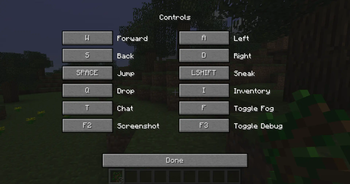
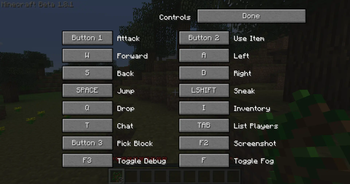
Verison Beta 1. 8. 1 re-introduces the F key feature for fog, I was already jacking up the Controls GUI.
Spoiler
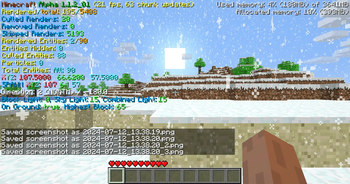
Game Version + FPS + Chunk Updates
Rendered/total - Number of chunk sections rendered over total number of chunks
Culled Renders - Number of chunk sections loaded outside the viewing distance
Removed Renders - Number of chunk sections removed through occlusion culling, commonly 0
Skipped Renders - Number of empty chunk sections
Rendered Entities - Number of rendered entities over total entities
Entities Hidden - Vanilla Minecraft, _at least this version doesn't have invisible entites_. So unless a mod you have installed does this number will always be 0
Culled Entities - Entites in the loaded chunks that aren't rendered
Particles - Rendered particle effects such as, Smoke, Breaking Blocks, Bubbles or splashing
Total Entites - Entites in all chunks that could possibly be rendered
XYZ - Current coordinates
SPAWN XYZ - Coordinates you spawned at
Direction - Currect direction you are facing, North, West, South, East
Block Light - The amount of light from other blocks (example torches) at the block the player's head is in. If the player stands on top of a torch, this field shows a light level of 13 instead of the expected 14, due to the player's head being one block away from it
Sky Light - The amount of light from the sky at the block the player's head is in. Note that the number shown here is accurate only during the day
Combined Light - The total light level where the player's head is, equal to max (Block Light + Sky Light)
On Ground - Is the player on the ground or not
Highest Block - The y-coordinate of the highest block where the player is able to stand in the current chunk, rounded up when standing on half-blocks, such as slabs.
Edits/Additions
Spoiler
Edits: Minecraft, GameSettings, GuiIngame, MathHelper, RenderGlobal
Adds: Direction, ScreenShotHelper
Version Information:
Spoiler
Beta 1. 8. 1:
Spoiler
This Version obviously already has screenshotting, this verison is just More Debug.
Edits: Minecraft, GameSettings, GuiControls, GuiIngame, MathHelper, RenderGlobal, WorldInfo
Adds: Direction
Beta 1. 3_01 - Beta 1. 7. 3:
Spoiler
These versions obviously already has screenshotting, this verison is just More Debug.
Edits: Minecraft, GameSettings, GuiIngame, MathHelper, RenderGlobal, WorldInfo
Adds: Direction
Alpha 1. 2. 6 - Beta 1. 2_02:
Spoiler
These versions obviously already has screenshotting but removes the F1 requirement, mostly just the More Debug mod.
Edits: Minecraft, GameSettings, GuiIngame, MathHelper, RenderGlobal
Adds: Direction
Alpha 1. 1. 0 - Alpha 1. 1. 2_02:
Spoiler
These versions don't have screenshotting. These verisons are More Debug + Screenshot!
Edits: Minecraft, GameSettings, GuiIngame, MathHelper, RenderGlobal
Adds: Direction, ScreenShotHelper
Alpha 1. 0. 4 - Alpha 1. 0. 17_04:
Spoiler
These versions don't have screenshotting. These verisons are More Debug + Screenshot!
Edits: Minecraft, GameSettings, GuiIngame, MathHelper, RenderGlobal
Adds: Direction, ScreenShotHelper
Additional Information:
Spoiler
In earlier versions of the game, the absence of multiplayer functionality means that chat features are not present. Consequently, certain versions of the mod developed for these early iterations may lack the black transparent shadow behind the file name.
Source and RetroMCP patches will be inside the download along side the mod, feel free to check it out.
_Modloader not required but I had to select an API._
(https://modrinth.com/mod/screenshot)
Screenshot info
Spoiler
# Screenshot! Alpha 1. 0. 4, 1. 0. 5_01, 1. 0. 11, 1. 0. 14, 1. 0. 15, 1. 0. 16, 1. 0. 17_04, 1. 1. 0, 1. 1. 2_01, 1. 2. 6 and Beta 1. 1_02
This is a backport of taking screenshots from Beta 1. 7. 3.
Screenshots were added the version after Alpha 1. 1. 2_01, in Alpha 1. 2.
📊 Mod Details
- Game
- Minecraft Mods
- Author
- poopiedoopie9002
- Version
- 1.1
- Downloads
- 1,176
- Endorsements
- 4
- Category
- modloader
- Created
- 7/13/2024
- Updated
- 7/24/2024
- Game Versions
- b1.8.1
- Tags
- utility
🔧 How to Install Minecraft Mods Mods
Download from Modrinth. Use Prism Launcher or drop into your mods folder.
📖 Full step-by-step install guide for Minecraft Mods →
Visit the official mod page for specific installation instructions for this mod.
🎮 Need cheat codes or console commands? Check ur gaming wiki for Minecraft Mods commands, item IDs, and more.
❓ Frequently Asked Questions
Which Minecraft Mods versions does More Debug + Screenshot support?
The author lists b1.8.1. Other versions may work but are untested by the author.
What is the latest version of More Debug + Screenshot?
Version 1.1, published 2024-07-24 with 1,176 downloads recorded at the source.
Keep browsing — more Minecraft Mods mods await