Mods Command
🟡 Updated this year⚠️ Install Order · 2 steps
Install in this order, then this mod last — most mods fail to load without their framework and dependencies in place.
🖼️ Gallery (3 images)
🔍 Analysis
- 👍 0.3% endorsement rate
- 🏆 #390 of 983 fabric mods in this game by downloads
📋 About This Mod
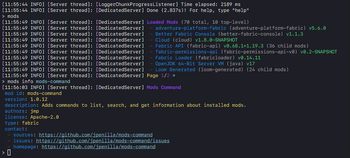
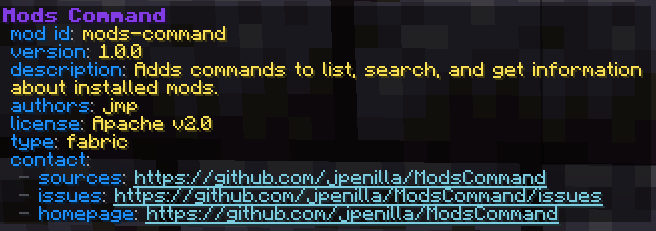
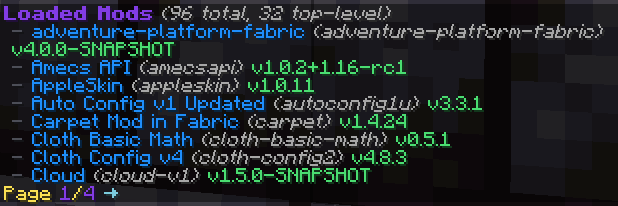
# Mods Command (https://img.shields.io/github/check-runs/jpenilla/mods-command/master?label=build)](https://github.com/jpenilla/mods-command/actions) (https://img.shields.io/badge/license-Apache--2.0-blue)](LICENSE) (https://img.shields.io/github/v/release/jpenilla/mods-command)](https://github.com/jpenilla/mods-command/releases) A Fabric mod adding commands to list, search, and get information about installed mods. Requires (https://www.curseforge.com/minecraft/mc-mods/fabric-api). ### Commands *(Minecraft Command Syntax Reference: (https://minecraft.fandom.com/wiki/Commands#Syntax))* Command | Description | Permission ------------------------------------------------|----------------------------------------------------------------------------------------------------------------------------------------------------------------------------------------------------------------------------------------------------------------------------------------------------------------------------|------------------------ `/mods ` | Displays a paginated view of installed mods. | `modscommand.mods` `/mods info <mod_id>` | Displays detailed information about the specified mod. | `modscommand.mods` `/mods info <mod_id> children ` | Displays a paginated view of child mods for the specified mod. | `modscommand.mods` `/mods search <query> ` | Displays a paginated view of mods matching the search query. | `modscommand.mods` `/mods config <mod_id>` | Opens the Mod Menu config screen for the specified mod. This command is only registered when installed on the client and Mod Menu is installed. | `modscommand.mods` `/dumpmods` | Dumps the list of installed mods and some information about the current environment to `installed-mods.yml` in the game directory. When used in game, the contents of the file can be copied to the clipboard by clicking a chat message. This is a diagnostics command, meant to aid in creating more useful bug reports. | `modscommand.dumpmods` ### Client Commands Client commands are commands which are processed on the client and never sent to the server. All of Mods Command's commands are usable as client commands. - `/mods` and all subcommands are registered under `/clientmods` and `/modscommand:clientmods`. - `/dumpmods` is registered as `/dumpclientmods` and `/modscommand:dumpclientmods`. - The client variants of commands do not require any permissions. ### Configuration Mods Command can be configured though the `mods-command.conf` generated in the `config` directory after the first run.
# Mods Command
[!(https://img.shields.io/github/check-runs/jpenilla/mods-command/master?label=build)](https://github.com/jpenilla/mods-command/actions) [!(https://img.shields.io/badge/license-Apache--2. 0-blue)](LICENSE) [!(https://img.shields.io/github/v/release/jpenilla/mods-command)](https://github.com/jpenilla/mods-command/releases)
A Fabric mod adding commands to list, search, and get information about installed mods. Requires (https://www.curseforge.com/minecraft/mc-mods/fabric-api).
### Commands
*(Minecraft Command Syntax Reference: (https://minecraft.fandom.com/wiki/Commands#Syntax))*
Command | Description | Permission
------------------------------------------------|----------------------------------------------------------------------------------------------------------------------------------------------------------------------------------------------------------------------------------------------------------------------------------------------------------------------------|------------------------
`/mods [
### Client Commands
Client commands are commands which are processed on the client and never sent to the server.
All of Mods Command's commands are usable as client commands.
- `/mods` and all subcommands are registered under `/clientmods` and `/modscommand:clientmods`.
- `/dumpmods` is registered as `/dumpclientmods` and `/modscommand:dumpclientmods`.
- The client variants of commands do not require any permissions.
### Configuration
Mods Command can be configured though the `mods-command.conf` generated in the `config` directory after the first run.
📊 Mod Details
- Game
- Minecraft Mods
- Author
- jpenilla
- Version
- 1.1.16
- Downloads
- 60,335
- Endorsements
- 152
- Category
- fabric
- Created
- 4/11/2021
- Updated
- 7/4/2026
- Game Versions
- 26.2
- Tags
- utility
🔧 How to Install Minecraft Mods Mods
Download from Modrinth. Use Prism Launcher or drop into your mods folder.
📖 Full step-by-step install guide for Minecraft Mods →
Visit the official mod page for specific installation instructions for this mod.
🎮 Need cheat codes or console commands? Check ur gaming wiki for Minecraft Mods commands, item IDs, and more.
❓ Frequently Asked Questions
Which Minecraft Mods versions does Mods Command support?
The author lists 26.2. Other versions may work but are untested by the author.
What is the latest version of Mods Command?
Version 1.1.16, published 2026-07-04 with 60,335 downloads recorded at the source.
Keep browsing — more Minecraft Mods mods await