ModMenu Badges Lib
🟡 Updated this year⚠️ Install Order · 2 steps
Install in this order, then this mod last — most mods fail to load without their framework and dependencies in place.
🖼️ Gallery (2 images)

🔍 Analysis
- 👍 0.0% endorsement rate
- 🏆 #930 of 1284 fabric mods in this game by downloads
📋 About This Mod
<!-- Suppress IDEA Warnings --> <!--suppress ALL --> <a name="readme-top"></a> ] ] ] ] ] ] ] ] <br /> <div align="center"> <h3 align="center">ModMenu Badges Lib</h3> <p align="center"> More badge!!! <br /> <a href="https://discord.gg/pbwnMwnUD6">Support</a> · <a href="https://github.com/syorito-hatsuki/modmenu-badges-lib/issues">Report Bug</a> · <a href="https://github.com/syorito-hatsuki/modmenu-badges-lib/issues">Request Feature</a> </p> </div> <details> <summary>Table of Contents</summary> <ol> <li><a href="#about-the-project">About The Project</a></li> <li><a href="#usage">Usage</a></li> <li><a href="#roadmap">Roadmap</a></li> <li><a href="#contributing">Contributing</a></li> <li><a href="#license">License</a></li> </ol> </details> ## About The Project ! Just a simple library for adding your own badges to ModMenu. For example, (https://github.com/Tschipcraft) uses it for the Data Pack badge in (https://github.com/Tschipcraft/dynamiclights) <p align="right">(<a href="#readme-top">back to top</a>)</p> ## Usage <details> <summary>Mod Developers</summary> 1. Add Gradle dependency into `build.gradle` or `build.gradle.kts` ```gradle repositories { maven("https://api.modrinth.com/maven") } dependencies { // Option 1: Include ModMenu Badges Lib to project for it available within your own jar (additional ~5kb) include(modImplementation("maven.modrinth", "modmenu-badges-libb", "<version>")) // Option 2: Depend on ModMenu Badges Lib, but require that users install it manually modImplementation("maven.modrinth", "modmenu-badges-lib", "<version>") } ``` 2. Add the dependency recommend in your fabric.mod.json ```json "recommends": { "modmenu-badges-lib": "*" } ``` 3. Open (https://syorito-hatsuki.github.io/modmenu-badges-lib/) add copy result to our `fabric.mod.json`. > Alternative color code generator: https://argb-int-calculator.netlify.app ```json5 { ... "custom": { "mcb": }, ... } ``` </details> <details> <summary>Modpack developers</summary> 1. Create `modmenu-extra-badges.json` file in root of your modpack instance (.minecraft folder or else depend on launcher ) 2. Use example below to edit all how you want Color values generating tool https://syorito-hatsuki.github.io/modmenu-badges-lib/ ```json5 { // Mod ID "modmenu-badges-lib": { // Sort badges by alphabet "sort": true, // Overwrite all badges with new, aka delete all "overwrite": true, // List of modmenu-badges-lib badges "badges": }, // Deleting default Minecraft Badge "minecraft": { "badges": } } ``` </details> ## Roadmap - Search by badge - Own online badge editor with real-time preview See the (https://github.com/syorito-hatsuki/modmenu-badges-lib/issues) for a full list of proposed features (and known issues). <p align="right">(<a href="#readme-top">back to top</a>)</p> ## Contributing Contributions are what make the open source community such an amazing place to learn, inspire, and create. Any contributions you make are **greatly appreciated**. If you have a suggestion that would make this better, please fork the repo and create a pull request. You can also simply open an issue with the tag "enhancement". Don't forget to give the project a star! Thanks again! 1. Fork the Project 2. Create your Feature Branch (`git checkout -b feature/AmazingFeature`) 3. Commit your Changes (`git commit -m 'Add some AmazingFeature'`) 4. Push to the Branch (`git push origin feature/AmazingFeature`) 5. Open a Pull Request <p align="right">(<a href="#readme-top">back to top</a>)</p> ## License Distributed under the MIT License. See `LICENSE.txt` for more information. <p align="right">(<a href="#readme-top">b
[!] [!] [!] [!] [!] [!] [!] [!]
Table of Contents
## About The Project
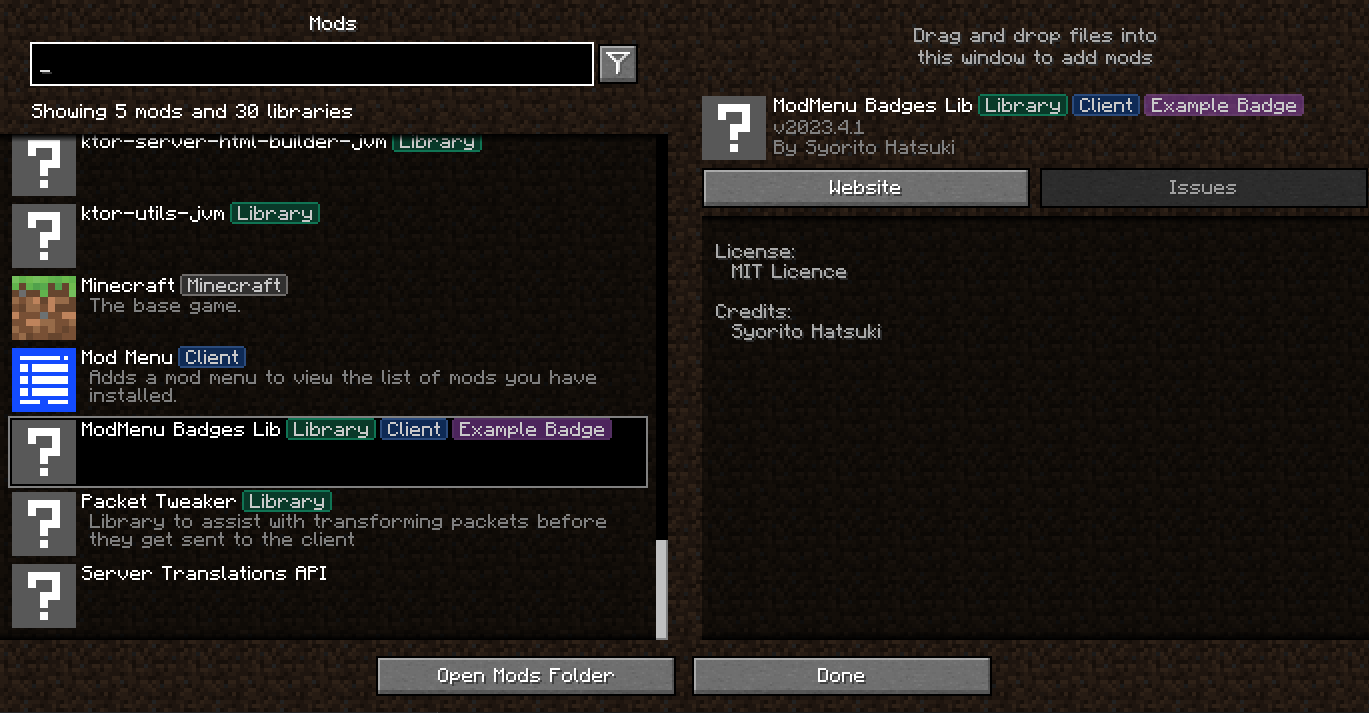
Just a simple library for adding your own badges to ModMenu.
For example, (https://github.com/Tschipcraft) uses it for the Data Pack badge in (https://github.com/Tschipcraft/dynamiclights)
1. Add Gradle dependency into `build.gradle` or `build.gradle.kts`
```gradle repositories { maven("https://api.modrinth.com/maven") }
dependencies {
// Option 1: Include ModMenu Badges Lib to project for it available within your own jar (additional ~5kb)
include(modImplementation("maven.modrinth", "modmenu-badges-libb", "
2. Add the dependency recommend in your fabric.mod.json
```json "recommends": { "modmenu-badges-lib": "*" } ```
3. Open (https://syorito-hatsuki.github.io/modmenu-badges-lib/) add copy result to our `fabric.mod.json`.
> Alternative color code generator: https://argb-int-calculator.netlify.app
```json5 { ... "custom": { "mcb": [ { // Badge text "name": "Example Badge", // Fill color "fillColor": -2003942227, // Outline color "outlineColor": -2003084874 }, { //Next badge } ] }, ... } ```
1. Create `modmenu-extra-badges.json` file in root of your modpack instance (.minecraft folder or else depend on launcher ) 2. Use example below to edit all how you want
Color values generating tool https://syorito-hatsuki.github.io/modmenu-badges-lib/
```json5 { // Mod ID "modmenu-badges-lib": { // Sort badges by alphabet "sort": true, // Overwrite all badges with new, aka delete all "overwrite": true, // List of modmenu-badges-lib badges "badges": [ { // Name is only required value. // Other values will be generated by it if missed "name": "Another House" }, { // Required "name": "COLORFUL", // Optional "labelColor": -16711936, // Optional "fillColor": -16776961, // Optional "outlineColor": -65536, // Optional "delete": false }, ] }, // Deleting default Minecraft Badge "minecraft": { "badges": [ { "delete": true, "name": "Minecraft" }, ] } } ```
- [ ] Search by badge
- Own online badge editor with real-time preview
See the (https://github.com/syorito-hatsuki/modmenu-badges-lib/issues) for a full list of proposed features (and known issues).
## Contributing
Contributions are what make the open source community such an amazing place to learn, inspire, and create. Any contributions you make are greatly appreciated.
If you have a suggestion that would make this better, please fork the repo and create a pull request. You can also simply open an issue with the tag "enhancement". Don't forget to give the project a star! Thanks again!
1. Fork the Project 2. Create your Feature Branch (`git checkout -b feature/AmazingFeature`) 3. Commit your Changes (`git commit -m 'Add some AmazingFeature'`) 4. Push to the Branch (`git push origin feature/AmazingFeature`) 5. Open a Pull Request
Distributed under the MIT License. See `LICENSE.txt` for more information.
(b
📊 Mod Details
- Game
- Minecraft Mods
- Author
- syorito-hatsuki
- Version
- 2026.3.1
- Downloads
- 847,532
- Endorsements
- 243
- Category
- fabric
- Created
- 4/22/2023
- Updated
- 3/30/2026
- Game Versions
- 26.1, 26.1.1, 26.1.2, 26.2
- Tags
- library, utility
🔗 Required By 1 Mod
These mods list this mod as a dependency.
🔧 How to Install Minecraft Mods Mods
Download from Modrinth. Use Prism Launcher or drop into your mods folder.
📖 Full step-by-step install guide for Minecraft Mods →
Visit the official mod page for specific installation instructions for this mod.
🎮 Need cheat codes or console commands? Check ur gaming wiki for Minecraft Mods commands, item IDs, and more.
❓ Frequently Asked Questions
Which Minecraft Mods versions does ModMenu Badges Lib support?
The author lists 26.1, 26.1.1, 26.1.2, 26.2. Other versions may work but are untested by the author.
What is the latest version of ModMenu Badges Lib?
Version 2026.3.1, published 2026-03-30 with 847,532 downloads recorded at the source.
Keep browsing — more Minecraft Mods mods await