ModernConfig
🟡 Updated this year⚠️ Install Order · 2 steps
Install in this order, then this mod last — most mods fail to load without their framework and dependencies in place.
🖼️ Gallery (3 images)
🔍 Analysis
- 👍 0.0% endorsement rate
- 🏆 #708 of 983 fabric mods in this game by downloads
📋 About This Mod
# ModernConfig <div align="center"> <img src="https://raw.githubusercontent.com/QWERTZexe/ModernConfig/refs/heads/main/src/main/resources/assets/modernconfig/icon.png" alt="ModernConfig Logo" width="150" height="150"> **A beautiful, modern configuration library for Minecraft mods** (https://img.shields.io/badge/License-ARR-blue.svg)](LICENSE) (https://img.shields.io/badge/Minecraft-1.21.6+-brightgreen.svg)](https://minecraft.net) (https://img.shields.io/badge/Mod%20Loader-Fabric-orange.svg)](https://fabricmc.net) (https://img.shields.io/badge/Version-1.4-yellow.svg)](https://modrinth.com/mod/modernconfig) </div> ## 🌟 Overview ModernConfig is a sleek configuration library for Minecraft Fabric mods that makes managing settings easy. No more config commands - ModernConfig has animations, a modern style, and its really easy to implement in your mods. ## ✨ Features <!--### 🎨 **Beautiful Modern Interface** - **Smooth Animations**: Fluid transitions and hover effects using advanced easing functions - **Responsive Design**: Adapts to different screen sizes and resolutions - **Modern UI Components**: Sleek buttons, toggles, sliders, and input fields - **Dark Theme**: Eye-friendly interface with carefully chosen colors--> ### 🧩 **Configuration Options** - **🔘 Toggles**: Boolean switches - on or off - **📝 Text Fields**: String inputs - **🎚️ Sliders**: Numeric inputs with customizable ranges and precision - **📋 Lists**: Dynamic string lists with add/remove functionality - **🎨 Color Pickers**: HSV color selection with hex input support - **📋 Dropdowns**: Selection menus - **📁 Categories**: Organized sections with nested configurations ### 🚀 **Easy to Develop with** - **Simple API**: Easy to use Builder - **Listeners for config updates**: Register a listener to fire when the config changes ### 🔧 **Other Features** - **Global Config Screen**: One place to access all mods configs - **Integrated Keybind**: Right Shift opens the config (configurable) - **Performance Optimized**: Non FPS draining animations ## 📸 Screenshots ### Main Interface !(https://raw.githubusercontent.com/QWERTZexe/ModernConfig/refs/heads/main/images/MainMenu.png) *Main interface with animations and modern design* ### Configuration Options !(https://raw.githubusercontent.com/QWERTZexe/ModernConfig/refs/heads/main/images/ConfigOptions.png) *Rich variety of input types: toggles, sliders, text fields, and more* ### Color Picker !(https://raw.githubusercontent.com/QWERTZexe/ModernConfig/refs/heads/main/images/Color.png) *HSV color picker with real-time preview* ## 🚀 Installation ### For Players 1. **Download and Install Fabric** - Get (https://fabricmc.net/use/installer/) - Install (https://modrinth.com/mod/fabric-api) 2. **Download ModernConfig** - Download from (https://modrinth.com/mod/modernconfig) 3. **Install the Mod** - Place the `.jar` file in your `mods` folder - Launch Minecraft with the Fabric profile ### For Developers Add ModernConfig to your `build.gradle`: ```gradle repositories { maven { name = 'QWERTZ-Repo' url = 'https://repo.qwertz.app/' } } dependencies { modImplementation 'app.qwertz:modernconfig:1.3' } ``` ## 🎮 Usage ### Opening the Configuration - **In-Game**: Press `Right Shift` (you can change this keybind) ### Navigation - **Main Screen**: Shows all mods that use ModernConfig - **Click a Mod**: Opens that mod's settings - **Back Button**: Goes back to the previous screen ## 🔧 Developer Guide ### Quick Start Here is how easy it is to set up a config: ```java public class YourMod implements ClientModInitializer { @Override public void onInitializeClient() { ModernConfig config = ConfigBuilder.create("YourMod", "Your Mod Configuration") .toggle("enabled", "Enable Mod", true) .slider("power", "Power Level", 50, 0, 100, 1) .text("username", "Player Name", "Steve") .color("theme_color", "Theme Color", 0x4A90E2) .list("whitelist", "Player Whitelist", "Player Name") .dropdown("difficulty", "Difficulty", Arrays.asList("Easy", "Normal", "Hard"), "Normal") .build(); } } ``` ### Using Categories When you have lots of settings, organize them into categories: ```java ModernConfig config = ConfigBuilder.create("AdvancedMod", "Advanced Mod Settings") .category("general", "General Settings", "Main configuration options", category -> category .toggle("enabled", "Enable Mod", true) .slider("update_interval", "Update Interval", 20, 1, 100, 1) .text("server_url", "Server URL", "https://api.example.com") ) .category("ui", "User Interface", "Customize the user interface", category -> category .color("primary_color", "Primary Color", 0x4A90E2) .color("secondary_color",
# ModernConfig

A beautiful, modern configuration library for Minecraft mods
[!(https://img.shields.io/badge/License-ARR-blue.svg)](LICENSE) [!(https://img.shields.io/badge/Minecraft-1. 21. 6+-brightgreen.svg)](https://minecraft.net) [!(https://img.shields.io/badge/Mod%20Loader-Fabric-orange.svg)](https://fabricmc.net) [!(https://img.shields.io/badge/Version-1. 4-yellow.svg)](https://modrinth.com/mod/modernconfig)
## 🌟 Overview
ModernConfig is a sleek configuration library for Minecraft Fabric mods that makes managing settings easy. No more config commands - ModernConfig has animations, a modern style, and its really easy to implement in your mods.
## ✨ Features
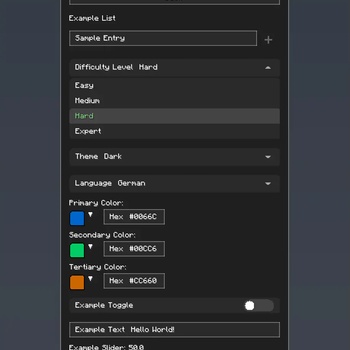
### 🧩 Configuration Options - 🔘 Toggles: Boolean switches - on or off - 📝 Text Fields: String inputs - 🎚️ Sliders: Numeric inputs with customizable ranges and precision - 📋 Lists: Dynamic string lists with add/remove functionality - 🎨 Color Pickers: HSV color selection with hex input support - 📋 Dropdowns: Selection menus - 📁 Categories: Organized sections with nested configurations
### 🚀 Easy to Develop with - Simple API: Easy to use Builder - Listeners for config updates: Register a listener to fire when the config changes
### 🔧 Other Features - Global Config Screen: One place to access all mods configs - Integrated Keybind: Right Shift opens the config (configurable) - Performance Optimized: Non FPS draining animations
## 📸 Screenshots
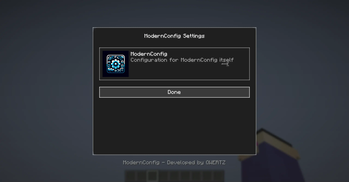
### Main Interface !(https://raw.githubusercontent.com/QWERTZexe/ModernConfig/refs/heads/main/images/MainMenu.png) Main interface with animations and modern design
### Configuration Options !(https://raw.githubusercontent.com/QWERTZexe/ModernConfig/refs/heads/main/images/ConfigOptions.png) Rich variety of input types: toggles, sliders, text fields, and more
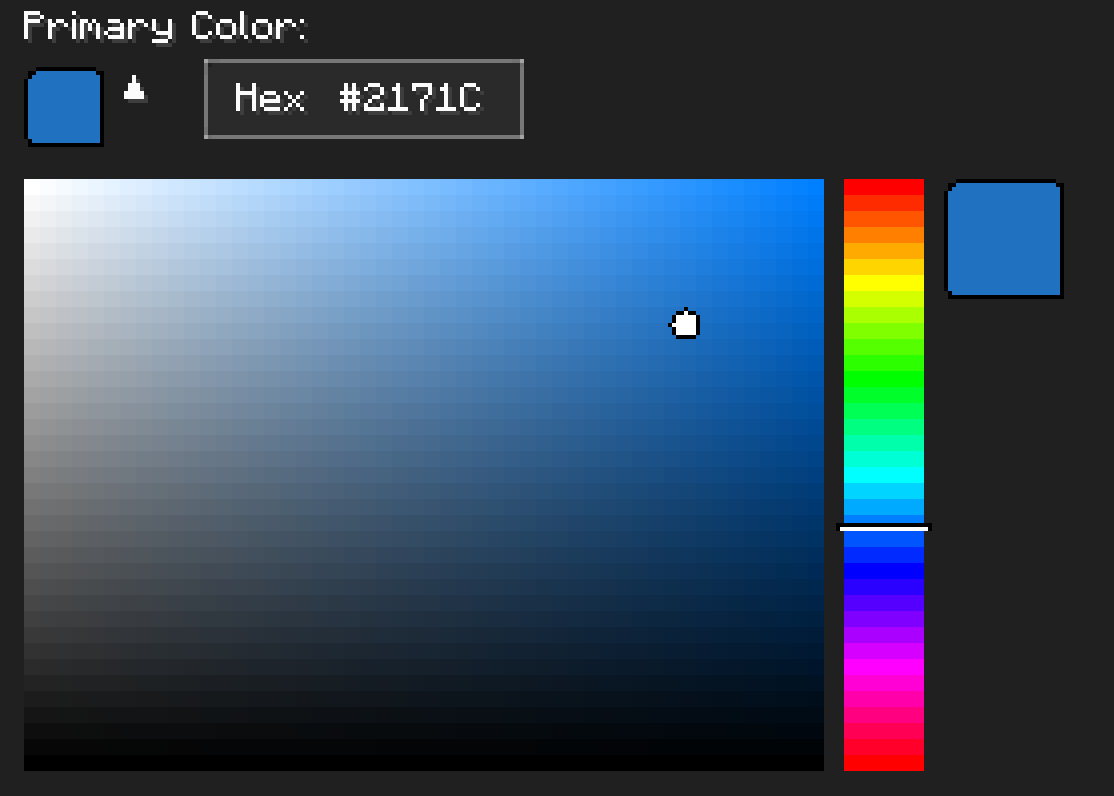
### Color Picker !(https://raw.githubusercontent.com/QWERTZexe/ModernConfig/refs/heads/main/images/Color.png) HSV color picker with real-time preview
## 🚀 Installation
### For Players
1. Download and Install Fabric - Get (https://fabricmc.net/use/installer/) - Install (https://modrinth.com/mod/fabric-api)
2. Download ModernConfig - Download from (https://modrinth.com/mod/modernconfig)
3. Install the Mod - Place the `.jar` file in your `mods` folder - Launch Minecraft with the Fabric profile
### For Developers
Add ModernConfig to your `build.gradle`:
```gradle repositories { maven { name = 'QWERTZ-Repo' url = 'https://repo.qwertz.app/' } }
dependencies { modImplementation 'app.qwertz:modernconfig:1. 3' } ```
## 🎮 Usage
### Opening the Configuration
- In-Game: Press `Right Shift` (you can change this keybind)
### Navigation
- Main Screen: Shows all mods that use ModernConfig
- Click a Mod: Opens that mod's settings
- Back Button: Goes back to the previous screen
## 🔧 Developer Guide
### Quick Start
Here is how easy it is to set up a config:
```java public class YourMod implements ClientModInitializer { @Override public void onInitializeClient() { ModernConfig config = ConfigBuilder.create("YourMod", "Your Mod Configuration") .toggle("enabled", "Enable Mod", true) .slider("power", "Power Level", 50, 0, 100, 1) .text("username", "Player Name", "Steve") .color("theme_color", "Theme Color", 0x4A90E2) .list("whitelist", "Player Whitelist", "Player Name") .dropdown("difficulty", "Difficulty", Arrays.asList("Easy", "Normal", "Hard"), "Normal") .build(); } } ```
### Using Categories
When you have lots of settings, organize them into categories:
```java ModernConfig config = ConfigBuilder.create("AdvancedMod", "Advanced Mod Settings") .category("general", "General Settings", "Main configuration options", category -> category .toggle("enabled", "Enable Mod", true) .slider("update_interval", "Update Interval", 20, 1, 100, 1) .text("server_url", "Server URL", "https://api.example.com") ) .category("ui", "User Interface", "Customize the user interface", category -> category .color("primary_color", "Primary Color", 0x4A90E2) .color("secondary_color",
📊 Mod Details
- Game
- Minecraft Mods
- Author
- QWERTZexe
- Version
- 1.4
- Downloads
- 43,376
- Endorsements
- 1
- Category
- fabric
- Created
- 7/19/2025
- Updated
- 7/30/2026
- Game Versions
- 26.2
- Tags
- library
🔧 How to Install Minecraft Mods Mods
Download from Modrinth. Use Prism Launcher or drop into your mods folder.
📖 Full step-by-step install guide for Minecraft Mods →
Visit the official mod page for specific installation instructions for this mod.
🎮 Need cheat codes or console commands? Check ur gaming wiki for Minecraft Mods commands, item IDs, and more.
❓ Frequently Asked Questions
Which Minecraft Mods versions does ModernConfig support?
The author lists 26.2. Other versions may work but are untested by the author.
What is the latest version of ModernConfig?
Version 1.4, published 2026-07-30 with 43,376 downloads recorded at the source.
Keep browsing — more Minecraft Mods mods await