Misia's Simple ToolTips
🟡 Updated this year⚠️ Install Order · 2 steps
Install in this order, then this mod last — most mods fail to load without their framework and dependencies in place.
🖼️ Gallery (2 images)

🔍 Analysis
- 👍 0.0% endorsement rate
- 🏆 #56 of 67 neoforge mods in this game by downloads
📋 About This Mod
# Overview This is a utility mod designed for map makers and modpack authors. It provides modpack creators with a low‑threshold way to manipulate item tooltip content. # Features The mod has three operation modes: - **Replace** (corresponding `replace` folder): Clears the original tooltip and writes custom text. - **Append** (corresponding `append` folder): Adds text starting from the line directly below the original tooltip. - **Extra** (corresponding `extra` folder): Shows extra text when holding Shift. All three modes can work simultaneously, applied in the order: Replace → Append → Extra. # How to Use The mod is extremely easy to use – you only need a basic understanding of JSON format and Minecraft registry names. Simply write a JSON file, place it in the folder corresponding to the mod ID and the desired mode. The JSON file name does not matter; the mod will read all JSON files under the correct path. Supports `\n` for line breaks and vanilla control characters. ``` <modpack root> └─simple_tooltips/ ├── modid/ │ ├── replace/ │ │ └── XXX.json │ ├── append/ │ │ └── XXX.json │ └── extra/ │ └── XXX.json ...... ``` # Configuration Example Example using Replace mode + apple: `<modpack root>\simple_tooltips\minecraft\append\apple.json` ```json { "apple": "§aAn apple a day\nkeeps the doctor away" } ```
This is a utility mod designed for map makers and modpack authors.
It provides modpack creators with a low‑threshold way to manipulate item tooltip content.
The mod has three operation modes:
- Replace (corresponding `replace` folder): Clears the original tooltip and writes custom text.
- Append (corresponding `append` folder): Adds text starting from the line directly below the original tooltip.
- Extra (corresponding `extra` folder): Shows extra text when holding Shift.
All three modes can work simultaneously, applied in the order: Replace → Append → Extra.
# How to Use
The mod is extremely easy to use – you only need a basic understanding of JSON format and Minecraft registry names.
Simply write a JSON file, place it in the folder corresponding to the mod ID and the desired mode. The JSON file name does not matter; the mod will read all JSON files under the correct path.
Supports `\n` for line breaks and vanilla control characters.
```
# Configuration Example
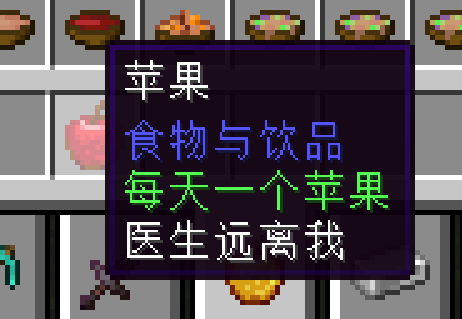
Example using Replace mode + apple:
`
```json { "apple": "§aAn apple a day\nkeeps the doctor away" } ```
📊 Mod Details
- Game
- Minecraft Mods
- Author
- Misia0721
- Version
- 1.0.0
- Downloads
- 974
- Endorsements
- 0
- Category
- neoforge
- Created
- 6/9/2026
- Updated
- 6/6/2026
- Game Versions
- 1.21, 1.21.1, 1.21.2, 1.21.3, 1.21.4
- Tags
- utility
🔧 How to Install Minecraft Mods Mods
Download from Modrinth. Use Prism Launcher or drop into your mods folder.
📖 Full step-by-step install guide for Minecraft Mods →
Visit the official mod page for specific installation instructions for this mod.
🎮 Need cheat codes or console commands? Check ur gaming wiki for Minecraft Mods commands, item IDs, and more.
❓ Frequently Asked Questions
Which Minecraft Mods versions does Misia's Simple ToolTips support?
The author lists 1.21, 1.21.1, 1.21.2, 1.21.3, 1.21.4, 1.21.5. Other versions may work but are untested by the author.
What is the latest version of Misia's Simple ToolTips?
Version 1.0.0, published 2026-06-06 with 974 downloads recorded at the source.
Keep browsing — more Minecraft Mods mods await