MineMention
⚪ Last updated 2023⚠️ Install Order · 2 steps
Install in this order, then this mod last — most mods fail to load without their framework and dependencies in place.
🖼️ Gallery (4 images)
🔍 Analysis
- 👍 0.1% endorsement rate
- 🏆 #57 of 359 forge mods in this game by downloads
📋 About This Mod
# MineMention MineMention is a mention mod for the chat so you can specify who should get your messages better. MineMention allows you to mention people or groups in chat. Whenever your message contains at least one mention, it will not be displayed to all users but only to the ones you mentioned. But you can mention multiple people. !(https://cdn.modrinth.com/data/cGVpcVeo/images/35363bd3220fc5a3afe6d54dbe2827c930f7a1e5.png) whenever you type an `@` you'll get autocompletion for your mentions: !(https://cdn.modrinth.com/data/cGVpcVeo/images/0376a3986e35e22f5c2bad9207b4f51b09dea7c2.png) MineMention has three builtin Groups you can mention but other mods can easily add more: * `@everyone` mentions every player on the server. * `@here` mentions every player in the same dimension. * `@near` mentions every player within a 100 block distance You can also click on mentions or the sender name of a message in the chat to write a reply: !(https://cdn.modrinth.com/data/cGVpcVeo/images/44a963725b8083178231004d85535206b544652d.png) Now you might think: when I write private messages with another payer I don't want to type `@PlayerName` all the time. Luckily you can run the command `/d PlayerName` to change your default mentions (those are applied if you don't provide a mention explicitly) To change the default mentions run `/d` with a list of mentions as arguments that should be your new default mentions (but without the preceding `@` character). Run `/d` without arguments to reset it to `@everyone`. You can also see your current default mentions right over your chat: !(https://cdn.modrinth.com/data/cGVpcVeo/images/b96a6304f337c86f77003dc577eff8c67f0c9727.png) Whenever multiple mods register the same special mention (seems to happen a lot with @team), none of them will be available by default. You can however change that in the config. There's a map called `mentions` where you can specify what special mention should be what. The key is always the name of the special mention and the value is an id of what the mentions does. You can redirect all mentions except `@everyone`. If you redirect a mention to `minemention:none`, you can remove it. Example: ```json { "mentions": { "here": "minemention:none", "near": "minemention:none", "close": "minemention:near" } } ``` This would remove `@here` and rename `@near` to `@close`. The ids of the builtin mentions are `minemention:everyone`, `minemention:here`, `minemention:near`, `minemention:ftb` and `minemention:none`.
# MineMention
MineMention is a mention mod for the chat so you can specify who should get your messages better.
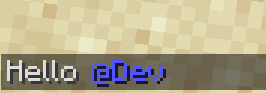
MineMention allows you to mention people or groups in chat. Whenever your message contains at least one mention, it will not be displayed to all users but only to the ones you mentioned. But you can mention multiple people.

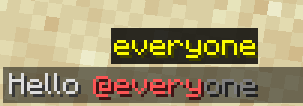
whenever you type an `@` you'll get autocompletion for your mentions:

MineMention has three builtin Groups you can mention but other mods can easily add more:
`@everyone` mentions every player on the server. `@here` mentions every player in the same dimension. * `@near` mentions every player within a 100 block distance
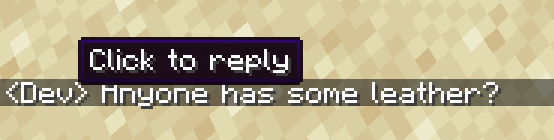
You can also click on mentions or the sender name of a message in the chat to write a reply:

Now you might think: when I write private messages with another payer I don't want to type `@PlayerName` all the time. Luckily you can run the command `/d PlayerName` to change your default mentions (those are applied if you don't provide a mention explicitly)
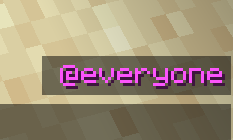
To change the default mentions run `/d` with a list of mentions as arguments that should be your new default mentions (but without the preceding `@` character). Run `/d` without arguments to reset it to `@everyone`.
You can also see your current default mentions right over your chat:

Whenever multiple mods register the same special mention (seems to happen a lot with @team), none of them will be available by default. You can however change that in the config. There's a map called `mentions` where you can specify what special mention should be what. The key is always the name of the special mention and the value is an id of what the mentions does. You can redirect all mentions except `@everyone`. If you redirect a mention to `minemention:none`, you can remove it.
Example: ```json { "mentions": { "here": "minemention:none", "near": "minemention:none", "close": "minemention:near" } } ```
This would remove `@here` and rename `@near` to `@close`.
The ids of the builtin mentions are `minemention:everyone`, `minemention:here`, `minemention:near`, `minemention:ftb` and `minemention:none`.
📊 Mod Details
- Game
- Minecraft Mods
- Author
- noeppi-noeppi
- Version
- 1.20.1-3.0.1
- Downloads
- 15,543
- Endorsements
- 10
- Category
- forge
- Created
- 8/22/2022
- Updated
- 6/28/2023
- Game Versions
- 1.20.1
- Tags
- management, utility
🔧 How to Install Minecraft Mods Mods
Download from Modrinth. Use Prism Launcher or drop into your mods folder.
📖 Full step-by-step install guide for Minecraft Mods →
Visit the official mod page for specific installation instructions for this mod.
🎮 Need cheat codes or console commands? Check ur gaming wiki for Minecraft Mods commands, item IDs, and more.
❓ Frequently Asked Questions
Which Minecraft Mods versions does MineMention support?
The author lists 1.20.1. Other versions may work but are untested by the author.
What is the latest version of MineMention?
Version 1.20.1-3.0.1, published 2023-06-28 with 15,543 downloads recorded at the source.
Keep browsing — more Minecraft Mods mods await