Minecraft Heads Browser
🟠 Updated over a year ago⚠️ Install Order · 2 steps
Install in this order, then this mod last — most mods fail to load without their framework and dependencies in place.
🖼️ Gallery (2 images)

🔍 Analysis
- 👍 1.1% endorsement rate — high engagement, a strong quality signal
- 🏆 #134 of 241 decoration mods in this game by downloads
📋 About This Mod
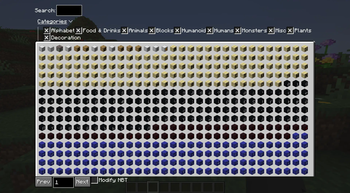
This mod adds an in-game GUI (default bound to `H`) that allows you to browse heads from the "Best Heads" collection from minecraft-heads.com. This mod is targeted towards those who like to build in singleplayer, and want easier access to decorative skulls.
By default, clicking a head will run a `/give` command to obtain the head. If you do not have permissions to use this command on a server, there is a `Modify NBT` option provided.
REQUIRED MODS
(https://modrinth.com/project/ccKDOlHs)
(https://modrinth.com/project/P7dR8mSH)
How does Modify NBT Work?
This feature works by modifying the currently held item's NBT to apply the custom skin. It only works in creative mode, and may not work on all or be allowed on all servers. You must be holding a `player_head` item in your main hand for this to work.
Configuration
This mod provides a few simple configuration options- accessible via (https://modrinth.com/mod/modmenu), mostly relating to what filtering options to save when re-opening the GUI.
Why is the mod 7MB?
The mod is 7MB as the mod includes a backup file of the heads database. This is so that if my server goes down, the mod still functions properly. Each release contains an additional file, ending in `_min`, which does not include this functionality and is only 57kb as of v1. 0. 0. These can be found by clicking the appropriate version in the (https://modrinth.com/mod/minecraft-heads-browser/versions) tab. Note that file size should not significantly impact startup times at all.
Privacy
On startup, this mod makes a request to my website mcheads.sophiethefox.cc. This is done to obtain the latest heads data from minecraft-heads.com, acting as a proxy for cache purposes. None of your information including IP nor username is logged.
Planned Features
- UI Improvements
- Better search
!(https://images.minecraft-heads.com/banners/minecraft-heads.webp)
📊 Mod Details
- Game
- Minecraft Mods
- Author
- sophiethefox
- Version
- 1.0.0
- Downloads
- 824
- Endorsements
- 9
- Category
- decoration
- Created
- 5/23/2025
- Updated
- 5/21/2025
- Game Versions
- 1.21, 1.21.1, 1.21.2, 1.21.3, 1.21.4
- Tags
- decoration, utility
🔧 How to Install Minecraft Mods Mods
Download from Modrinth. Use Prism Launcher or drop into your mods folder.
📖 Full step-by-step install guide for Minecraft Mods →
Visit the official mod page for specific installation instructions for this mod.
🎮 Need cheat codes or console commands? Check ur gaming wiki for Minecraft Mods commands, item IDs, and more.
❓ Frequently Asked Questions
Which Minecraft Mods versions does Minecraft Heads Browser support?
The author lists 1.21, 1.21.1, 1.21.2, 1.21.3, 1.21.4. Other versions may work but are untested by the author.
What is the latest version of Minecraft Heads Browser?
Version 1.0.0, published 2025-05-21 with 824 downloads recorded at the source.
Keep browsing — more Minecraft Mods mods await