Minecraft Bingo
🟡 Updated this year⚠️ Install Order · 2 steps
Install in this order, then this mod last — most mods fail to load without their framework and dependencies in place.
🖼️ Gallery (8 images)


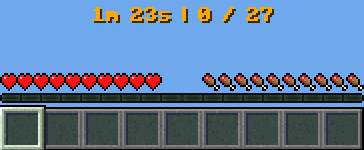
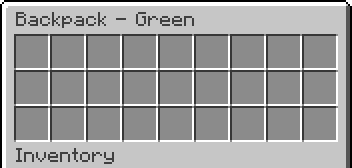
🔍 Analysis
- 👍 1.1% endorsement rate — high engagement, a strong quality signal
- 🏆 #226 of 590 adventure mods in this game by downloads
📋 About This Mod
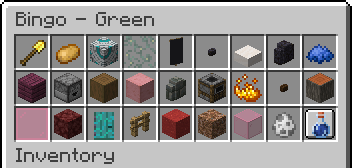
# Minecraft Bingo Be the first team to collect all required `items`, `mobs` and `advancements` to win the game! !(https://cdn.modrinth.com/data/cached_images/e1f3a00884f50236abcce1b8d85952373779c229.png)<br> !(https://cdn.modrinth.com/data/cached_images/a2c56d715887ef27d65288ae12a6af848350c1f5.png)<br> Minecraft Bingo lets you and your friends play a game of bingo in Minecraft. Players are divided into teams and must collect all randomly selected items, mobs and advancements to win. The mod is highly configurable and can be adjusted to suit different playing styles. The mod is designed to be played on a multiplayer server, but can also be played without a server. ## Getting Started 1. (https://fabricmc.net/use/installer/) 2. Download (https://modrinth.com/mod/fabric-api) and put it in the mods folder 3. Download Minecraft Bingo from (https://modrinth.com/mod/minecraft-bingo/versions) and put it in the mods folder 4. (Optional - but highly recommended) Use the (https://github.com/170yt/Minecraft-Bingo-Resource-Pack) ## Commands - `/bingo` or `/b` - Opens the bingo GUI, that shows all items to collect - `/bingo teams` - Opens the team selection GUI - `/bingo settings` - `OP` Opens the settings GUI - `/bingo start` - `OP` Starts a new bingo game with the current settings - `/bingo stop` - `OP` Stops the current bingo game - `/bingo pause` - `OP` Pauses the current bingo game - `/bingo resume` - `OP` Resumes the current bingo game - `/bingo reset <suggested random string>` - `OP` Stops the server and resets the world with a new seed. The random string at the end is used to prevent accidental resets - `/top` - Teleports you to the surface (or to the world spawn if you are in the nether or the end) - `/backpack` or `/bp` or `/ec` - Opens the team backpack ## Teams !(https://cdn.modrinth.com/data/cached_images/5703a0e873f093d37af478fc636b00df66b1f8a0.png)<br> Players can join a team by using the `/bingo teams` command.<br> <details> <summary>Team Management for OPs</summary> Teams in Bingo are managed using the standard Minecraft team system. All teams used by Bingo are automatically created and managed by the mod (nine different teams are used). OPs can use the vanilla `/team` command to manage the players in the teams. The following commands are available: - `/team join <team> ` - `OP` Joins the specified team - `/team leave <members>` - `OP` Leaves the team </details> ## Settings The settings are automatically saved between rounds so you do not have to reconfigure them every time.<br> !(https://cdn.modrinth.com/data/cached_images/736bc10bb49ddacfa9bb9ce71693ef3e031ecf87.png)<br> All available settings from top left to bottom right: - `PvP` - Enable player vs player combat - `No Damage` - Players do not take damage - `No Hunger` - Players do not lose hunger - `Keep Inventory` - Keep inventory on death - `Allow Flying` - Enable creative flight for all players - `Block Break Speed` - Multiplier for block break speed - `Movement Speed` - Multiplier for movement speed (including swimming) - `Step Height` - Additional step height - `Command Top` - Enable the `/top` command - `Team Backpack` - Enable team backpacks (`/backpack`) - `Goal Amount` - The amount of items, mobs and advancements each team needs to collect - `Goal Type: Items` - Enable items as goals - `Goal Type: Mobs` - Enable mobs as goals - `Goal Type: Advancements` - Enable advancements as goals - Enable/Disable up to 18 Pools (see (#Pools)) - `Stop Game` - Stops the current game and shows the leaderboard - `Pause/Resume Game` - Pauses or resumes the current game - `Start Game` - Starts a new game with the current settings ## Icons !(https://cdn.modrinth.com/data/cached_images/9a761ce036ca50338c693d4425af69bdb2e8a870.png)<br> The scoreboard can display icons for each goal. For this to work, the player (client) needs to have the (https://github.com/170yt/Minecraft-Bingo-Resource-Pack) installed.<br> For instructions on how to install the resource pack, see (https://github.com/170yt/Minecraft-Bingo-Resource-Pack). ## Pools Pools are used to group goals into different categories. Each pool contains a set of items, mobs and advancements that can be selected as goals. Each pool has a config file that can be modified to add or remove goals. You can also create your own custom pools by creating a new config file in the `config/bingo/pools` folder. There you will also find the existing pool config files that you can modify. Bingo comes with the following pools by default: ### Overworld Easy Requires little to no traveling and can be completed in a short amount of time.<br> Most goals are related to mining, crafting and fighting.<br> Includes: Coal, Iron, Copper ### Overworld Medium Requires a decent
# Minecraft Bingo Be the first team to collect all required `items`, `mobs` and `advancements` to win the game!
!(https://cdn.modrinth.com/data/cached_images/e1f3a00884f50236abcce1b8d85952373779c229.png)
!(https://cdn.modrinth.com/data/cached_images/a2c56d715887ef27d65288ae12a6af848350c1f5.png)
Minecraft Bingo lets you and your friends play a game of bingo in Minecraft. Players are divided into teams and must collect all randomly selected items, mobs and advancements to win. The mod is highly configurable and can be adjusted to suit different playing styles. The mod is designed to be played on a multiplayer server, but can also be played without a server.
## Getting Started 1. (https://fabricmc.net/use/installer/) 2. Download (https://modrinth.com/mod/fabric-api) and put it in the mods folder 3. Download Minecraft Bingo from (https://modrinth.com/mod/minecraft-bingo/versions) and put it in the mods folder 4. (Optional - but highly recommended) Use the (https://github.com/170yt/Minecraft-Bingo-Resource-Pack)
## Commands
- `/bingo` or `/b` - Opens the bingo GUI, that shows all items to collect
- `/bingo teams` - Opens the team selection GUI
- `/bingo settings` - `OP` Opens the settings GUI
- `/bingo start` - `OP` Starts a new bingo game with the current settings
- `/bingo stop` - `OP` Stops the current bingo game
- `/bingo pause` - `OP` Pauses the current bingo game
- `/bingo resume` - `OP` Resumes the current bingo game
- `/bingo reset
## Teams !(https://cdn.modrinth.com/data/cached_images/5703a0e873f093d37af478fc636b00df66b1f8a0.png)
Players can join a team by using the `/bingo teams` command.
Team Management for OPs
Teams in Bingo are managed using the standard Minecraft team system. All teams used by Bingo are automatically created and managed by the mod (nine different teams are used).
OPs can use the vanilla `/team` command to manage the players in the teams. The following commands are available:
- `/team join
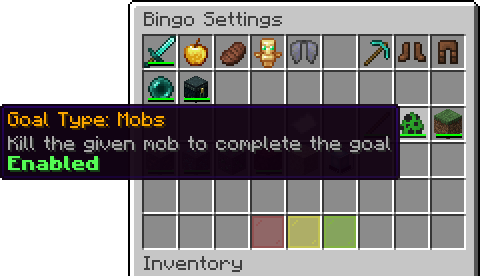
## Settings The settings are automatically saved between rounds so you do not have to reconfigure them every time.
!(https://cdn.modrinth.com/data/cached_images/736bc10bb49ddacfa9bb9ce71693ef3e031ecf87.png)
All available settings from top left to bottom right: - `PvP` - Enable player vs player combat - `No Damage` - Players do not take damage - `No Hunger` - Players do not lose hunger - `Keep Inventory` - Keep inventory on death - `Allow Flying` - Enable creative flight for all players - `Block Break Speed` - Multiplier for block break speed - `Movement Speed` - Multiplier for movement speed (including swimming) - `Step Height` - Additional step height - `Command Top` - Enable the `/top` command - `Team Backpack` - Enable team backpacks (`/backpack`) - `Goal Amount` - The amount of items, mobs and advancements each team needs to collect - `Goal Type: Items` - Enable items as goals - `Goal Type: Mobs` - Enable mobs as goals - `Goal Type: Advancements` - Enable advancements as goals - Enable/Disable up to 18 Pools (see (#Pools)) - `Stop Game` - Stops the current game and shows the leaderboard - `Pause/Resume Game` - Pauses or resumes the current game - `Start Game` - Starts a new game with the current settings
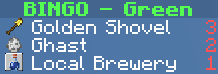
## Icons !(https://cdn.modrinth.com/data/cached_images/9a761ce036ca50338c693d4425af69bdb2e8a870.png)
The scoreboard can display icons for each goal. For this to work, the player (client) needs to have the (https://github.com/170yt/Minecraft-Bingo-Resource-Pack) installed.
For instructions on how to install the resource pack, see (https://github.com/170yt/Minecraft-Bingo-Resource-Pack).
## Pools Pools are used to group goals into different categories. Each pool contains a set of items, mobs and advancements that can be selected as goals. Each pool has a config file that can be modified to add or remove goals. You can also create your own custom pools by creating a new config file in the `config/bingo/pools` folder. There you will also find the existing pool config files that you can modify.
Bingo comes with the following pools by default:
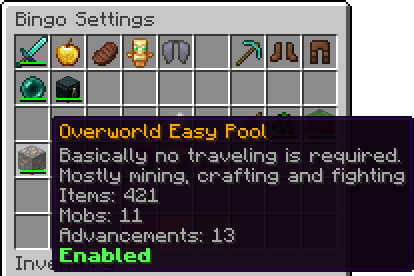
### Overworld Easy Requires little to no traveling and can be completed in a short amount of time.
Most goals are related to mining, crafting and fighting.
Includes: Coal, Iron, Copper
### Overworld Medium Requires a decent
📊 Mod Details
- Game
- Minecraft Mods
- Author
- 170yt
- Version
- 1.0+1.21.11
- Downloads
- 538
- Endorsements
- 6
- Category
- adventure
- Created
- 2/27/2025
- Updated
- 1/3/2026
- Game Versions
- 1.21.11
- Tags
- adventure, minigame, social
🔧 How to Install Minecraft Mods Mods
Download from Modrinth. Use Prism Launcher or drop into your mods folder.
📖 Full step-by-step install guide for Minecraft Mods →
Visit the official mod page for specific installation instructions for this mod.
🎮 Need cheat codes or console commands? Check ur gaming wiki for Minecraft Mods commands, item IDs, and more.
❓ Frequently Asked Questions
Which Minecraft Mods versions does Minecraft Bingo support?
The author lists 1.21.11. Other versions may work but are untested by the author.
What is the latest version of Minecraft Bingo?
Version 1.0+1.21.11, published 2026-01-03 with 538 downloads recorded at the source.
Keep browsing — more Minecraft Mods mods await