minecord
🟠 Updated over a year ago⚠️ Install Order · 2 steps
Install in this order, then this mod last — most mods fail to load without their framework and dependencies in place.
🖼️ Gallery (2 images)
🔍 Analysis
- 🏆 #202 of 371 forge mods in this game by downloads
📋 About This Mod
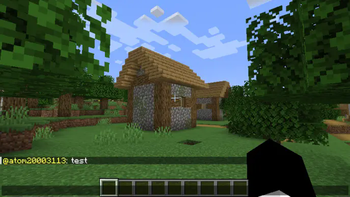
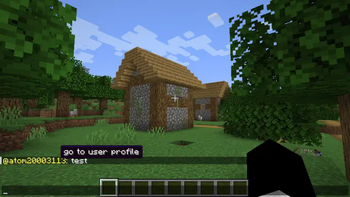
Adds Discord Chat Engine to Minecraft <span style="color:red">⚠️currently and if we dont get a desinger it will stay as chat-ui (/tellraw)⚠️</span>. ### Current Features: ╚═ Current Features ╚═ Text Engine ╚═ Formatting from: `"<user> message"` to `"user: message"` with the "go to user profile" tooltip in the "user" text, and when clicked redirects to (https://namemc.com/profile/user) ╚═ Support for multiple message formats, including markdown for bold, italic, and strikethrough text. ╚═ Direct messaging capability using the "dm!" command for private conversations between users. ╚═ Custom font selection with the `#font=<minecraft font>` system to change the appearance of messages. ╚═ User pinging functionality using "@" to notify online users, with appropriate tooltips and profile links. ╚═ URL detection with clickable links formatted as underlined text that open in a browser when clicked. ╚═ Support for reactions to messages using the "reaction!" command, allowing users to interact with each other. ╚═ Nickname management with the "setnick!" command for personalized display names in chat. ╚═ Avatar customization via the "setavatar!" command to enhance user identity in chat. ╚═ Channel management features with "joinchannel!" and "leavechannel!" commands to organize conversations. ╚═ Threaded conversation support using the "reply!" command for structured discussions. ╚═ Scheduled announcements feature using the "schedule!" command for automated notifications. ╚═ Polling capabilities with "poll!" and "vote!" commands to engage users in decision-making. ╚═ Changelog ╚═ Text Engine ╚═ Formatting from: `"<user> message"` to `"user: message"` with the "go to user profile" tooltip in the "user" text, and when clicked redirects to (https://namemc.com/profile/user). ╚═ Support for multiple message formats, including markdown for bold, italic, and strikethrough text. ╚═ Direct messaging capability using the "dm!" command for private conversations between users. ╚═ Custom font selection with the `#font=<minecraft font>` system to change the appearance of messages. ╚═ User pinging functionality using "@" to notify online users, with appropriate tooltips and profile links. ╚═ URL detection with clickable links formatted as underlined text that open in a browser when clicked. ╚═ Support for reactions to messages using the "reaction!" command, allowing users to interact with each other. ╚═ Nickname management with the "setnick!" command for personalized display names in chat. ╚═ Avatar customization via the "setavatar!" command to enhance user identity in chat. ╚═ Channel management features with "joinchannel!" and "leavechannel!" commands to organize conversations. ╚═ Threaded conversation support using the "reply!" command for structured discussions. ╚═ Scheduled announcements feature using the "schedule!" command for automated notifications. ╚═ Polling capabilities with "poll!" and "vote!" commands to engage users in decision-making.
Adds Discord Chat Engine to Minecraft
╚═ Changelog
╚═ Text Engine
╚═ Formatting from: `"
📊 Mod Details
- Game
- Minecraft Mods
- Author
- HEXAGON
- Version
- 1.2.2
- Downloads
- 331
- Endorsements
- 5
- Category
- forge
- Created
- 9/22/2024
- Updated
- 1/26/2025
- Game Versions
- 1.20.1
- Tags
- social
🔧 How to Install Minecraft Mods Mods
Download from Modrinth. Use Prism Launcher or drop into your mods folder.
📖 Full step-by-step install guide for Minecraft Mods →
Visit the official mod page for specific installation instructions for this mod.
🎮 Need cheat codes or console commands? Check ur gaming wiki for Minecraft Mods commands, item IDs, and more.
❓ Frequently Asked Questions
Which Minecraft Mods versions does minecord support?
The author lists 1.20.1. Other versions may work but are untested by the author.
What is the latest version of minecord?
Version 1.2.2, published 2025-01-26 with 331 downloads recorded at the source.
Keep browsing — more Minecraft Mods mods await