Mercurizer
🟡 Updated this year⚠️ Install Order · 2 steps
Install in this order, then this mod last — most mods fail to load without their framework and dependencies in place.
🖼️ Gallery (1 images)
🔍 Analysis
- 👍 0.1% endorsement rate
- 🏆 #539 of 983 fabric mods in this game by downloads
📋 About This Mod
[!(https://cdn.discordapp.com/attachments/1330912431496495165/1490018985675198534/Artboard_2-1.png?ex=69d287d1\&is=69d13651\&hm=fa99fc9a0f45b09a7ef09ae91ba8f79d8cd7e3b1a06fd73b17010a9561bbfad1&)](https://billing.sparkedhost.com/aff.php?aff=3220)!(https://cdn.modrinth.com/data/cached_images/646e556128d2ae29fadbb533012aa0645b0f1a8e.png)
A Sodium addon built for hardware that can't handle Sodium. Most "performance" mods assume you have a dedicated GPU and at least 8GB of RAM. Mercurizer doesn't. It's a Sodium addon designed specifically for integrated graphics, 4GB of RAM, and the kind of PC that struggles with Windows 10.
!(https://cdn.modrinth.com/data/cached_images/f3006f73c95ae556da2a09f84fd7624c62cc5692_0.webp)
Sodium is great — but it still has a performance floor that leaves a lot of players behind, especially in developing countries where "gaming PC" means integrated graphics and 4GB of RAM, not a GTX 1080 Ti.
Mercurizer goes further. The goal is simple:
> Give players with low-end hardware the ability to play Minecraft at a smooth framerate.
### What makes it different from plain Sodium?
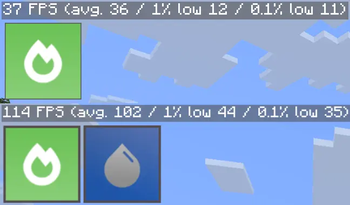
Auto-tuning benchmark — on the first 3 launches, Mercurizer benchmarks your GPU upload bandwidth, round-trip driver latency, and CPU throughput, then automatically tunes chunk upload budgets and texture animation thresholds to match your exact hardware. Results are averaged across all 3 runs for accuracy, and re-run automatically if you change GPU or drivers Adaptive refinement — after 30 seconds of stable gameplay, Mercurizer refines its tuning based on real in-game frame times, improving accuracy beyond what the startup benchmark alone can achieve Anti-stutter recovery — upload fraction cuts quickly when frames spike, recovers slowly when stable, preventing the oscillation that causes micro-stutters VSync-aware — automatically applies a more conservative upload budget when VSync is enabled to avoid blocking the render thread Safety mode for old hardware — Intel Gen 8 and older, and certain AMD driver configurations, automatically get conservative single-threaded settings that prevent driver crashes Real low-end benchmarks — tested on actual budget hardware. 37 FPS to 114 FPS on integrated graphics — 3. 08x Sodium's performance!
!(https://cdn.modrinth.com/data/cached_images/e7d54af16e32c59101fd646a4b55ce2885b05be7.png)
Specs: MacBook Air 2017, i5-5350U, 8GB RAM, Intel HD Graphics 6000, Debian 13 (KDE Plasma)
Settings: 16 chunks render distance, Vsync off, rest is vanilla, in a normal world (no superflat/amplified/etc)
Mercurizer Version: 0. 9. 1-beta. 2+mc26. 2-1. 1, 0. 9. 1-beta. 2+mc26. 1. 2-1. 1, 0. 8. 9+mc26. 1. 1-1. 5, 0. 8. 9+mc26. 1-1. 5 and 0. 8. 13-beta. 2+mc1. 21. 11-1. 1
!(https://cdn.modrinth.com/data/cached_images/31fc766ebc7ed3d63fed6a16cad3270afab7beaf_0.webp)
Players on integrated graphics (Intel HD, AMD Vega, etc.) Players with 4GB of RAM or less Anyone who tried Sodium and still struggled Players in developing countries where budget hardware is the norm
!(https://cdn.modrinth.com/data/cached_images/ea3c72527957c64fabe79018e2a4af9c2be1540f_0.webp)
Minecraft: 1. 21. 11+ (Java Edition) Loader: Fabric Requires Sodium to be installed alongside it Fully compatible with Iris, Sodium Extra, and Reese's Sodium Options
Expect bugs — Mercurizer is in active development. If something breaks, report it and include your hardware specs.
!(https://cdn.modrinth.com/data/cached_images/02ea782fbcbea12e19b05855cf1d96924b7f3d2e_0.webp)
Mercurizer is one of the core optimization mods behind (https://modrinth.com/modpack/potatooptimizer) by Edonme Studios — an ultra-lightweight modpack built for PCs that struggle to run modern Minecraft. Check it out: (https://edonme.dev/)
!(https://cdn.modrinth.com/data/cached_images/e5a283057d3b1573f722cad5fb34f15f42134d96_0.webp)
_Logo made by Kolocreep_
Made with love by Edonme Studios for every player who was told their PC was too weak to play.
[!(https://raw.githubusercontent.com/ModderZellior/Image/main/bannerofswills.jpg)](https://swills.gg/?ref=ZELLIOR)
📊 Mod Details
- Game
- Minecraft Mods
- Author
- _Slib
- Version
- 0.9.1+mc26.2-1.2
- Downloads
- 50,834
- Endorsements
- 55
- Category
- fabric
- Created
- 5/29/2026
- Updated
- 8/17/2026
- Game Versions
- 26.2
- Tags
- optimization
🔧 How to Install Minecraft Mods Mods
Download from Modrinth. Use Prism Launcher or drop into your mods folder.
📖 Full step-by-step install guide for Minecraft Mods →
Visit the official mod page for specific installation instructions for this mod.
🎮 Need cheat codes or console commands? Check ur gaming wiki for Minecraft Mods commands, item IDs, and more.
❓ Frequently Asked Questions
Which Minecraft Mods versions does Mercurizer support?
The author lists 26.2. Other versions may work but are untested by the author.
What is the latest version of Mercurizer?
Version 0.9.1+mc26.2-1.2, published 2026-08-17 with 50,834 downloads recorded at the source.
Keep browsing — more Minecraft Mods mods await