Media HUD
🟡 Updated this year⚠️ Install Order · 2 steps
Install in this order, then this mod last — most mods fail to load without their framework and dependencies in place.
🖼️ Gallery (6 images)
🔍 Analysis
- 👍 1.0% endorsement rate
- 🏆 #834 of 874 fabric mods in this game by downloads
📋 About This Mod
## Full Description !(https://cdn.modrinth.com/data/cached_images/4683b5b56d12e97ac330846bcf57666d9f31eadc.png) ### Media HUD adds a local media player directly to the Minecraft HUD. It is built for players who want music, videos, and visualizers inside Minecraft without constantly alt-tabbing. You can scan a local media folder, load files directly, drag the player anywhere on the screen, switch between full and compact layouts, and choose between several visual modes ranging from standard video playback to Minecraft-style mosaic rendering. This mod is client-side only and local-files only. It does not require server installation, it does not use streaming services, and it does not rely on online playback. ## Features - Client-side only Fabric mod - Local file playback only - Draggable HUD with saved position - Full and compact HUD layouts - Expandable library panel for folders and files - Scrollable library panel with current-track follow behavior - Audio playback for `mp3`, `wav`, and `ogg` - Video playback for `mp4` - Progress bar with click-to-seek - Play, pause, stop, next, previous, loop, shuffle, and volume controls - Filter modes for audio, video, or both - Saved HUD scale and transparency settings - Built-in HUD color themes - Custom HUD theme colors with hex input - Normal video mode with aspect-aware layout - Waveform visualizer mode - Dance visualizer mode - Dense mosaic video mode - Item mosaic video mode built around Minecraft item icon visuals - `/media` and `/m` command aliases ## Supported Formats - Audio: `mp3`, `wav`, `ogg` - Video: `mp4` Recommended video format for the smoothest results: - `H.264` video - `AAC` audio - `.mp4` container ## Supported Minecraft Versions Media HUD currently has working builds for: - `1.20.5` - `1.20.6` - `1.21` - `1.21.1` - `1.21.2` - `1.21.3` - `1.21.4` - `1.21.5` - `1.21.6` - `1.21.7` - `1.21.8` - `1.21.9` - `1.21.10` - `1.21.11` ## Fabric API Version Guide Use the Media HUD jar built for your exact Minecraft version, and match it with the Fabric API version line below: - Minecraft `1.20.5` -> Fabric API `0.97.8+1.20.5` - Minecraft `1.20.6` -> Fabric API `0.100.8+1.20.6` - Minecraft `1.21` -> Fabric API `0.102.0+1.21` - Minecraft `1.21.1` -> Fabric API `0.116.9+1.21.1` - Minecraft `1.21.2` -> Fabric API `0.106.1+1.21.2` - Minecraft `1.21.3` -> Fabric API `0.114.1+1.21.3` - Minecraft `1.21.4` -> Fabric API `0.119.4+1.21.4` - Minecraft `1.21.5` -> Fabric API `0.128.2+1.21.5` - Minecraft `1.21.6` -> Fabric API `0.128.2+1.21.6` - Minecraft `1.21.7` -> Fabric API `0.129.0+1.21.7` - Minecraft `1.21.8` -> Fabric API `0.136.1+1.21.8` - Minecraft `1.21.9` -> Fabric API `0.134.1+1.21.9` - Minecraft `1.21.10` -> Fabric API `0.138.4+1.21.10` - Minecraft `1.21.11` -> Fabric API `0.141.3+1.21.11` Recommended: - Fabric Loader `0.18.4` or newer - Java `21` ## Installation 1. Install Minecraft Java Edition for one of the supported versions above 2. Install Fabric Loader `0.18.4` or newer 3. Install the matching Fabric API version for your Minecraft version 4. Use Java `21` 5. Put the correct versioned `mediahud` jar in your `mods` folder 6. Launch the game and use `/m ui` to open the interaction overlay Media HUD is client-side only. A multiplayer server does not need to install it. This public build is packaged for Windows `x86_64`. No extra FFmpeg or JavaCV download is required for this release file. This release package includes third-party notice material for bundled runtime components. ## Command Guide You can use either `/m` or `/media`. They are identical aliases. ### Basic HUD Commands - `/m show` Shows the HUD. - `/m hide` Hides the HUD. - `/m toggle` Toggles the HUD on or off. - `/m ui` Opens the drag-and-move interaction overlay. - `/m pos reset` Resets the HUD position back to its default location. ### Playback Commands - `/m play` Starts playback of the currently selected media. - `/m pause` Pauses playback. - `/m
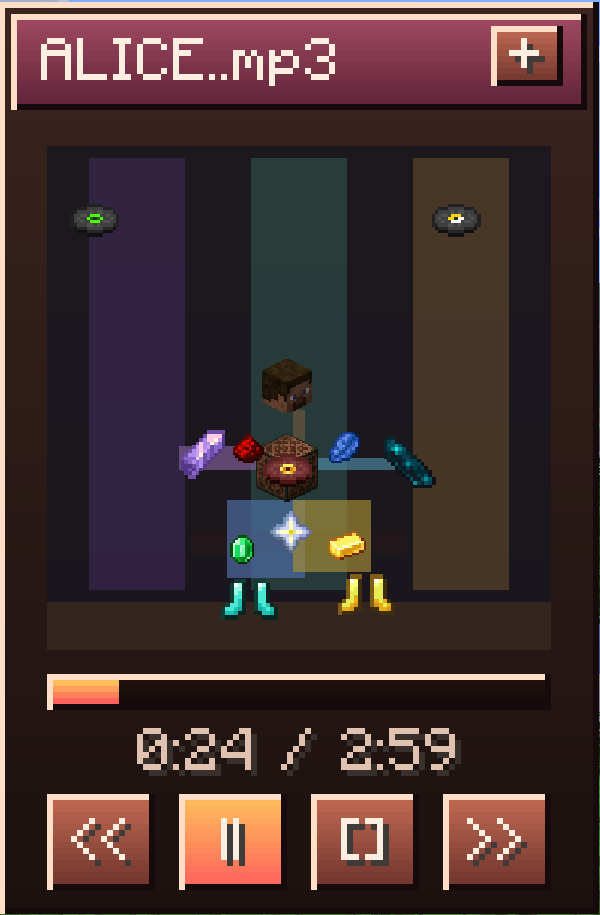
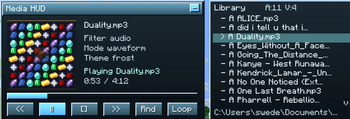
## Full Description !(https://cdn.modrinth.com/data/cached_images/4683b5b56d12e97ac330846bcf57666d9f31eadc.png) ### Media HUD adds a local media player directly to the Minecraft HUD.
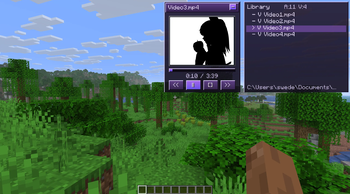
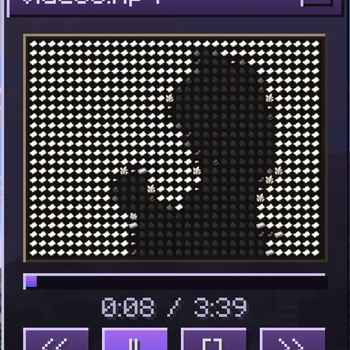
It is built for players who want music, videos, and visualizers inside Minecraft without constantly alt-tabbing. You can scan a local media folder, load files directly, drag the player anywhere on the screen, switch between full and compact layouts, and choose between several visual modes ranging from standard video playback to Minecraft-style mosaic rendering.
This mod is client-side only and local-files only. It does not require server installation, it does not use streaming services, and it does not rely on online playback.
## Features
- Client-side only Fabric mod
- Local file playback only
- Draggable HUD with saved position
- Full and compact HUD layouts
- Expandable library panel for folders and files
- Scrollable library panel with current-track follow behavior
- Audio playback for `mp3`, `wav`, and `ogg`
- Video playback for `mp4`
- Progress bar with click-to-seek
- Play, pause, stop, next, previous, loop, shuffle, and volume controls
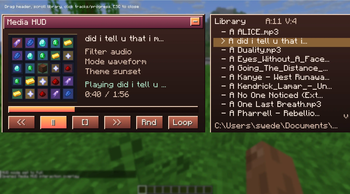
- Filter modes for audio, video, or both
- Saved HUD scale and transparency settings
- Built-in HUD color themes
- Custom HUD theme colors with hex input
- Normal video mode with aspect-aware layout
- Waveform visualizer mode
- Dance visualizer mode
- Dense mosaic video mode
- Item mosaic video mode built around Minecraft item icon visuals
- `/media` and `/m` command aliases
## Supported Formats
- Audio: `mp3`, `wav`, `ogg`
- Video: `mp4`
Recommended video format for the smoothest results: - `H. 264` video - `AAC` audio - `.mp4` container
## Supported Minecraft Versions
Media HUD currently has working builds for:
- `1. 20. 5`
- `1. 20. 6`
- `1. 21`
- `1. 21. 1`
- `1. 21. 2`
- `1. 21. 3`
- `1. 21. 4`
- `1. 21. 5`
- `1. 21. 6`
- `1. 21. 7`
- `1. 21. 8`
- `1. 21. 9`
- `1. 21. 10`
- `1. 21. 11`
## Fabric API Version Guide
Use the Media HUD jar built for your exact Minecraft version, and match it with the Fabric API version line below:
- Minecraft `1. 20. 5` -> Fabric API `0. 97. 8+1. 20. 5`
- Minecraft `1. 20. 6` -> Fabric API `0. 100. 8+1. 20. 6`
- Minecraft `1. 21` -> Fabric API `0. 102. 0+1. 21`
- Minecraft `1. 21. 1` -> Fabric API `0. 116. 9+1. 21. 1`
- Minecraft `1. 21. 2` -> Fabric API `0. 106. 1+1. 21. 2`
- Minecraft `1. 21. 3` -> Fabric API `0. 114. 1+1. 21. 3`
- Minecraft `1. 21. 4` -> Fabric API `0. 119. 4+1. 21. 4`
- Minecraft `1. 21. 5` -> Fabric API `0. 128. 2+1. 21. 5`
- Minecraft `1. 21. 6` -> Fabric API `0. 128. 2+1. 21. 6`
- Minecraft `1. 21. 7` -> Fabric API `0. 129. 0+1. 21. 7`
- Minecraft `1. 21. 8` -> Fabric API `0. 136. 1+1. 21. 8`
- Minecraft `1. 21. 9` -> Fabric API `0. 134. 1+1. 21. 9`
- Minecraft `1. 21. 10` -> Fabric API `0. 138. 4+1. 21. 10`
- Minecraft `1. 21. 11` -> Fabric API `0. 141. 3+1. 21. 11`
Recommended: - Fabric Loader `0. 18. 4` or newer - Java `21`
## Installation
1. Install Minecraft Java Edition for one of the supported versions above 2. Install Fabric Loader `0. 18. 4` or newer 3. Install the matching Fabric API version for your Minecraft version 4. Use Java `21` 5. Put the correct versioned `mediahud` jar in your `mods` folder 6. Launch the game and use `/m ui` to open the interaction overlay
Media HUD is client-side only. A multiplayer server does not need to install it.
This public build is packaged for Windows `x86_64`. No extra FFmpeg or JavaCV download is required for this release file. This release package includes third-party notice material for bundled runtime components.
## Command Guide
You can use either `/m` or `/media`. They are identical aliases.
### Basic HUD Commands
- `/m show`
- Shows the HUD.
- `/m hide`
- Hides the HUD.
- `/m toggle`
- Toggles the HUD on or off.
- `/m ui`
- Opens the drag-and-move interaction overlay.
- `/m pos reset`
- Resets the HUD position back to its default location.
### Playback Commands
- `/m play`
- Starts playback of the currently selected media.
- `/m pause`
- Pauses playback.
📊 Mod Details
- Game
- Minecraft Mods
- Author
- Pikey
- Version
- 1.0.1+mc1.21.11
- Downloads
- 1,607
- Endorsements
- 16
- Category
- fabric
- Created
- 3/12/2026
- Updated
- 3/20/2026
- Game Versions
- 1.21.11
- Tags
- game-mechanics, technology, utility
🔧 How to Install Minecraft Mods Mods
Download from Modrinth. Use Prism Launcher or drop into your mods folder.
📖 Full step-by-step install guide for Minecraft Mods →
Visit the official mod page for specific installation instructions for this mod.
🎮 Need cheat codes or console commands? Check ur gaming wiki for Minecraft Mods commands, item IDs, and more.
❓ Frequently Asked Questions
Which Minecraft Mods versions does Media HUD support?
The author lists 1.21.11. Other versions may work but are untested by the author.
What is the latest version of Media HUD?
Version 1.0.1+mc1.21.11, published 2026-03-20 with 1,607 downloads recorded at the source.
Keep browsing — more Minecraft Mods mods await