MCLLM
🟡 Updated this year⚠️ Install Order · 2 steps
Install in this order, then this mod last — most mods fail to load without their framework and dependencies in place.
🖼️ Gallery (1 images)
🔍 Analysis
- 👍 0.1% endorsement rate
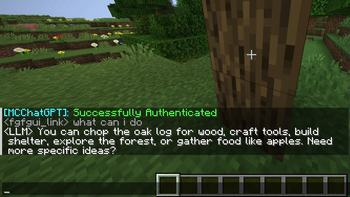
- 🏆 #398 of 874 fabric mods in this game by downloads
📋 About This Mod
# MCLLM If you like this project, please consider giving it a ⭐ on (https://github.com/link-fgfgui/MCLLM)! This is a fork of (https://github.com/Bawnorton/MCChatGPT). Unlike the original, the base URI is no longer hardcoded—you can now configure it via a file, making it compatible with nearly any LLM service, not just OpenAI. ## How to Use 1. **Download the JAR file** compatible with your Minecraft version from (https://modrinth.com/mod/mcllm) or (https://github.com/link-fgfgui/MCLLM/releases), and place it in your `mods` folder. *(Make sure the appropriate mod loader is installed.)* 2. **Download the required dependencies** from the same source and also place them in the `mods` folder. *(They are usually listed on the Modrinth.)* - Supported platforms: **Fabric (>= 1.20.1)**, **Forge (1.19.4–1.20.1)**, and **NeoForge (>= 1.21.1)** 3. **Launch the game once** to generate the configuration file. 4. Open `config/mcllm.json` and edit the following fields: - `baseurl`: Set this to the endpoint of your preferred LLM service, e.g. `https://api.deepseek.com/v1` - `model`: Specify the model name, e.g. `deepseek-chat` 5. **Re-launch the game**, then run: `/mcllm-auth YourToken` This securely stores your token (it will be encrypted in the config file). 6. Use `/ask YourQuestion` to send a message to the LLM. The LLM’s reply will appear in your **local** chat—only you can see it. !(https://cdn.modrinth.com/data/cached_images/69e5fd9660090a58fd583d03262e30a964dc5ad2.png)
If you like this project, please consider giving it a ⭐ on (https://github.com/link-fgfgui/MCLLM)!
This is a fork of (https://github.com/Bawnorton/MCChatGPT). Unlike the original, the base URI is no longer hardcoded—you can now configure it via a file, making it compatible with nearly any LLM service, not just OpenAI.
## How to Use
1. Download the JAR file compatible with your Minecraft version from (https://modrinth.com/mod/mcllm) or (https://github.com/link-fgfgui/MCLLM/releases), and place it in your `mods` folder. (Make sure the appropriate mod loader is installed.)
2. Download the required dependencies from the same source and also place them in the `mods` folder. (They are usually listed on the Modrinth.)
- Supported platforms: Fabric (>= 1. 20. 1), Forge (1. 19. 4–1. 20. 1), and NeoForge (>= 1. 21. 1)
3. Launch the game once to generate the configuration file.
4. Open `config/mcllm.json` and edit the following fields: - `baseurl`: Set this to the endpoint of your preferred LLM service, e.g. `https://api.deepseek.com/v1` - `model`: Specify the model name, e.g. `deepseek-chat`
5. Re-launch the game, then run: `/mcllm-auth YourToken` This securely stores your token (it will be encrypted in the config file).
6. Use `/ask YourQuestion` to send a message to the LLM. The LLM’s reply will appear in your local chat—only you can see it.
!(https://cdn.modrinth.com/data/cached_images/69e5fd9660090a58fd583d03262e30a964dc5ad2.png)
📊 Mod Details
- Game
- Minecraft Mods
- Author
- link-fgfgui
- Version
- 1.4.0
- Downloads
- 1,851
- Endorsements
- 2
- Category
- fabric
- Created
- 6/25/2025
- Updated
- 6/4/2026
- Game Versions
- 26.1.2
- Tags
- utility
🔧 How to Install Minecraft Mods Mods
Download from Modrinth. Use Prism Launcher or drop into your mods folder.
📖 Full step-by-step install guide for Minecraft Mods →
Visit the official mod page for specific installation instructions for this mod.
🎮 Need cheat codes or console commands? Check ur gaming wiki for Minecraft Mods commands, item IDs, and more.
❓ Frequently Asked Questions
Which Minecraft Mods versions does MCLLM support?
The author lists 26.1.2. Other versions may work but are untested by the author.
What is the latest version of MCLLM?
Version 1.4.0, published 2026-06-04 with 1,851 downloads recorded at the source.
Keep browsing — more Minecraft Mods mods await