McDiscordWebhook
🟠 Updated over a year ago⚠️ Install Order · 2 steps
Install in this order, then this mod last — most mods fail to load without their framework and dependencies in place.
🖼️ Gallery (3 images)
🔍 Analysis
- 👍 0.3% endorsement rate
- 🏆 #221 of 874 fabric mods in this game by downloads
📋 About This Mod
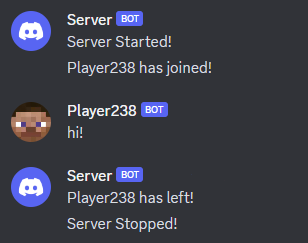
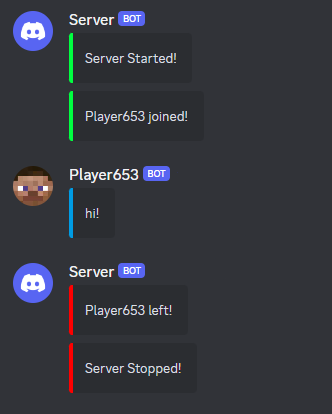
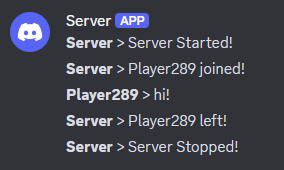
# What This Mod Does McDiscordWebhook intergrates your discord server with your minecraft server using a discord webhook. This mod sends configurable information including player join/leave messages, server start/stop messages and in game messages. This mod is meant for smaller servers that don't need all the features from a mod that uses a discord bot would provide. As it doesn't use a discord bot, it makes it a more lightweight alternative. There is currently 2 modes to choose from, default and embed. ## Disclaimer **Messages sent in the channel where the webhook was created or other channels will not be sent in game. This is because this mod doesn't use a discord bot and purely relies on discord webhooks to function. This makes it impossible to read any message sent in any discord server. For this feature you will have to find a mod that makes use of a discord bot.** ## Setting up the mod 1. View (https://support.discord.com/hc/en-us/articles/228383668-Intro-to-Webhooks) discord support article for information about creating a webhook 2. After creating the webhook make sure the game has already been run with the mod so it can generate the config 3. Copy the webhook url and paste it after the `webhook-uri=` in the `mcdiscwbhk.properties` file 4. Adjust any other config settings you want and run the game, messages should be sent in the channel where the webhook was created <details> <summary>Not Working?</summary> Verify that the webhook url is correct. The log file will output Invalid Webhook url after world load if it isn't. The log will also contain Webhook Url: ... which outputs the webhook url specified in the config. If this doesn't match what's in the config then you have done something wrong and it is best to delete the config and refollow instructions begginning at the 2nd one. </details>
# What This Mod Does
McDiscordWebhook intergrates your discord server with your minecraft server using a discord webhook. This mod sends configurable information including player join/leave messages, server start/stop messages and in game messages. This mod is meant for smaller servers that don't need all the features from a mod that uses a discord bot would provide. As it doesn't use a discord bot, it makes it a more lightweight alternative. There is currently 2 modes to choose from, default and embed.
## Disclaimer
Messages sent in the channel where the webhook was created or other channels will not be sent in game. This is because this mod doesn't use a discord bot and purely relies on discord webhooks to function. This makes it impossible to read any message sent in any discord server. For this feature you will have to find a mod that makes use of a discord bot.
## Setting up the mod
1. View (https://support.discord.com/hc/en-us/articles/228383668-Intro-to-Webhooks) discord support article for information about creating a webhook 2. After creating the webhook make sure the game has already been run with the mod so it can generate the config 3. Copy the webhook url and paste it after the `webhook-uri=` in the `mcdiscwbhk.properties` file 4. Adjust any other config settings you want and run the game, messages should be sent in the channel where the webhook was created
Not Working?
Verify that the webhook url is correct. The log file will output Invalid Webhook url after world load if it isn't. The log will also contain Webhook Url: ... which outputs the webhook url specified in the config. If this doesn't match what's in the config then you have done something wrong and it is best to delete the config and refollow instructions begginning at the 2nd one.
📊 Mod Details
- Game
- Minecraft Mods
- Author
- Yo56789
- Version
- 1.2.0
- Downloads
- 1,963
- Endorsements
- 5
- Category
- fabric
- Created
- 3/29/2024
- Updated
- 9/29/2024
- Game Versions
- 1.21, 1.21.1
- Tags
- social, utility
🔧 How to Install Minecraft Mods Mods
Download from Modrinth. Use Prism Launcher or drop into your mods folder.
📖 Full step-by-step install guide for Minecraft Mods →
Visit the official mod page for specific installation instructions for this mod.
🎮 Need cheat codes or console commands? Check ur gaming wiki for Minecraft Mods commands, item IDs, and more.
❓ Frequently Asked Questions
Which Minecraft Mods versions does McDiscordWebhook support?
The author lists 1.21, 1.21.1. Other versions may work but are untested by the author.
What is the latest version of McDiscordWebhook?
Version 1.2.0, published 2024-09-29 with 1,963 downloads recorded at the source.
Keep browsing — more Minecraft Mods mods await