⚠️ Install Order · 2 steps
Install in this order, then this mod last — most mods fail to load without their framework and dependencies in place.
Preview

🔍 Analysis
- 👍 0.5% endorsement rate
- 🏆 #271 of 280 decoration mods in this game by downloads
📋 About This Mod
# MCAI - Minecraft (Character) Artificial Intelligence Have you ever played Minecraft alone? Well, let me tell you something - it gets very lonely, very quickly when you're all alone in a vast blocky world and the only human-ish thing in the game just makes 'hrm' and 'huh' noises. This mod aims to alleviate that by providing you access to your very own AIs for you to chat with. ## Setup MCAI requires setup to work properly. This is because (https://c.ai), like most websites, requires an authorization token before it gives you any data. Thankfully, obtaining your authorization token is simple. First, head to (https://c.ai). Log in or create a new account. Then, open Inspect Element, navigate to Application, find Local Storage -> https://beta.character.ai !(https://cdn.modrinth.com/data/cached_images/356d1b64bc60fcf963c330a0574f5ff6431a41e6.png) !(https://cdn.modrinth.com/data/cached_images/6ee6913ff2a6718824ddfd0b4aabecdbfa8a1ec3.png) Once you're there, you will need to find a key called `char_token`. This should be a JSON file with two keys; `value` and `ttl`. You can ignore the `ttl` key; you only need the `value` key. !(https://cdn.modrinth.com/data/cached_images/838c358453f4c9b4d4648b0c952d7f13f65380b0.png) Copy the value of the `value` key, go to either the mod config (`mcai.toml`) and locate ``, where you will find the `authorization` field in which you can paste the value of `value`. Then you're good to go! Alternatively, you can use the `/ai authorize <token>` command in-game to automatically update the configuration file. To register an AI to chat with, you can manually edit the configuration file, or you can use the command `/ai register <character id> <aliases (optional)>`. The `aliases` field is an optional space-separated list of alternative names to ping the AI with in chat, sort of like a nicknames system for the AI. The `character id` field is used to get basic information about the character (like their name) and also as a way to know which character to send messages to. You can obtain the character ID of a character by going to (https://c.ai), opening a chat with the character you want the ID from, and then copying the value of `char=` from the URL. !(https://cdn.modrinth.com/data/cached_images/cdcff45cf1405d3b8358caa401662fdfd7a0395c.png) ## Chatting with registered AIs There are two methods to chat with registered AIs - pinging them in a message via @<AI's name/alias> or via the `/ai talk <name> <text>` command. ## Commands `/ai authorize <token>` - an admin-only command that changes the access token the mod uses to interface with (https://c.ai) in-game. `/ai context <name> <broadcast (optional)>` - retrieves the last few messages from the chat with the AI. Note that changing the `format` in the MCAI config may or may not cause it to fail when retrieving the name of the message sender. As the command defaults to only giving you context, broadcast is an available option for admins to broadcast the last few messages to everyone in chat. `/ai disable <name>` - like `/ai unregister`, but less permanent. `/ai enable <name>` - undoes `/ai disable`. `/ai list` - lists all available AIs and relevant information (such as whether they're enabled, and their aliases). `/ai register <character id> <aliases (optional)>` - character ID is the ID obtained from the (https://c.ai) website. Registers an AI so that you can chat with 'em. `/ai unregister <character id>` - permanently removes an AI. `/ai reload` - reloads the mod's config so that any edits made with an external tool are loaded without requiring a complete restart of Minecraft. `/ai reset <name>` - wipes the memory of an AI. `/ai talk <name> <text>` - alternative to pinging the AI that's arguably more clunky. ## FAQ Q: Is this mod client-side? A: Nope! This mod is fully server-side. You can look at the development of the client-side port (https://github.com/alfiae/MCAI/tree/client-1.20.x). Q: How do I talk with an AI? A: (https://github.com/alfiae/MCAI?tab=readme-ov-file#Setup)! Q: I don't like the AIs randomly responding to my messages! How do I stop them from doing that? A: You can disable random responses by switching the `disableRandomResponses` to true in the config's `general` section. Q: Will you make a Forge port? A: Nope! You're welcome to port it yourself, if you really want it on Forge, though.
# MCAI - Minecraft (Character) Artificial Intelligence
Have you ever played Minecraft alone? Well, let me tell you something - it gets very lonely, very quickly when you're all alone in a vast blocky world and the only human-ish thing in the game just makes 'hrm' and 'huh' noises. This mod aims to alleviate that by providing you access to your very own AIs for you to chat with.
## Setup MCAI requires setup to work properly. This is because (https://c.ai), like most websites, requires an authorization token before it gives you any data.
Thankfully, obtaining your authorization token is simple.
First, head to (https://c.ai). Log in or create a new account.
Then, open Inspect Element, navigate to Application, find Local Storage -> https://beta.character.ai 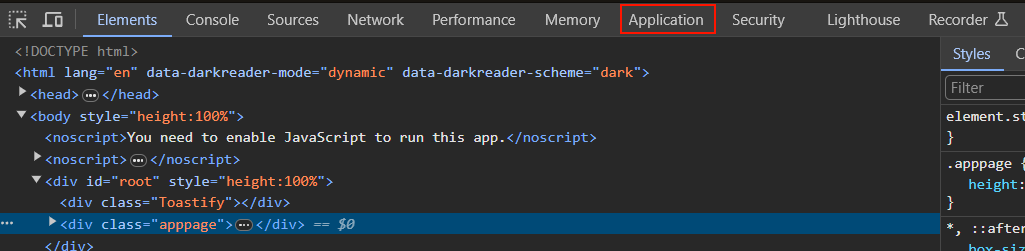 
Once you're there, you will need to find a key called `char_token`. This should be a JSON file with two keys; `value` and `ttl`. You can ignore the `ttl` key; you only need the `value` key. 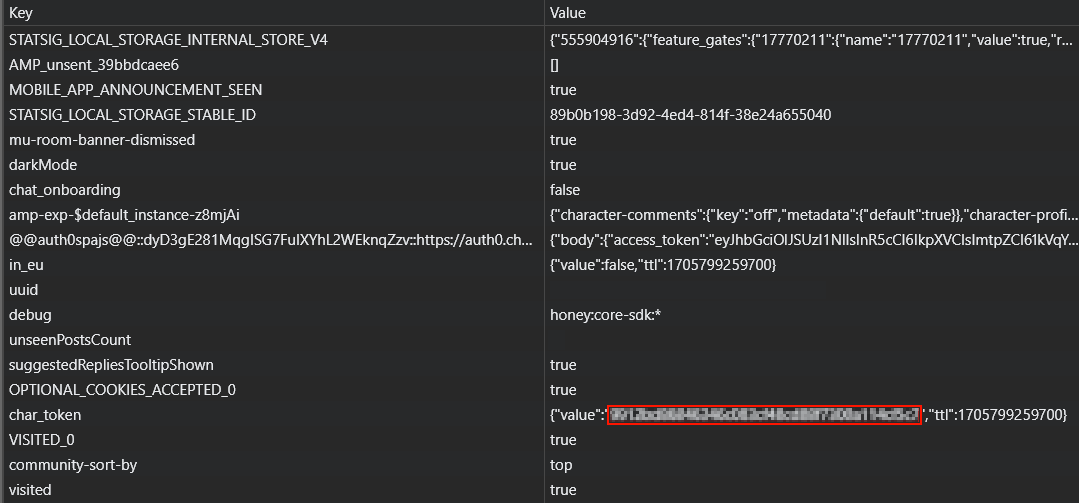
Copy the value of the `value` key, go to either the mod config (`mcai.toml`) and locate ``, where you will find the `authorization` field in which you can paste the value of `value`. Then you're good to go! Alternatively, you can use the `/ai authorize
To register an AI to chat with, you can manually edit the configuration file, or you can use the command `/ai register
The `character id` field is used to get basic information about the character (like their name) and also as a way to know which character to send messages to. You can obtain the character ID of a character by going to (https://c.ai), opening a chat with the character you want the ID from, and then copying the value of `char=` from the URL. 
## Chatting with registered AIs
There are two methods to chat with registered AIs - pinging them in a message via @
## Commands
`/ai authorize
`/ai context
`/ai disable
`/ai enable
`/ai list` - lists all available AIs and relevant information (such as whether they're enabled, and their aliases).
`/ai register
`/ai unregister
`/ai reload` - reloads the mod's config so that any edits made with an external tool are loaded without requiring a complete restart of Minecraft.
`/ai reset
`/ai talk
## FAQ Q: Is this mod client-side?
A: Nope! This mod is fully server-side. You can look at the development of the client-side port (https://github.com/alfiae/MCAI/tree/client-1. 20.x).
Q: How do I talk with an AI?
A: (https://github.com/alfiae/MCAI?tab=readme-ov-file#Setup)!
Q: I don't like the AIs randomly responding to my messages! How do I stop them from doing that?
A: You can disable random responses by switching the `disableRandomResponses` to true in the config's `general` section.
Q: Will you make a Forge port?
A: Nope! You're welcome to port it yourself, if you really want it on Forge, though.
📊 Mod Details
- Game
- Minecraft Mods
- Author
- alfuwu
- Version
- 2
- Downloads
- 2,947
- Endorsements
- 15
- Category
- decoration
- Created
- 3/3/2024
- Updated
- 11/8/2025
- Game Versions
- 1.21.1, 1.21.2, 1.21.3, 1.21.4, 1.21.5
- Tags
- decoration, game-mechanics, social
🔧 How to Install Minecraft Mods Mods
Download from Modrinth. Use Prism Launcher or drop into your mods folder.
📖 Full step-by-step install guide for Minecraft Mods →
Visit the official mod page for specific installation instructions for this mod.
🎮 Need cheat codes or console commands? Check ur gaming wiki for Minecraft Mods commands, item IDs, and more.
❓ Frequently Asked Questions
Which Minecraft Mods versions does MCAI support?
The author lists 1.21.1, 1.21.2, 1.21.3, 1.21.4, 1.21.5, 1.21.6. Other versions may work but are untested by the author.
What is the latest version of MCAI?
Version 2, published 2025-11-08 with 2,947 downloads recorded at the source.
Keep browsing — more Minecraft Mods mods await