MC Game of Life Sim
🟠 Updated over a year ago⚠️ Install Order · 2 steps
Install in this order, then this mod last — most mods fail to load without their framework and dependencies in place.
🖼️ Gallery (1 images)
🔍 Analysis
- 🏆 #156 of 876 fabric mods in this game by downloads
📋 About This Mod
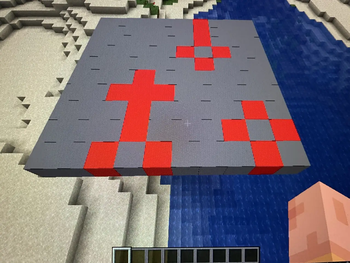
# What is it? This mod is basically a port of the famous Conway's Game of Life. The game is simple, you edit state of the grid and simulate the next step to see how it evolves based on pre-set rules. ## The Rules 1. Any live cell with fewer than two live neighbours dies, as if by underpopulation. 2. Any live cell with two or three live neighbours lives on to the next generation. 3. Any live cell with more than three live neighbours dies, as if by overpopulation. 4. Any dead cell with exactly three live neighbours becomes a live cell, as if by reproduction. # How to use? You can create a 10x10 grid by running the command: ``` /spawn_gol_grid ``` This will create a gray grid nearby for you to interact with. Breaking a block removes the entire grid, while "using" or right-clicking on a block toggles its state between Alive (Red) and Dead (Gray). Once you are ready and want to see how your grid evolves, run the following command: ``` /simulate_gol_step ``` This will simulate the grid by the specified steps, you can keep running this command to see more evolution steps, or modify the grid before another simulation step. You can also right-click the magenta block to quickly simulate a step. # What's Next? I plan on adding more features and making the experience better as I learn more about MC modding. Some things I have planned are: - Better colors and textures - Reverse simulation - A control block for settings
# What is it? This mod is basically a port of the famous Conway's Game of Life. The game is simple, you edit state of the grid and simulate the next step to see how it evolves based on pre-set rules. ## The Rules 1. Any live cell with fewer than two live neighbours dies, as if by underpopulation. 2. Any live cell with two or three live neighbours lives on to the next generation. 3. Any live cell with more than three live neighbours dies, as if by overpopulation. 4. Any dead cell with exactly three live neighbours becomes a live cell, as if by reproduction.
# How to use? You can create a 10x10 grid by running the command: ``` /spawn_gol_grid ``` This will create a gray grid nearby for you to interact with. Breaking a block removes the entire grid, while "using" or right-clicking on a block toggles its state between Alive (Red) and Dead (Gray).
Once you are ready and want to see how your grid evolves, run the following command: ``` /simulate_gol_step ``` This will simulate the grid by the specified steps, you can keep running this command to see more evolution steps, or modify the grid before another simulation step. You can also right-click the magenta block to quickly simulate a step.
# What's Next? I plan on adding more features and making the experience better as I learn more about MC modding. Some things I have planned are: - Better colors and textures - Reverse simulation - A control block for settings
📊 Mod Details
- Game
- Minecraft Mods
- Author
- cyberneel
- Version
- 1.0.1
- Downloads
- 360
- Endorsements
- 0
- Category
- fabric
- Created
- 1/11/2025
- Updated
- 1/18/2025
- Game Versions
- 1.20.3, 1.20.4, 1.20.5, 1.20.6
- Tags
- game-mechanics, minigame, worldgen
🔧 How to Install Minecraft Mods Mods
Download from Modrinth. Use Prism Launcher or drop into your mods folder.
📖 Full step-by-step install guide for Minecraft Mods →
Visit the official mod page for specific installation instructions for this mod.
🎮 Need cheat codes or console commands? Check ur gaming wiki for Minecraft Mods commands, item IDs, and more.
❓ Frequently Asked Questions
Which Minecraft Mods versions does MC Game of Life Sim support?
The author lists 1.20.3, 1.20.4, 1.20.5, 1.20.6. Other versions may work but are untested by the author.
What is the latest version of MC Game of Life Sim?
Version 1.0.1, published 2025-01-18 with 360 downloads recorded at the source.
Keep browsing — more Minecraft Mods mods await