MC-249136 Fix
⚪ Last updated 2023⚠️ Install Order · 2 steps
Install in this order, then this mod last — most mods fail to load without their framework and dependencies in place.
🖼️ Gallery (2 images)
🔍 Analysis
- 👍 0.1% endorsement rate
- 🏆 #119 of 983 fabric mods in this game by downloads
📋 About This Mod
<table><tbody><td> ## **NOTICE** (https://bugs.mojang.com/browse/MC-249136) in newer versions of Minecraft! As such, I've decided not to update this mod for 1.20.5-onwards. If you still encounter problems with treasure maps in 1.20.5+, please (https://gitlab.com/horrific-tweaks/MC-249136/-/issues/new) to let me know! </td></tbody></table> # MC-249136 Fix (https://cdn.jsdelivr.net/npm/@intergrav/devins-badges@2/assets/cozy/requires/fabric-api_vector.svg)](https://modrinth.com/mod/fabric-api) (https://cdn.jsdelivr.net/npm/@intergrav/devins-badges@2/assets/cozy/available/gitlab_vector.svg)](https://gitlab.com/horrific-tweaks/MC-249136) (https://cdn.jsdelivr.net/npm/@intergrav/devins-badges@2/assets/cozy/available/modrinth_vector.svg)](https://modrinth.com/mod/mc-249136-fix) This mod implements a minimal hacky fix for (https://bugs.mojang.com/browse/MC-249136), a significant server lag spike that occurs when locating buried treasure structures for shipwreck loot. To avoid this lag spike, structure location is moved into a separate thread that does not block the server tick loop. This does nothing to improve the structure location performance, but it does at least prevent it from significantly impeding gameplay. !(https://gitlab.com/horrific-tweaks/MC-249136/-/raw/main/screenshot.png?v=1) ## Configuration The map "loading" images can be customized by placing `128x128` PNG files in `/config/mc249136/map_loading.png` and `/config/mc249136/map_not_found.png`. For performance reasons, these images will draw all pixels as black unless they are fully transparent (i.e. `rgba(0,0,0,0)`). Minecraft's map color palette is difficult and expensive to calculate - so this mod literally just does an `if (rgb != 0)` to draw the image. Known issues: - This mod does not handle state persistence, and only updates loaded maps once they are inside a player's inventory. This means that it is possible to prevent a treasure map from loading by breaking the chest, leaving it in item entity form, and then restarting the server.
## NOTICE (https://bugs.mojang.com/browse/MC-249136) in newer versions of Minecraft! As such, I've decided not to update this mod for 1. 20. 5-onwards. If you still encounter problems with treasure maps in 1. 20. 5+, please (https://gitlab.com/horrific-tweaks/MC-249136/-/issues/new) to let me know! |
# MC-249136 Fix
[!(https://cdn.jsdelivr.net/npm/@intergrav/devins-badges@2/assets/cozy/requires/fabric-api_vector.svg)](https://modrinth.com/mod/fabric-api) [!(https://cdn.jsdelivr.net/npm/@intergrav/devins-badges@2/assets/cozy/available/gitlab_vector.svg)](https://gitlab.com/horrific-tweaks/MC-249136) [!(https://cdn.jsdelivr.net/npm/@intergrav/devins-badges@2/assets/cozy/available/modrinth_vector.svg)](https://modrinth.com/mod/mc-249136-fix)
This mod implements a minimal hacky fix for (https://bugs.mojang.com/browse/MC-249136), a significant server lag spike that occurs when locating buried treasure structures for shipwreck loot.
To avoid this lag spike, structure location is moved into a separate thread that does not block the server tick loop. This does nothing to improve the structure location performance, but it does at least prevent it from significantly impeding gameplay.
!(https://gitlab.com/horrific-tweaks/MC-249136/-/raw/main/screenshot.png?v=1)
## Configuration
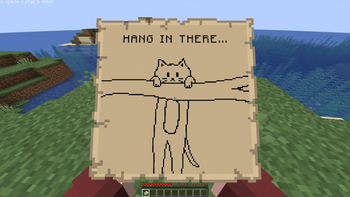
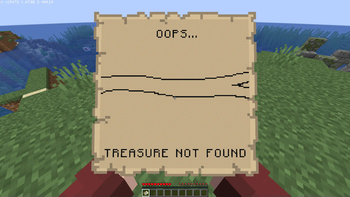
The map "loading" images can be customized by placing `128x128` PNG files in `/config/mc249136/map_loading.png` and `/config/mc249136/map_not_found.png`.
For performance reasons, these images will draw all pixels as black unless they are fully transparent (i.e. `rgba(0,0,0,0)`). Minecraft's map color palette is difficult and expensive to calculate - so this mod literally just does an `if (rgb != 0)` to draw the image.
Known issues: - This mod does not handle state persistence, and only updates loaded maps once they are inside a player's inventory. This means that it is possible to prevent a treasure map from loading by breaking the chest, leaving it in item entity form, and then restarting the server.
📊 Mod Details
- Game
- Minecraft Mods
- Author
- fennifith
- Version
- 1.0.2
- Downloads
- 79,367
- Endorsements
- 50
- Category
- fabric
- Created
- 8/14/2023
- Updated
- 12/9/2023
- Game Versions
- 1.19, 1.19.1, 1.19.2, 1.19.3, 1.19.4
- Tags
- optimization, utility
🔧 How to Install Minecraft Mods Mods
Download from Modrinth. Use Prism Launcher or drop into your mods folder.
📖 Full step-by-step install guide for Minecraft Mods →
Visit the official mod page for specific installation instructions for this mod.
🎮 Need cheat codes or console commands? Check ur gaming wiki for Minecraft Mods commands, item IDs, and more.
❓ Frequently Asked Questions
Which Minecraft Mods versions does MC-249136 Fix support?
The author lists 1.19, 1.19.1, 1.19.2, 1.19.3, 1.19.4, 1.20. Other versions may work but are untested by the author.
What is the latest version of MC-249136 Fix?
Version 1.0.2, published 2023-12-09 with 79,367 downloads recorded at the source.
Keep browsing — more Minecraft Mods mods await