Map Atlases
🟡 Updated this year⚠️ Install Order · 2 steps
Install in this order, then this mod last — most mods fail to load without their framework and dependencies in place.
🖼️ Gallery (3 images)
🔍 Analysis
- 👍 0.2% endorsement rate
- 🏆 #14 of 653 adventure mods in this game by downloads
📋 About This Mod
NOTE: This is the Original version of Map Atlases (Fabric only). You may be interested in the Multi-Platform fork which also contains a larger feature-set.
A vanilla-friendly mini-map/world-view mod using vanilla Maps, introducing the "Atlas".




## 📖 About !(https://user-images.githubusercontent.com/17690401/206921288-fa262fb0-e294-409c-b0d8-9321ab6dbadd.png)
An Atlas can be crafted by combining a: - Filled Map (the source map) - Book - And something sticky (Slimeball or Honey Bottle by default)
The source map determines the Atlas' scale. Who knew this whole time, all you had to do to get a mini-map was slap a map onto a book?
!(https://user-images.githubusercontent.com/17690401/206921556-f865f820-0aba-4db3-a14f-7f5646b401a0.png)
- You can put both Filled Maps and Empty Maps with an Atlas in a crafting inventory to insert either Map type into the Atlas.
- A Cartography Table can be used to add Filled Maps and Empty Maps as well.
- Filled Maps which are added must be of same Scale.
- There's a maximum of 512 Maps in each Atlas (configurable/togglable).
- You can use your Atlas and Shears in the Crafting Grid to remove Maps from the Atlas.
!(https://user-images.githubusercontent.com/17690401/206921859-f21cacac-2f6d-4522-a7a6-871edb6b7c74.png)
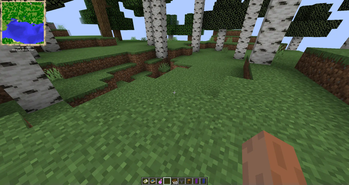
- When the Atlas is active (on your hot-bar or off-hand by default), it will render your current-position Map on the HUD if a such Map exists inside the Atlas.
- Filled Maps inside the Atlas will continue updating your location & world-state.
- Empty Maps are consumed when you enter an un-mapped region to generate a new Map of the corresponding Scale.
- - If the player is in Creative, un-mapped regions will generate new Maps even if there's no Empty Maps in the Atlas.
- - If specified, the requirement for having Empty Maps to create new regions can be disabled.
- Atlases do work inter-dimensionally. They create new Maps in new Dimensions as you'd expect.
- The mini-map supports the ability to display your current X, Y, & Z coordinates as well as your current Biome
- Optional Trinkets support:
- - When Trinkets is installed, there will be a new Slot for an Atlas
- - The Atlas will continue to function as normal inside the Trinkets slot
!(https://user-images.githubusercontent.com/17690401/206922018-2b6195e3-fbe8-4850-bf31-4896764a5747.png)
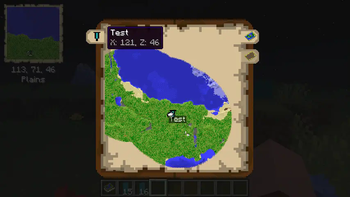
- The Atlas has a world map view as well. To access this, right-click the Atlas or press "m" while the Atlas is on your hot-bar.
- The world map has selectable tabs for each Dimension you've explored and created Map entries for.
- It also has selectable tabs for each Banner you've added in each Dimension. Clicking these will snap the center of your view to the map containing the Banner.
- The world map will display the active X & Z coordinates of the point your mouse is hovering over.
- The Atlas world view has zoom support & scales by odd numbers 1x1, 3x3, 5x5, 7x7, etc using your mouse scroll wheel.
- The Atlas world view has full pan support as well, using your mouse to drag the world map.
- Atlases also support right-clicking Banners to add "waypoints", which display in both the mini-map & world-view map.
!(https://user-images.githubusercontent.com/17690401/206922262-7346a3d7-8c76-4399-9d54-6cfb0f806c6e.png)
- Atlases can be merged with a Cartography Table - simply put an Atlas in the top & bottom slots and the Atlases will combine their mapped regions with one-another!
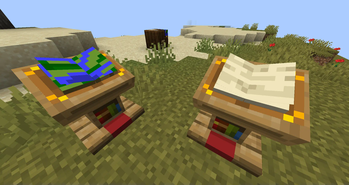
- Atlases support Lecterns - Show off your world by putting an Atlas in a Lectern!
- - Simply right click a Lectern while holding an Atlas to display the Lectern
- - The Atlas will appear visually different depending on the Dimension its displayed in - there's a unique texture for the Overworld, Nether, End and "Other".
- Atlases can be stored in Chiseled Bookshelves in 1. 20+
## ⚙️ Config The mod is highly configurable and offers in-game config editing with ModMenu. See the current config (https://gith
📊 Mod Details
- Game
- Minecraft Mods
- Author
- Pepperoni-Jabroni
- Version
- 1.21-6.7.2
- Downloads
- 395,104
- Endorsements
- 866
- Category
- adventure
- Created
- 1/30/2021
- Updated
- 8/17/2026
- Game Versions
- 1.21.1
- Tags
- adventure, equipment, utility
🔧 How to Install Minecraft Mods Mods
Download from Modrinth. Use Prism Launcher or drop into your mods folder.
📖 Full step-by-step install guide for Minecraft Mods →
Visit the official mod page for specific installation instructions for this mod.
🎮 Need cheat codes or console commands? Check ur gaming wiki for Minecraft Mods commands, item IDs, and more.
❓ Frequently Asked Questions
Which Minecraft Mods versions does Map Atlases support?
The author lists 1.21.1. Other versions may work but are untested by the author.
What is the latest version of Map Atlases?
Version 1.21-6.7.2, published 2026-08-17 with 395,104 downloads recorded at the source.
Keep browsing — more Minecraft Mods mods await